Mirror Filtered Packets to CPU
Mirroring to CPU with filter feature provides the ability to mirror filtered data plane packets to CPU. It enables sniffing of selected packets that match the programmed filter condition and real-time monitoring in the Network Operating System.
The mirrored packets can be viewed by running tcpdump in Linux shell to capture runtime traffic and inspect them for troubleshooting, monitoring, and analyzing network behavior at the interface level in real-time or can be subsequently saved as PCAP files for further analysis and offline detailed examination.
Feature Characteristics
The main characteristics of Mirroring to CPU are as follows:
• Enables monitoring in the switching devices, such as leaf and spine switches.
• Monitoring at the leaf provides visibility into north-south traffic (between endpoints and external networks or services).
• Monitoring at the spine provides visibility into east-west traffic, i.e., between leaf switches.
• Supports one or more source interfaces and one or more VLAN sources in the ingress direction.
• Supports port-based mirroring on ingress and egress direction and filter based mirroring only on ingress direction
• Works similar to monitor session and supports stop or delete function.
• Overcomes the issue of latency or delay incurred on the path of mirrored traffic to reach its monitoring device while using SPAN, RSPAN, or ERSPAN.
Note: Enabling only port-based mirroring, without selecting streams using filter rules on high traffic ports starves the protocol packets.
Benefits
This feature helps to overcome the situations mentioned below:
• Latency or delay incurred on the path of mirrored traffic to reach its monitoring device.
• Reserving switch ports bandwidth for the additional mirrored traffic.
• If the port that forwards mirrored traffic is congested, the mirrored copy will not reach, impairing the monitoring ability to debug the issue.
Limitations
• This feature does not capture VXLAN-OAM packets.
• TTL and TCP flags are not supported on TR3 platforms.
• Truncation of packets is not supported on TH2 platforms.
• The BFD packets, original and mirrored, redirect to hw-bfd cpu-queue and are not captured in tcpdump on TH3 and TH2 devices
Supported Hardware
The following XGS platforms are supported:
• Maverick2 (AS5835-54X)
• TR3-X7 (AS7326-56X, AS7726-32X, S9110-32X)
• TR3-X5 (S8901-54XC)
• TH2 (AS7816-64X)
• TH3 (AS9716-32D)
Configuration
Topology
A network traffic simulator device connects to routers R1 and R2 to generate and send various types of network traffic.The traffic passing through these routers are monitored real-time in the router itself.
Using the mirroring to CPU capability, sniffing is done on selective packets that match the programmed filter condition, and a copy of the packet is lifted to the CPU of the device.
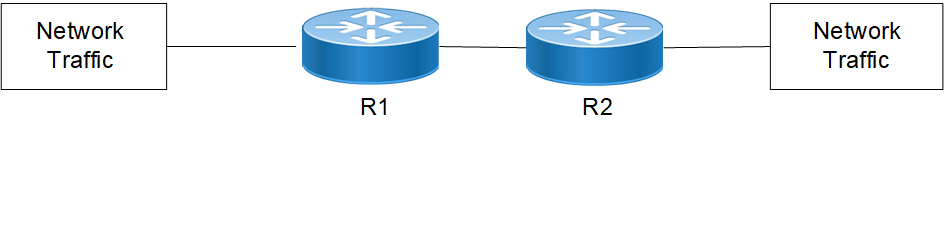
Here are the configuration steps:
1. Enter configure mode and create a session for Mirror to CPU
R1(config)#monitor session 1 type sniff
2. Optionally, add sources such as source VLAN and/or source interface to the sessions. For example, the command source interface configures the monitored source interface and the direction of the traffic to be monitored. If not specified, both ingress and egress traffic are monitored.
R1(config-monitor)#source interface xe57 rx
3. Configure the CPU interface sniff as destination interface for ingress or egress directions.
R1config-monitor)#destination interface sniff
Packets mirrored from ingress direction are sent to sniff0 whereas packets mirrored from egress direction are sent to sniff1.
4. Configure filter rules for IPv4/IPv6 packets using the filter attributes as follows:
1. Configure DSCP for IPv4/IPv6 frame type in the range 0 to 63
R1(config-monitor)#filter frame-type ipv4 (dscp <0-63>
or
R1(config-monitor)#filter frame-type ipv6 (dscp <0-63>
2. Configure filter rules of L2 matching parameters for L2/IPv4 packets or IPv5 packets
filter vlan 2 cos 2 frametype 0x8100
dest-mac host 0044.0055.0066 src-mac host 0011.0022.0033
or
filter frame-type ipv6 cos 2 vlan 2
3. Configure hop limit for IPv6 frame type in the range 1 to 255
R1(config-monitor)#filter frame-type ipv6 (hop-limit <1-255>
4. Configure TTL for IPv4 frame type in the range 1 to 255
R1(config-monitor)#filter frame-type ipv4 (ttl <1-255>
5. Configure ICMP, TCP, and UDP protocols for IPv4/IPv6 frame type in the range 0 to 255
R1(config-monitor)#filter frame-type ipv4 (protocol (icmp | tcp | udp | <0- 255>)
or
R1(config-monitor)#filter frame-type ipv6 (next-header (icmpv6 | tcp | udp | <0-255>)
6. Configure ICMP type for IPv4/IPv6 frame types in the range 0 to 255
R1(config-monitor)#filter frame-type ipv4 protocol icmp icmp-type <0-255>
or
R1(config-monitor)#filter frame-type ipv6 next-header icmp icmp-type <0-255>
7. Configure ICMP code in the range <0-255>
R1(config-monitor)#filter frame-type ipv4 protocol icmp icmp-type <0-255> icmp-code <0-255>
or
R1(config-monitor)#filter frame-type ipv6 next-header icmpv6 icmp-type <0-255> icmp-code <0-255>
8. Configure source port with TCP and UDP protocols
R1(config-monitor)#filter frame-type filter frame-type ipv4 protocol udp sport <0-65535>
R1(config-monitor)#filter frame-type ipv4 protocol tcp sport <0-65535>
or
R1(config-monitor)#filter frame-type filter frame-type ipv6 next-header udp sport <0-65535>
R1(config-monitor)#filter frame-type ipv6 next-header tcp sport <0-65535>
9. Configure destination port with TCP and UDP protocols
R1(config-monitor)#filter frame-type ipv4 protocol udp dport <0-65535>
R1(config-monitor)#filter frame-type ipv4 protocol tcp dport <0-65535>
or
R1(config-monitor)#filter frame-type ipv6 next-header udp dport <0-65535>
R1(config-monitor)#filter frame-type ipv6 next-header tcp dport <0-65535>
10. Configure TCP flags with TCP protocol
R1(config-monitor)#filter frame-type ipv4 protocol tcp tcp-flags {established | urg | ack | psh | rst | syn | fin}
or
R1(config-monitor)#filter frame-type ipv6 next-header tcp tcp-flags {established | urg | ack | psh | rst | syn | fin}
5. Enable the configured session on the interface.
no shut
The packets that are enqueued in a dedicated cpu-queue sniff have a default rate-limits of 200 (max upto 10000 pps) assigned to them, which can be seen in the output of the following command
show cpu-queue details
You can modify the default rate-limits of cpu-queue upto 10000, using below command:
cpu-queue sniff rate 10000 (pps)
Validation
OcNOS#sh running-config monitor
!
monitor session 1 type sniff
source interface xe33 rx
destination interface sniff
10 filter frame-type ipv4 src-ip 20.20.20.0/24
20 filter frame-type ipv6 next-header icmpv6
no shut
OcNOS#
OcNOS#sh monitor session all
session 1
---------------
type : sniff
state : up
source intf :
tx :
rx : xe33
both :
source VLANs :
rx :
destination ports : sniff
sniff-truncate : enabled
filter count : 2
Legend: f = forwarding enabled, l = learning enabled
OcNOS#
OcNOS#sh monitor session 1
session 1
---------------
type : sniff
state : up
source intf :
tx :
rx : xe33
both :
source VLANs :
rx :
destination ports : sniff
sniff-truncate : enabled
filter count : 2
Legend: f = forwarding enabled, l = learning enabled
OcNOS#
OcNOS#sh monitor session 1 filter
session 1
---------------
filter count : 2
---------------
match set 1
---------------
Sequence number : 10
frame type : ipv4
source ip address : 20.20.20.0/24
---------------
match set 2
---------------
Sequence number : 20
frame type : ipv6
next header : icmpv6
OcNOS#
OcNOS#
CLI Commands
The Mirror to CPU feature introduces the following configuration commands.
monitor destination sniff truncate
Use this command to enable truncation of the packets sniffed to CPU.
Use no form of this command to disable truncation of the packets sniffed to CPU.
Note: Truncation of packets is not supported on TH2 platforms.
Command Syntax
monitor destination sniff truncate
(no) monitor destination sniff truncate
Parameters
None
Default
When monitor session of type sniff is created, truncation is enabled.
Command Mode
Configure mode
Applicability
This command was introduced in OcNOS version 7.0.0.
The below commands have been revised for this feature. For more details, refer to the Traffic Mirroring Commands chapter.
• Command syntax in monitor session
• Command syntax in filter
This feature also supports the existing Traffic Mirroring commands listed here: