VxLAN Operation Administration Maintenance
Overview
In Data centers, where Leaf and Spine CLOS network topology is deployed, L2 and L3 VxLAN overlay packets gets forwarded over IP underlay. Traditional monitoring tools such as ping, trace-route could only provide information related to underlay path. For both reactive and proactive fault management of overlay networks, there arises a need to have Ethernet OAM like functions available for the overlay networks.
Like traditional Ethernet, the VxLAN networks need OAM (Operations, Administration, and Maintenance) services to verify connectivity, continuity, and fault isolation between Leaf switches. To achieve this, VxLAN OAM functionality is implemented in the OcNOS 7.0 release. It defines MEPs (Maintenance End Points) and MIPs (Maintenance Intermediate Points) within the VxLAN Leaf and Spine architecture.
Leafs are the nodes where the VxLAN tunnel endpoints (VTEPs) are logically located. It encapsulates standard Ethernet traffic from hosts into VxLAN packets for transport across the IP underlay and decapsulates them upon arrival. The document uses Leaf and VTEP terms interchangeably.
The Spine switch operates purely at the IP underlay level, utilizing routing protocols like OSPF and BGP to route encapsulated packets to the destination VTEPs. So, it is viewed as a transit node in the underlay path.
VxLAN Maintenance End Point (MEP)
A VxLAN MEP is a logical endpoint of an OAM Maintenance Entity (ME) located at a VTEP. It is the OAM anchor point at the VTEP edge of a VxLAN segment. It is responsible for generating, transmitting, and terminating VxLAN OAM frames (like continuity check message, ping and pathtrace). VxLAN MEPs are uniquely identified using the VxLAN Network Identifier (VNI) and remote VTEP IP. The OAM feature works on the Down MEP.
VxLAN Maintenance Intermediate Point (MIP)
A VxLAN MIP is a passive point inside the VxLAN underlay path (typically spine node). It does not originate OAM frames but can respond to certain OAM requests (like pathtrace). It is an intermediate transit point that allows operators to trace the underlay path hop by hop. The MIPs placement is conceptually inside the VxLAN tunnel between VTEPs.
Feature Characteristics
In Leaf and Spine CLOS network topology, Equal-Cost Multi-Path (ECMP) routes exist to and from each leaf and spine switch, ensuring multiple redundant paths for traffic forwarding. Thus the VxLAN data packets traverse through multiple ECMP paths. Identifying the exact point of failure in the path is often complex. The CLI commands introduced in VxLAN OAM feature are designed to overcome these challenges. This feature provides the following OAM services to verify loopback, pathtrace and continuity check message (CCM) exchanges between MEPs:
• Fault Verification (loopback/ping): This function utilizes loopback messages (ping) to verify basic VTEP reachability and tunnel connectivity between leaf nodes. These packets traverse the spine or MIP nodes, which perform standard IP routing without engaging in OAM path discovery. The spine simply forwards the packet to the next hop.
• Fault Isolation (pathtrace): This function utilizes trace messages (pathtrace) to identify and isolate the exact path of a flow between leaf nodes. The spine or MIP node plays an active role in this process by uplifting the pathtrace packets having a TTL of 1 and responding, which allows operators to trace the underlay path hop-by-hop.
• Loss of Continuity Detection: Performs one-way connectivity checks to detect any loss of communication between endpoints. The interval for the CCM message is dependent on the CPU load and CCM message scale, the minimum interval (resolution) supported is 10 ms, aligning with existing Ethernet OAM behavior in non-scaled environments. If ECMP paths exist to a remote leaf, all paths are probed, and their connectivity states are reported individually.
• OAM functionality, including CCM message handling, is implemented in the control plane (i.e., processed by the CPU), thus the CCM packet intervals may not be honoured as configured.
• The Round Trip Time (RTT) values reported in the ping and pathtrace output are measured by the control plane module, so it is not accurate link-level RTT.
• It supports both static or dynamic VxLAN tunnels for single homing or multi-homing setup and is agnostic to the underlay protocols used in establishing routing or tunnels.
Limitation:
• VxLAN for IRB or Layer 3 services are not supported.
• VxLAN over IPv6 is not supported.
• Only one active ping instance is allowed per MEP at a time.
• Only one active pathtrace instance is allowed per MEP at a time.
• The ping or pathtrace operations to the local VTEP IP address are not supported.
• It is supported on the Trident 3 switch: AS7726-32X, AS7326-56X, AS5835-54X only.
•
VxLAN OAM Packet Flow
In the VxLAN network topology, server nodes are connected to leaf switches on the access side, while the uplink ports of the leaf switches are connected to spine nodes.
VxLAN OAM 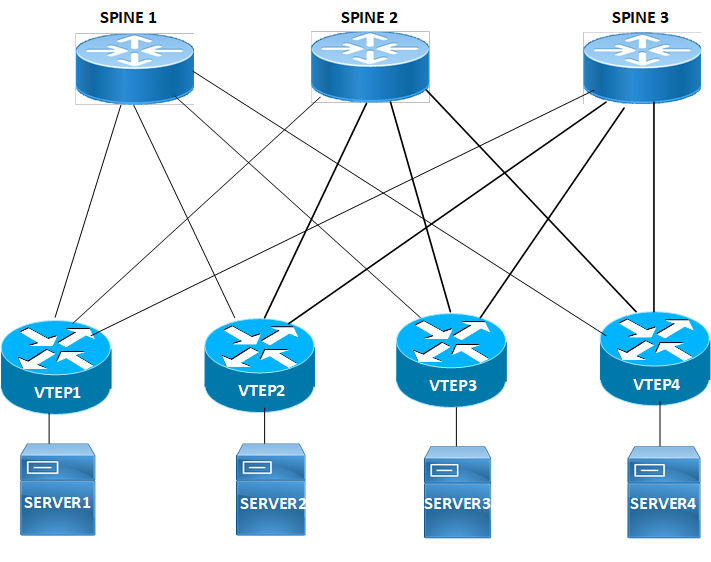 Packet Flow
Packet FlowFollowing is the flow of VxLAN OAM Packet communication:
1. The source leaf generates a OAM packet targeting the destination VTEP.
2. The source leaf encapsulates the OAM packet into the full VxLAN tunnel header.
1. Host side L2 parameters supplied through Ping and Pahtrace commands are encapsulated into the inner L2 header. And these parameters are not applicable to the Continuity Check Message operation.
3. The encapsulated OAM packet is forwarded across the underlay network. The Packet forwarding is based on the installed routes and the load-balancing configuration.
4. The target leaf receives the packet and decapsulates the VxLAN tunnel headers. It identifies the inner packet as a VxLAN OAM message, and sends it to the OAM process.
1. For interactive checks like ping or pathtrace, the target leaf generates a corresponding OAM response packet.
2. CCM messages are consumed by the process and resets the CCM timers.
5. This response is then encapsulated back into a VxLAN tunnel header and sent back through the underlay.
VxLAN OAM Modes
The CFM objects (Maintenance Domain (MD) or Maintenance Association (MA) and Maintenance Endpoint (MEP) / Maintenance Intermediate Point (MIP)) required for the VxLAN OAM operations are created by default or explicitly through the configurations. The default CFM objects are created when the feature is enabled. And the explicit objects are created as part of the CFM module configurations. Both the implicit and explicit configurations can co-exist in the system at the same time. However, it is the VxLAN OAM operations which decides the implicit or explicit mode functioning, based on the supplied CLI parameters.
Note: CCM operation is performed only on the explicit CFM objects.
Below Table 1-1 explains the VxLAN OAM mode, configurations and the allowed operations.
Implicit Mode | Explicit Mode | |
|---|---|---|
Leaf Configurations | Creates MA, MD, and MEP CFM objects implicitly nvo vxlan-oam For details, refer to nvo vxlan-oam CLI section. | Creates MA, MD, and MIP CFM objects explicitly. Refer to ethernet cfm domain-type and ethernet cfm mep CLI sections for more information. nvo vxlan-oam ethernet cfm domain-type character-string domain-name testmd level 3 mip-creation none service ma-type string ma-name testma evpn 2 ethernet cfm mep down mpid 12 active true remote-vtep 1.1.1.1 |
Spine Configurations | Creates MA, MD, and MIP CFM objects implicitly. nvo vxlan-oam spine. For details, refer to nvo vxlan-oam CLI section. | Creates MA, MD, and MIP CFM objects explicitly. Refer to ethernet cfm domain-type and ethernet cfm mep CLI sections for more information. nvo vxlan-oam spine ethernet cfm domain-type character-string domain-name testmd level 3 mip-creation static service ma-type string ma-name testma |
Ping and Pathtrace | It supports only ping and pathtrace operations and when the CFM object parameters are not supplied, these operations are performed in this mode • Below are the examples without CFM object parameters. • ping ethernet evpn destination 1.1.1.1 2 flow-inport xe1 flow-dst 0010.7700.0001 flow-vlan 102 flowethtype 0x8100 • pathtrace ethernet evpn destination 1.1.1.1 2 flow-inport xe1 flow-dst 0010.7700.0001 flow-vlan 102 flowethtype 0x8100 | It supports ping and pathtrace operations. The parameters provided in the ping and pathtrace CLI command chooses the mode. Below are the examples with CFM object parameters. • ping ethernet evpn 12 domain testdomain ma testma destination 1.1.1.1 2 flow-inport xe1 flow-dst 0010.7700.0001 flow-vlan 102 flow-ethtype 0x8100 • pathtrace ethernet evpn 12 domain testdomain ma testma destination 1.1.1.1 2 flow-inport xe1 flow-dst 0010.7700.0001 flow-vlan 102 flow-ethtype 0x8100 Above CLIs carry the MEP ID 12, MA name testma, and the MD name testdomain. |
CCM | Not applicable. | It supports CCM operation. Below is the example with MA/MD/MEP objects. nvo vxlan-oam ethernet cfm domain-type characterstring domain-name testmd level 3 mipcreation none service ma-type string ma-name testma evpn 2 mep crosscheck mpid 21 ethernet cfm mep down mpid 12 active true remote-vtep 1.1.1.1 cc multicast state enable |
Using Same Path for VxLAN OAM and Data Packets
For accurate packet path debugging, OAM packets (ping and pathtrace) must follow the same forwarding logic as host data packets. The OAM packets are generated directly on the VTEP node while VxLAN data typically originates from a host. Since the VTEP generates OAM packets locally, users can supply the flow parameters (such as ingress port, destination MAC, and VLAN) in the ping and pathtrace CLIs manually by copying the parameters of the host device to simulate a specific host's traffic.
Following are the example that shows the usage of flow parameters in ping and pathtrace CLIs.
pathtrace ethernet evpn 12 domain testdomain ma testma destination 1.1.1.1 2 flow-inport xe1 flow-dst 0010.7700.0001 flow-vlan 102 flow-ethtype 0x8100
ping ethernet evpn 12 domain testdomain ma testma destination 1.1.1.1 2 flow-inport xe1 flow-dst 0010.7700.0001 flow-vlan 102 flow-ethtype 0x8100
Benefits
It provides the capability of OAM operation for VxLAN networks.
Prerequisites
Ensure the following prerequisites are met before configuring VxLAN OAM functionality:
• Enable VxLAN hardware capability on Leaf and Spine nodes.
Configuration
This section details the systematic procedures required to establish the VxLAN OAM feature, starting with the Leaf-Spine (CLOS) network topology and providing step-by-step Command Line Interface (CLI) instructions to configure VTEPs, Spines, and access switches for OAM operation, BGP routing, and CFM maintenance points.
Topology
The VxLAN OAM feature is demonstrated using a standard 2-Tier Leaf-Spine (CLOS) topology. This topology ensures redundant paths and is fundamental to the EVPN architecture used for VxLAN control.
The topology shown in Figure 1-6 consists of:
• 2 Spine nodes: Spine1 and Spine2
• 4 Leaf nodes are explicitly named as VTEPs (VTEP1, VTEP2, VTEP3, and VTEP4)
• 2 Access Switches: One connecting VTEP1/VTEP2, another connecting VTEP3/VTEP4
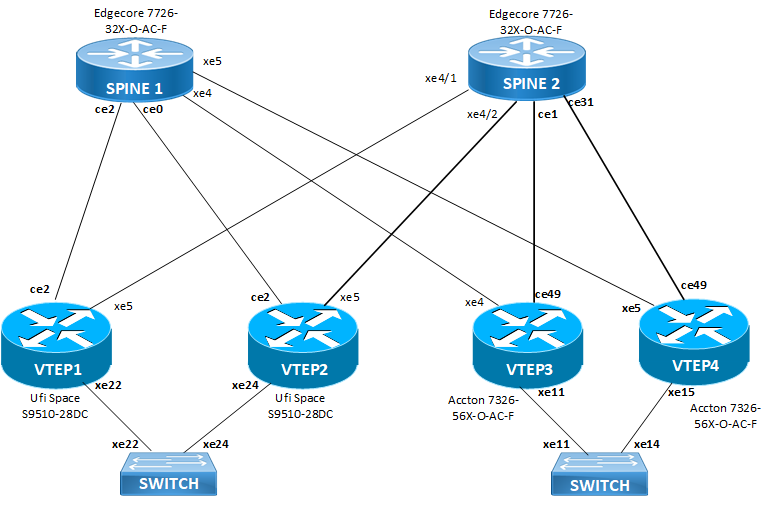
VxLAN OAM Topology
Procedure to configure VxLAN OAM
The configuration includes the steps listed in the below table.
Nodes | VxLAN OAM Functionality | Relevant Configuration Steps |
|---|---|---|
Leaf Nodes (VTEP1 - VTEP4) | Act as VTEPs (VxLAN Tunnel Endpoints) and are configured as MEPs (Maintenance End Points). Each VTEP uses a unique Loopback IP address (e.g., 1.1.1.1) as its VTEP-IP source/destination. nvo vxlan-oam, explicit MEP creation (ethernet cfm mep down...), BGP configuration for VTEP-IP advertisement, EVPN instance mapping. | |
Spine Nodes (Spine 1, Spine 2) | Act as the transit layer in the IP underlay and are configured as MIPs (Maintenance Intermediate Points). They also serve as BGP Route Reflectors for the EVPN overlay nvo vxlan-oam spine, explicit CFM domain configuration with static MIP creation (mip-creation static), BGP configuration for VTEP reachability and EVPN route reflection. | |
Access Switches | Provide the Layer 2 connectivity to the servers and connect to the VTEPs via trunk links (Port-Channels/LAG) that carry the traffic for the VLAN mapped to the VxLAN segment (VNI ID). Standard Layer 2 configuration with Rapid Spanning Tree Protocol (RSTP) bridge and VLAN trunking on the VTEP-facing links. |
Configure VTEP1, VTEP2, VTEP3, and VTEP4
1. Login to global configuration mode. Enable VxLAN hardware filtering and multihoming on VTEP1 and VTEP2.
#configure terminal
(config)#hardware-profile filter vxlan enable
(config)#hardware-profile filter vxlan-mh enable
on VTEP3 and VTEP4
#configure terminal
(config)#hardware-profile filter bfd-group enable
2. Configure host name and enable VxLAN. Network Virtualization Overlay (NVO) globally. Set the EVPN Ethernet Segment Identifier (ESI) hold-time and enable VxLAN multihoming for redundancy.
(config)#nvo vxlan enable
(config)#evpn esi hold-time 90
(config)#evpn vxlan multihoming enable
3. Configure an EVPN service (MAC VRF) named vrf2, map to a VLAN, RD (carries MAC/IP advertisements for VLAN2), and route target.
on VTEP1
(config)#mac vrf vrf2
(config-vrf)#evpn-vlan-service vlan-based
(config-vrf)#rd 1.1.1.1:2
(config-vrf)#route-target both 100:2
on VTEP2
(config)#mac vrf vrf2
(config-vrf)#evpn-vlan-service vlan-based
(config-vrf)#rd 2.2.2.2:2
(config-vrf)#route-target both 100:2
on VTEP3
(config)#mac vrf vrf2
(config-vrf)#evpn-vlan-service vlan-based
(config-vrf)#rd 3.3.3.3:2
(config-vrf)#route-target both 100:2
on VTEP4
(config)#mac vrf vrf2
(config-vrf)#evpn-vlan-service vlan-based
(config-vrf)#rd 4.4.4.4:2
(config-vrf)#route-target both 100:2
4. Set the global VTEP IP address (loopback address) for VxLAN encapsulation and decapsulation. Configure NVO VxLAN ID 2, broadcast traffic replication at ingress and control plan as EVPN-BGP for MAC/IP learning. Associate the previously created EVPN VRF (vrf2)instance. This configuration maps the VLAN/EVPN instance (VLAN2)to a VxLAN segment (VNID 2).
on VTEP1
(config)#nvo vxlan vtep-ip-global 1.1.1.1
(config)#nvo vxlan id 2 ingress-replication
(config-nvo)#vxlan host-reachability-protocol evpn-bgp vrf2
on VTEP2
(config)#nvo vxlan vtep-ip-global 2.2.2.2
(config)#nvo vxlan id 2 ingress-replication
(config-nvo)#vxlan host-reachability-protocol evpn-bgp vrf2
on VTEP3
(config)#nvo vxlan vtep-ip-global 3.3.3.3
(config)#nvo vxlan id 2 ingress-replication bridge-vlan 2
(config-nvo)#vxlan host-reachability-protocol evpn-bgp vrf2
on VTEP4
(config)#nvo vxlan vtep-ip-global 4.4.4.4
(config)#nvo vxlan id 2 ingress-replication bridge-vlan 2
(config-nvo)#vxlan host-reachability-protocol evpn-bgp vrf2
5. Configure a multihomed EVPN access port interface with switchport mode, load interval, EVPN MAC holdtime, and multihomed shared system MAC address across multi-homed leafs (Ethernet Segment).
on VTEP1 and VTEP2
(config)#interface po12
(config-if)#switchport
(config-if)#load-interval 30
(config-if)#evpn-mac-holdtime 180
(config-if)#evpn multi-homed system-mac 0000.0000.1212
on VTEP3
(config)#interface po34
(config-if)#switchport
(config-if)#bridge-group 1 spanning-tree disable
(config-if)#switchport trunk allowed vlan add 2
(config-if)#load-interval 30
(config-if)#evpn-mac-holdtime 180
(config-if)#access-if-vxlan
(config-if)#evpn multi-homed system-mac 0000.0000.3434
on VTEP4
6. Configure the access side subinterface for encapsulation, rewrite VLAN tag with POP, and EVPN mapping. This configuration connects VLAN 2 traffic from the access side (po12.2) to EVPN/VxLAN (VPN-ID 2) overlay.
on VTEP1 and VTEP2
(config)#interface po12.2 switchport
(config-if)#encapsulation dot1q 2
(config-if)#rewrite pop
(config-if)#access-if-evpn
(config-acc-if-evpn)#map vpn-id 2
7. Configure the underlay network connecting to both spines and access side with description and IP address on:
VTEP1
(config)#interface ce2
(config-if)#description to_C1-SPINE1
(config-if)#ip address 11.10.1.1/24
(config-if)#commit
(config-if)#exit
(config)#interface lo
(config)#ip address 1.1.1.1/32 secondary
(config)#interface xe5
(config-if)#description to_C1-SPINE2
(config-if)#speed 10g
(config-if)#load-interval 30
(config-if)#ip address 12.10.1.1/24
(config-if)#commit
(config-if)#exit
(config)interface xe22
(config-if)#speed 10g
(config-if)#channel-group 12 mode active
(config-if)#commit
(config-if)#exit
VTEP2
(config)#interface ce2
(config-if)#description to_C1-SPINE1
(config-if)#load-interval 30
(config-if)#ip address 21.10.1.1/24
(config-if)#commit
(config-if)#exit
(config)#interface lo
(config)#ip address 2.2.2.2/32 secondary
(config)#interface xe5
(config-if)#description to_C1-SPINE2
(config-if)#speed 10g
(config-if)#load-interval 30
(config-if)#ip address 22.10.1.1/24
(config-if)#commit
(config-if)#exit
(config)interface xe24
(config-if)#speed 10g
(config-if)#channel-group 12 mode active
(config-if)#commit
(config-if)#exit
VTEP3
(config)#interface ce49
(config-if)#description to_C1-SPINE2
(config-if)#load-interval 30
(config-if)#ip address 32.10.1.1/24
(config-if)#exit
(config)#interface lo
(config-if)#ip address 3.3.3.3/32 secondary
(config-if)#exit
(config)#interface xe4
(config-if)#description to_C1-SPINE1
(config-if)#load-interval 30
(config-if)#ip address 31.10.1.1/24
(config-if)#exit
(config)#interface xe11
(config-if)#channel-group 34 mode active
(config-if)#commit
(config-if)#exit
(config)#
VTEP4
(config)#interface ce49
(config-if)#description to_C1-SPINE2
(config-if)#load-interval 30
(config-if)#ip address 42.10.1.1/24
(config-if)#exit
(config)#interface lo
(config-if)#ip address 4.4.4.4/32 secondary
(config-if)#exit
(config)#interface xe5
(config-if)#description to_C1-SPINE1
(config-if)#load-interval 30
(config-if)#ip address 41.10.1.1/24
(config-if)#exit
(config)#interface xe15
(config-if)#channel-group 34 mode active
(config-if)#commit
(config-if)#exit
8. Configure BGP router mode and set router ID, peer groups, neighbors, and address families.
on VTEP1
(config)#router bgp 100
(config-router)#bgp router-id 1.1.1.1
(config-router)#neighbor Overlay peer-group
(config-router)#neighbor Overlay remote-as 200
(config-router)#neighbor Overlay ebgp-multihop
(config-router)#neighbor Overlay update-source lo
(config-router)#neighbor Overlay advertisement-interval 0
(config-router)#neighbor Overlay fall-over bfd multihop
Note: BGP EVPN overlay handles MAC/IP advertisement and tunnel mapping.
(config-router)#neighbor Underlay peer-group
(config-router)#neighbor Underlay remote-as 200
(config-router)#neighbor Underlay advertisement-interval 0
(config-router)#neighbor Underlay fall-over bfd
Note: BGP underlay handles reachability between VTEPs
(config-router)#neighbor 11.10.1.2 peer-group Underlay
(config-router)#neighbor 11.11.11.11 peer-group Overlay
(config-router)#neighbor 11.11.11.11 description to_c1-spine1
(config-router)#neighbor 12.10.1.2 peer-group Underlay
(config-router)#neighbor 22.22.22.22 peer-group Overlay
(config-router)#neighbor 22.22.22.22 description to_c1-spine2
(config-router)#commit
(config-router)#exit
(config-router)#address-family ipv4 unicast
(config-router-af)#network 1.1.1.1/32
(config-router-af)#max-paths ebgp 2
(config-router-af)#neighbor Underlay activate
(config-router-af)#neighbor Underlay allowas-in 1
(config-router-af)#exit-address-family
Note: This configuration establishes eBGP sessions 2 with the spines over physical links (11.10.1.2, 12.10.1.2) and, advertises the VTEP IP (1.1.1.1/32) into the underlay. The max-paths ebgp 2 allows ECMP load-balancing across both spines.
(config-router)# address-family l2vpn evpn
(config-router-af)#neighbor Overlay activate
(config-router-af)#neighbor Overlay allowas-in 1
(config-router-af)#exit-address-family
Note: This configuration establishes BGP EVPN sessions between the VTEPs and the spine route reflectors. It also enables the EVPN control plane for VxLAN MAC/IP route exchange for VxLAN overlays.
on VTEP2
(config)#router bgp 100
(config-router)#bgp router-id 2.2.2.2
(config-router)#neighbor Overlay peer-group
(config-router)#neighbor Overlay remote-as 200
(config-router)#neighbor Overlay ebgp-multihop
(config-router)#neighbor Overlay update-source lo
(config-router)#neighbor Overlay advertisement-interval 0
(config-router)#neighbor Overlay fall-over bfd multihop
(config-router)#neighbor Underlay peer-group
(config-router)#neighbor Underlay remote-as 200
(config-router)#neighbor Underlay advertisement-interval 0
(config-router)#neighbor Underlay fall-over bfd
(config-router)#neighbor 11.11.11.11 peer-group Overlay
(config-router)#neighbor 21.10.1.2 peer-group Underlay
(config-router)#neighbor 22.10.1.2 peer-group Underlay
(config-router)#neighbor 22.22.22.22 peer-group Overlay
(config-router)#commit
(config-router)#exit
(config-router)#address-family ipv4 unicast
(config-router-af)#network 2.2.2.2/32
(config-router-af)#max-paths ebgp 4
(config-router-af)#neighbor Underlay activate
(config-router-af)#neighbor Underlay allowas-in 1
(config-router-af)#exit-address-family
(config-router)# address-family l2vpn evpn
(config-router-af)#neighbor Overlay activate
(config-router-af)#neighbor Overlay allowas-in 1
(config-router-af)#exit-address-family
on VTEP3
(config)#router bgp 100
(config-router)#bgp router-id 3.3.3.3
(config-router)#neighbor Overlay peer-group
(config-router)#neighbor Overlay remote-as 200
(config-router)#neighbor Overlay ebgp-multihop
(config-router)#neighbor Overlay update-source lo
(config-router)#neighbor Overlay advertisement-interval 0
(config-router)#neighbor Overlay fall-over bfd multihop
(config-router)#neighbor Underlay peer-group
(config-router)#neighbor Underlay remote-as 200
(config-router)#neighbor Underlay advertisement-interval 0
(config-router)#neighbor Underlay fall-over bfd
(config-router)#neighbor 11.11.11.11 peer-group Overlay
(config-router)#neighbor 22.22.22.22 peer-group Overlay
(config-router)#neighbor 31.10.1.2 peer-group Underlay
(config-router)#neighbor 32.10.1.2 peer-group Underlay
(config-router)#commit
(config-router)#exit
(config-router)#address-family ipv4 unicast
(config-router-af)#network 3.3.3.3/32
(config-router-af)#max-paths ebgp 4
(config-router-af)#neighbor Underlay activate
(config-router-af)#neighbor Underlay allowas-in 1
(config-router-af)#exit-address-family
(config-router)# address-family l2vpn evpn
(config-router-af)#neighbor Overlay activate
(config-router-af)#neighbor Overlay allowas-in 1
(config-router-af)#exit-address-family
on VTEP4
(config)#router bgp 100
(config-router)#bgp router-id 4.4.4.4
(config-router)#neighbor Overlay peer-group
(config-router)#neighbor Overlay remote-as 200
(config-router)#neighbor Overlay ebgp-multihop
(config-router)#neighbor Overlay update-source lo
(config-router)#neighbor Overlay advertisement-interval 0
(config-router)#neighbor Overlay fall-over bfd multihop
(config-router)#neighbor Underlay peer-group
(config-router)#neighbor Underlay remote-as 200
(config-router)#neighbor Underlay advertisement-interval 0
(config-router)#neighbor Underlay fall-over bfd
(config-router)#neighbor 11.11.11.11 peer-group Overlay
(config-router)#neighbor 22.22.22.22 peer-group Overlay
(config-router)#neighbor 41.10.1.2 peer-group Underlay
(config-router)#neighbor 42.10.1.2 peer-group Underlay
(config-router)#commit
(config-router)#exit
(config-router)#address-family ipv4 unicast
(config-router-af)#network 4.4.4.4/32
(config-router-af)#max-paths ebgp 4
(config-router-af)#neighbor Underlay activate
(config-router-af)#neighbor Underlay allowas-in 1
(config-router-af)#exit-address-family
(config-router)# address-family l2vpn evpn
(config-router-af)#neighbor Overlay activate
(config-router-af)#neighbor Overlay allowas-in 1
(config-router-af)#exit-address-family
The following VxLAN OAM configuration enables the VxLAN OAM monitoring for the VxLAN segment with VNID 2, continuously checks the health of VxLAN tunnels to three remote VTEP 2, VTEP 3 and VTEP 4 ( 2.2.2.2, 3.3.3.3, and 4.4.4.4) and verifies that all expected remote endpoints are reachable.
9. Configure VxLAN OAM and Ethernet CFM to support monitoring and diagnostics for VxLAN tunnels.
(config)#nvo vxlan-oam
10. Set up a CFM Maintenance Domain (MD) named mdom2 with level 7 and default MIP (Maintenance Intermediate Point) creation.
(config)#ethernet cfm domain-type character-string domain-name mdom2 level 7 mip-creation default
where
• domain-type character-string specifies the domain name format as a string.
• domain-name mdom2 specifies the maintenance domain named as mdom2.
• level 7 sets the CFM level 7, typically used for customer-level monitoring.
• mip-creation default enables default creation of MIPs for intermediate devices.
11. Define a MA service named ma2 within the mdom2 domain, associated with EVPN ID 2.
(config-ether-cfm)#service ma-type string ma-name ma2
(config-ether-cfm-ma)#evpn 2
Note: The following options:
• ma-type string specifies the MA name format as a string.
• ma-name ma2 names the MA ma2.
• evpn 2 links the service to EVPN with VPN-ID 2, aligning with the VxLAN ID 2 from the previous configuration. Refer to step, Configure the access side subinterface for encapsulation, rewrite VLAN tag with POP, and EVPN mapping. This configuration connects VLAN 2 traffic from the access side (po12.2) to EVPN/VxLAN (VPN-ID 2) overlay.)
Note: This configuration monitors VxLAN tunnels that belong to VNID 2.
12. Configure downward-facing MEPs with
MPIDs 13, 12 and 14 for the remote VTEPs 3.3.3.3, 2.2.2.2 and 4.4.4.4 for enabling continuity check (CC) multicast on VTEP1
(config-ether-cfm-ma)#ethernet cfm mep down mpid 13 active true remote-vtep 3.3.3.3
(config-ether-cfm-ma-mep)#cc multicast state enable
(config-ether-cfm-ma-mep)#exit-ether-ma-mep-mode
(config-ether-cfm-ma)#ethernet cfm mep down mpid 12 active true remote-vtep 2.2.2.2
(config-ether-cfm-ma-mep)#cc multicast state enable
(config-ether-cfm-ma-mep)#exit-ether-ma-mep-mode
(config-ether-cfm-ma)#ethernet cfm mep down mpid 14 active true remote-vtep 4.4.4.4
(config-ether-cfm-ma-mep)#cc multicast state enable
(config-ether-cfm-ma-mep)#exit-ether-ma-mep-mode
Note: The following options:
• mep down mpid 13 creates a downward-facing MEP with Maintenance Point ID 13.
• active true activates the MEP for monitoring.
• remote-vtep 3.3.3.3 associates the MEP with the remote VTEP IP 3.3.3.3.
• cc multicast state enables continuity check messages in multicast mode to monitor connectivity.
• exit-ether-ma-mep-mode exits the MEP configuration sub-mode.
Note: This configuration creates a down MEP with ID 13/12/14 that monitors the VxLAN tunnel to remote VTEP 3.3.3.3. / 2.2.2.2. / 4.4.4.4 respectively.
MPIDs 23, 21 and 24 for the remote VTEPs 3.3.3.3, 1.1.1.1 and 4.4.4.4 for enabling continuity check (CC) multicast on VTEP2
(config-ether-cfm-ma)#ethernet cfm mep down mpid 23 active true remote-vtep 3.3.3.3
(config-ether-cfm-ma-mep)#cc multicast state enable
(config-ether-cfm-ma-mep)#exit-ether-ma-mep-mode
(config-ether-cfm-ma)#ethernet cfm mep down mpid 21 active true remote-vtep 1.1.1.1
(config-ether-cfm-ma-mep)#cc multicast state enable
(config-ether-cfm-ma-mep)#exit-ether-ma-mep-mode
(config-ether-cfm-ma)#ethernet cfm mep down mpid 24 active true remote-vtep 4.4.4.4
(config-ether-cfm-ma-mep)#cc multicast state enable
(config-ether-cfm-ma-mep)#exit-ether-ma-mep-mode
Note:
MPIDs 32, 31 and 34 for the remote VTEPs 2.2.2.2, 1.1.1.1 and 4.4.4.4 for enabling continuity check (CC) multicast on VTEP3
(config-ether-cfm-ma)#ethernet cfm mep down mpid 32 active true remote-vtep 2.2.2.2
(config-ether-cfm-ma-mep)#cc multicast state enable
(config-ether-cfm-ma-mep)#exit-ether-ma-mep-mode
(config-ether-cfm-ma)#ethernet cfm mep down mpid 31 active true remote-vtep 1.1.1.1
(config-ether-cfm-ma-mep)#cc multicast state enable
(config-ether-cfm-ma-mep)#exit-ether-ma-mep-mode
(config-ether-cfm-ma)#ethernet cfm mep down mpid 34 active true remote-vtep 4.4.4.4
(config-ether-cfm-ma-mep)#cc multicast state enable
(config-ether-cfm-ma-mep)#exit-ether-ma-mep-mode
MPIDs 42, 41 and 43 for the remote VTEPs 2.2.2.2, 1.1.1.1 and 3.3.3.3 for enabling continuity check (CC) multicast on VTEP4
(config-ether-cfm-ma)#ethernet cfm mep down mpid 42 active true remote-vtep 2.2.2.2
(config-ether-cfm-ma-mep)#cc multicast state enable
(config-ether-cfm-ma-mep)#exit-ether-ma-mep-mode
(config-ether-cfm-ma)#ethernet cfm mep down mpid 41 active true remote-vtep 1.1.1.1
(config-ether-cfm-ma-mep)#cc multicast state enable
(config-ether-cfm-ma-mep)#exit-ether-ma-mep-mode
(config-ether-cfm-ma)#ethernet cfm mep down mpid 43 active true remote-vtep 3.3.3.3
(config-ether-cfm-ma-mep)#cc multicast state enable
(config-ether-cfm-ma-mep)#exit-ether-ma-mep-mode
13. Enable crosschecking for remote MEPs. Cross-check verifies that these remote MEPs exist and are reachable, ensuring the full end-to-end path is operational. Defines expected remote MEPs with IDs
31, 21, and 41 on VTEP1
(config-ether-cfm-ma)#mep crosscheck mpid 31
(config-ether-cfm-ma)#mep crosscheck mpid 21
(config-ether-cfm-ma)#mep crosscheck mpid 41
(config-ether-cfm-ma)#cc interval 1s
(config-ether-cfm-ma)#exit-ether-ma-mode
32, 12, and 42 on VTEP2
(config-ether-cfm-ma)#mep crosscheck mpid 32
(config-ether-cfm-ma)#mep crosscheck mpid 12
(config-ether-cfm-ma)#mep crosscheck mpid 42
(config-ether-cfm-ma)#cc interval 1s
(config-ether-cfm-ma)#exit-ether-ma-mode
23, 13, and 43 on VTEP3
(config-ether-cfm-ma)#mep crosscheck mpid 23
(config-ether-cfm-ma)#mep crosscheck mpid 13
(config-ether-cfm-ma)#mep crosscheck mpid 43
(config-ether-cfm-ma)#cc interval 1s
(config-ether-cfm-ma)#exit-ether-ma-mode
24, 14, and 34 on VTEP4
(config-ether-cfm-ma)#mep crosscheck mpid 23
(config-ether-cfm-ma)#mep crosscheck mpid 13
(config-ether-cfm-ma)#mep crosscheck mpid 43
(config-ether-cfm-ma)#cc interval 1s
(config-ether-cfm-ma)#exit-ether-ma-mode
Sample running configuration on VTEP 1
C1-Leaf1#show running-config (SP Node)
!
!
hardware-profile filter vxlan enable
hardware-profile filter vxlan-mh enable
hardware-profile statistics cfm-ccm enable
!
hostname C1-Leaf1
!
nvo vxlan enable
!
evpn esi hold-time 90
!
evpn vxlan multihoming enable
!
mac vrf vrf2
evpn-vlan-service vlan-based
rd 1.1.1.1:2
route-target both 100:2
!
nvo vxlan vtep-ip-global 1.1.1.1
!
nvo vxlan id 2 ingress-replication
vxlan host-reachability-protocol evpn-bgp vrf2
!
interface po12
switchport
load-interval 30
evpn-mac-holdtime 180
evpn multi-homed system-mac 0000.0000.1212
!
interface po12.2 switchport
encapsulation dot1q 2
rewrite pop
access-if-evpn
map vpn-id 2
!
interface ce2
description to_C1-SPINE1
ip address 11.10.1.1/24
!
interface lo
ip address 1.1.1.1/32 secondary
!
interface xe5
description to_C1-SPINE2
speed 10g
load-interval 30
ip address 12.10.1.1/24
!
interface xe22
speed 10g
channel-group 12 mode active
!
exit
!
router bgp 100
bgp router-id 1.1.1.1
neighbor Overlay peer-group
neighbor Overlay remote-as 200
neighbor Overlay ebgp-multihop
neighbor Overlay update-source lo
neighbor Overlay advertisement-interval 0
neighbor Overlay fall-over bfd multihop
neighbor Underlay peer-group
neighbor Underlay remote-as 200
neighbor Underlay advertisement-interval 0
neighbor Underlay fall-over bfd
neighbor 11.10.1.2 peer-group Underlay
neighbor 11.11.11.11 peer-group Overlay
neighbor 11.11.11.11 description to_c1-spine1
neighbor 12.10.1.2 peer-group Underlay
neighbor 22.22.22.22 peer-group Overlay
neighbor 22.22.22.22 description to_c1-spine2
!
address-family ipv4 unicast
network 1.1.1.1/32
max-paths ebgp 2
neighbor Underlay activate
neighbor Underlay allowas-in 1
exit-address-family
!
address-family l2vpn evpn
neighbor Overlay activate
neighbor Overlay allowas-in 1
exit-address-family
!
exit
!
end
##############################
nvo vxlan-oam
!
ethernet cfm domain-type character-string domain-name mdom2 level 7 mip-creation default
service ma-type string ma-name ma2
evpn 2
ethernet cfm mep down mpid 13 active true remote-vtep 3.3.3.3
cc multicast state enable
exit-ether-ma-mep-mode
ethernet cfm mep down mpid 12 active true remote-vtep 2.2.2.2
cc multicast state enable
exit-ether-ma-mep-mode
ethernet cfm mep down mpid 14 active true remote-vtep 4.4.4.4
cc multicast state enable
exit-ether-ma-mep-mode
mep crosscheck mpid 31
mep crosscheck mpid 21
mep crosscheck mpid 41
cc interval 1s
exit-ether-ma-mode
Sample running configuration on VTEP 2
C1-Leaf2#show running-config (SP Node)
!
!
hardware-profile filter vxlan enable
hardware-profile filter vxlan-mh enable
hardware-profile statistics cfm-ccm enable
!
hostname C1-Leaf2
!
nvo vxlan enable
!
evpn esi hold-time 90
!
evpn vxlan multihoming enable
!
mac vrf vrf2
evpn-vlan-service vlan-based
rd 2.2.2.2:2
route-target both 100:2
!
nvo vxlan vtep-ip-global 2.2.2.2
!
nvo vxlan id 2 ingress-replication
vxlan host-reachability-protocol evpn-bgp vrf2
!
interface po12
switchport
load-interval 30
evpn-mac-holdtime 180
evpn multi-homed system-mac 0000.0000.1212
!
interface po12.2 switchport
encapsulation dot1q 2
rewrite pop
access-if-evpn
map vpn-id 2
!
interface ce2
description to_C1-SPINE1
load-interval 30
ip address 21.10.1.1/24
!
interface lo
ip address 2.2.2.2/32 secondary
!
interface xe5
description to_C1-SPINE2
speed 10g
load-interval 30
ip address 22.10.1.1/24
!
interface xe24
speed 10g
channel-group 12 mode active
!
exit
!
router bgp 100
bgp router-id 2.2.2.2
neighbor Overlay peer-group
neighbor Overlay remote-as 200
neighbor Overlay ebgp-multihop
neighbor Overlay update-source lo
neighbor Overlay advertisement-interval 0
neighbor Overlay fall-over bfd multihop
neighbor Underlay peer-group
neighbor Underlay remote-as 200
neighbor Underlay advertisement-interval 0
neighbor Underlay fall-over bfd
neighbor 11.11.11.11 peer-group Overlay
neighbor 21.10.1.2 peer-group Underlay
neighbor 22.10.1.2 peer-group Underlay
neighbor 22.22.22.22 peer-group Overlay
!
address-family ipv4 unicast
network 2.2.2.2/32
max-paths ebgp 4
neighbor Underlay activate
neighbor Underlay allowas-in 1
exit-address-family
!
address-family l2vpn evpn
neighbor Overlay activate
neighbor Overlay allowas-in 1
exit-address-family
!
exit
!
end
!
C1-Leaf2#
##############################
nvo vxlan-oam
!
ethernet cfm domain-type character-string domain-name mdom2 level 7 mip-creation default
service ma-type string ma-name ma2
evpn 2
ethernet cfm mep down mpid 23 active true remote-vtep 3.3.3.3
cc multicast state enable
exit-ether-ma-mep-mode
ethernet cfm mep down mpid 21 active true remote-vtep 1.1.1.1
cc multicast state enable
exit-ether-ma-mep-mode
ethernet cfm mep down mpid 24 active true remote-vtep 4.4.4.4
cc multicast state enable
exit-ether-ma-mep-mode
mep crosscheck mpid 32
mep crosscheck mpid 12
mep crosscheck mpid 42
cc interval 1s
exit-ether-ma-mode
Sample running configuration on VTEP 3
C1-Leaf3#show running-config (DC Node)
!
hardware-profile filter bfd-group enable
!
hostname C1-Leaf3
!
port-group 3 speed 10g
!
bridge 1 protocol rstp vlan-bridge
!
vlan database
vlan 2 bridge 1 state enable
!
nvo vxlan enable
!
evpn esi hold-time 90
!
evpn vxlan multihoming enable
!
mac vrf vrf2
evpn-vlan-service vlan-based
rd 3.3.3.3:2
route-target both 100:2
!
nvo vxlan vtep-ip-global 3.3.3.3
!
nvo vxlan id 2 ingress-replication bridge-vlan 2
vxlan host-reachability-protocol evpn-bgp vrf2
!
interface po34
switchport
bridge-group 1 spanning-tree disable
switchport mode trunk
switchport trunk allowed vlan add 2
load-interval 30
evpn-mac-holdtime 180
access-if-vxlan
evpn multi-homed system-mac 0000.0000.3434
!
interface ce49
description to_C1-SPINE2
load-interval 30
ip address 32.10.1.1/24
!
interface lo
ip address 3.3.3.3/32 secondary
!
interface xe4
description to_C1-SPINE1
load-interval 30
ip address 31.10.1.1/24
!
interface xe11
channel-group 34 mode active
!
exit
!
router bgp 100
bgp router-id 3.3.3.3
neighbor Overlay peer-group
neighbor Overlay remote-as 200
neighbor Overlay ebgp-multihop
neighbor Overlay update-source lo
neighbor Overlay advertisement-interval 0
neighbor Overlay fall-over bfd multihop
neighbor Underlay peer-group
neighbor Underlay remote-as 200
neighbor Underlay advertisement-interval 0
neighbor Underlay fall-over bfd
neighbor 11.11.11.11 peer-group Overlay
neighbor 22.22.22.22 peer-group Overlay
neighbor 31.10.1.2 peer-group Underlay
neighbor 32.10.1.2 peer-group Underlay
!
address-family ipv4 unicast
network 3.3.3.3/32
max-paths ebgp 4
neighbor Underlay activate
neighbor Underlay allowas-in 1
exit-address-family
!
address-family l2vpn evpn
neighbor Overlay activate
neighbor Overlay allowas-in 1
exit-address-family
!
exit
!
end
!
C1-Leaf3#
##############################
nvo vxlan-oam
!
ethernet cfm domain-type character-string domain-name mdom2 level 7 mip-creation default
service ma-type string ma-name ma2
evpn 2
ethernet cfm mep down mpid 32 active true remote-vtep 2.2.2.2
cc multicast state enable
exit-ether-ma-mep-mode
ethernet cfm mep down mpid 31 active true remote-vtep 1.1.1.1
cc multicast state enable
exit-ether-ma-mep-mode
ethernet cfm mep down mpid 34 active true remote-vtep 4.4.4.4
cc multicast state enable
exit-ether-ma-mep-mode
mep crosscheck mpid 23
mep crosscheck mpid 13
mep crosscheck mpid 43
cc interval 1s
exit-ether-ma-mode
Sample running configuration on VTEP 4
C1-Leaf4#show running-config (DC Node)
!
hardware-profile filter bfd-group enable
!
hostname C1-Leaf4
port-group 4 speed 10g
port-group 12 speed 10g
!
bridge 1 protocol rstp vlan-bridge
!
vlan database
vlan-reservation 4037-4094
vlan 2 bridge 1 state enable
!
nvo vxlan enable
!
evpn esi hold-time 90
!
evpn vxlan multihoming enable
!
mac vrf vrf2
evpn-vlan-service vlan-based
rd 4.4.4.4:2
route-target both 100:2
!
nvo vxlan vtep-ip-global 4.4.4.4
!
nvo vxlan id 2 ingress-replication bridge-vlan 2
vxlan host-reachability-protocol evpn-bgp vrf2
!
interface po34
switchport
bridge-group 1 spanning-tree disable
switchport mode trunk
switchport trunk allowed vlan add 2
load-interval 30
evpn-mac-holdtime 180
access-if-vxlan
evpn multi-homed system-mac 0000.0000.3434
!
interface ce49
description to_C1-SPINE2
load-interval 30
ip address 42.10.1.1/24
!
interface lo
ip address 4.4.4.4/32 secondary
!
interface xe5
description to_C1-SPINE1
load-interval 30
ip address 41.10.1.1/24
!
interface xe15
channel-group 34 mode active
!
exit
!
router bgp 100
bgp router-id 4.4.4.4
neighbor Overlay peer-group
neighbor Overlay remote-as 200
neighbor Overlay ebgp-multihop
neighbor Overlay update-source lo
neighbor Overlay advertisement-interval 0
neighbor Overlay fall-over bfd multihop
neighbor Underlay peer-group
neighbor Underlay remote-as 200
neighbor Underlay advertisement-interval 0
neighbor Underlay fall-over bfd
neighbor 11.11.11.11 peer-group Overlay
neighbor 22.22.22.22 peer-group Overlay
neighbor 41.10.1.2 peer-group Underlay
neighbor 42.10.1.2 peer-group Underlay
!
address-family ipv4 unicast
network 4.4.4.4/32
max-paths ebgp 4
neighbor Underlay activate
neighbor Underlay allowas-in 1
exit-address-family
!
address-family l2vpn evpn
neighbor Overlay activate
neighbor Overlay allowas-in 1
exit-address-family
!
exit
!
end
!
C1-Leaf4#
##############################
nvo vxlan-oam
!
ethernet cfm domain-type character-string domain-name mdom2 level 7 mip-creation default
service ma-type string ma-name ma2
evpn 2
ethernet cfm mep down mpid 42 active true remote-vtep 2.2.2.2
cc multicast state enable
exit-ether-ma-mep-mode
ethernet cfm mep down mpid 41 active true remote-vtep 1.1.1.1
cc multicast state enable
exit-ether-ma-mep-mode
ethernet cfm mep down mpid 43 active true remote-vtep 3.3.3.3
cc multicast state enable
exit-ether-ma-mep-mode
mep crosscheck mpid 24
mep crosscheck mpid 14
mep crosscheck mpid 34
cc interval 1s
exit-ether-ma-mode
Configure the Spine 1 and Spine 2
The following configuration sets the underlay router and an EVPN Route Reflector (RR) in a VxLAN/EVPN network.
1. Login to Global Configuration Mode.
#configure terminal
(config)#hardware-profile statistics cfm-ccm enable
2. Configure the underlay network side
interfaces ce2,ce0, xe4 and xe5 towards VTEP1, VTEP2, VTEP3, and VTEP4 with description and IP address on Spine 1.
(config)#hostname C1-Spine1
(config)#interface ce0
(config-if)#description to_C1-LEAF2
(config-if)#load-interval 30
(config-if)#ip address 21.10.1.2/24
(config)#interface ce2
(config-if)#description to_C1-LEAF1
(config-if)#load-interval 30
(config-if)#ip address 11.10.1.2/24
(config)#interface lo
(config-if)#ip address 11.11.11.11/32 secondary
(config)#interface xe4
(config-if)#description to_C1-LEAF3
(config-if)#load-interval 30
(config-if)#ip address 31.10.1.2/24
(config)#interface xe5
(config-if)#description to_C1-LEAF4
(config-if)#load-interval 30
(config-if)#ip address 41.10.1.2/24
interfaces ce1,ce31, xe4/1 and xe4/2 towards VTEP1, VTEP2, VTEP3, and VTEP4 with description and IP address on Spine 2.
(config)#interface ce1
(config-if)#description to_C1-LEAF2
(config-if)#load-interval 30
(config-if)#ip address 32.10.1.2/24
(config)#interface ce31
(config-if)#description to_C1-LEAF4
(config-if)#load-interval 30
(config-if)#ip address 42.10.1.2/24
(config)#interface lo
(config-if)#ip address 22.22.22.22/32 secondary
(config)#interface xe4/1
(config-if)#description to_C1-LEAF1
(config-if)#load-interval 30
(config-if)#ip address 12.10.1.2/24
(config)#interface xe4/2
(config-if)#description to_C1-LEAF2
(config-if)#load-interval 30
(config-if)#ip address 22.10.1.2/24
3. Configure a BGP routing for both the underlay and overlay with router ID, peer groups, neighbors, and address families
on Spine 1
(config)#router bgp 200
(config-router)#bgp router-id 11.11.11.11
(config-router)#no bgp inbound-route-filter
Note: These CLIs configure BGP control plane for both the underlay routing and EVPN overlay signaling.
(config-router)#neighbor Overlay peer-group
(config-router)#neighbor Overlay remote-as 100
(config-router)#neighbor Overlay ebgp-multihop
(config-router)#neighbor Overlay update-source lo
(config-router)#neighbor Overlay advertisement-interval 0
(config-router)#neighbor Overlay fall-over bfd multihop
Note: These CLIs configure an overlay BGP session for EVPN route exchange.
(config-router)#neighbor Underlay peer-group
(config-router)#neighbor Underlay remote-as 100
(config-router)#neighbor Underlay advertisement-interval 0
(config-router)#neighbor Underlay fall-over bfd
Note: These CLIs configure an eBGP session for reachability across the underlay network.
(config-router)#neighbor 1.1.1.1 peer-group Overlay
(config-router)#neighbor 2.2.2.2 peer-group Overlay
(config-router)#neighbor 3.3.3.3 peer-group Overlay
(config-router)#neighbor 4.4.4.4 peer-group Overlay
Note: These CLIs form an overlay BGP EVPN session from each VTEP to spine through loopback address.
(config-router)#neighbor 11.10.1.1 peer-group Underlay
(config-router)#neighbor 21.10.1.1 peer-group Underlay
(config-router)#neighbor 31.10.1.1 peer-group Underlay
(config-router)#neighbor 41.10.1.1 peer-group Underlay
Note: These CLIs form an eBGP session to each VTEP via the underlay physical interfaces.
(config-router)#address-family ipv4 unicast
(config-router-af)#network 11.11.11.11/32
(config-router-af)#max-paths ebgp 4
(config-router-af)#neighbor Underlay activate
(config-router-af)#exit-address-family
Note: These CLIs configuration establish redundant ECMP paths, ensuring that every VTEP can reach all other VTEPs.
(config-router)#address-family l2vpn evpn
(config-router-af)#neighbor Overlay activate
(config-router-af)#exit-address-family
Note: Activates the L2VPN EVPN address family to advertise and reflect EVPN routes between VTEPs, enabling VxLAN tunnel establishment and MAC/IP reachability.
on Spine 2
(config)#router bgp 200
(config-router)#bgp router-id 22.22.22.22
(config-router)#no bgp inbound-route-filter
(config-router)#neighbor Overlay peer-group
(config-router)#neighbor Overlay remote-as 100
(config-router)#neighbor Overlay ebgp-multihop
(config-router)#neighbor Overlay update-source lo
(config-router)#neighbor Overlay advertisement-interval 0
(config-router)#neighbor Overlay fall-over bfd multihop
(config-router)#neighbor Underlay peer-group
(config-router)#neighbor Underlay remote-as 100
(config-router)#neighbor Underlay advertisement-interval 0
(config-router)#neighbor Underlay fall-over bfd
(config-router)#neighbor 1.1.1.1 peer-group Overlay
(config-router)#neighbor 2.2.2.2 peer-group Overlay
(config-router)#neighbor 3.3.3.3 peer-group Overlay
(config-router)#neighbor 4.4.4.4 peer-group Overlay
(config-router)#neighbor 12.10.1.1 peer-group Underlay
(config-router)#neighbor 22.10.1.1 peer-group Underlay
(config-router)#neighbor 32.10.1.1 peer-group Underlay
(config-router)#neighbor 42.10.1.1 peer-group Underlay
(config-router-af)address-family ipv4 unicast
(config-router-af)network 22.22.22.22/32
(config-router-af)max-paths ebgp 4
(config-router-af)neighbor Underlay activate
(config-router-af)exit-address-family
(config-router)#address-family l2vpn evpn
(config-router-af)#neighbor Overlay activate
(config-router-af)#exit-address-family
The following VxLAN OAM configuration enables the spine to host MIPs that participate in OAM operations such as ping, path-trace, and continuity checks (CCMs).
4. Enable VxLAN OAM functionality in spine mode. Set up a CFM Maintenance Domain (MD) named mdom2 with level 7 and default MIP (Maintenance Intermediate Point) creation.
(config)#nvo vxlan-oam spine
(config)#ethernet cfm domain-type character-string domain-name mdom2 level 7 mip-creation static
where
• domain-type character-string specifies the domain name format as a string.
• domain-name mdom2 specifies the maintenance domain mdom2.
• level 7 sets the CFM level 7, typically used for customer-level monitoring.
• mip-creation static enables static creation of MIPs for intermediate devices.
Note: These CLIs create MIPs within the mdom2 domain (same as VTEP) that help to trace the VxLAN OAM path across the spine.
5. Define a MA service named ma2 within the mdom2 domain.
(config-ether-cfm)#service ma-type string ma-name ma2
(config-ether-cfm-ma)#exit-ether-ma-mode
where
• ma-type string specifies the MA name format as a string.
• ma-name ma2 names the MA ma2
Note: These CLIs create a MA (ma2) within the domain mdom2. This ties the OAM configuration at the spine to the same MA (ma2) used by the VTEPs. When VTEP MEPs send OAM messages (e.g., ping or pathtrace), these messages traverse through the spine’s MIP, which can respond or timestamp the message for troubleshooting. Thus, improving fault isolation and visibility in the VxLAN underlay or overlay path.
Sample running configuration on Spine 1
C1-Spine1#show running-config (SP Node)
!
hardware-profile statistics cfm-ccm enable
!
hostname C1-Spine1
!
interface ce0
description to_C1-LEAF2
load-interval 30
ip address 21.10.1.2/24
!
interface ce2
description to_C1-LEAF1
load-interval 30
ip address 11.10.1.2/24
!
interface lo
ip address 11.11.11.11/32 secondary
!
interface xe4
description to_C1-LEAF3
load-interval 30
ip address 31.10.1.2/24
!
interface xe5
description to_C1-LEAF4
load-interval 30
ip address 41.10.1.2/24
!
exit
!
router bgp 200
bgp router-id 11.11.11.11
no bgp inbound-route-filter
neighbor Overlay peer-group
neighbor Overlay remote-as 100
neighbor Overlay ebgp-multihop
neighbor Overlay update-source lo
neighbor Overlay advertisement-interval 0
neighbor Overlay fall-over bfd multihop
neighbor Underlay peer-group
neighbor Underlay remote-as 100
neighbor Underlay advertisement-interval 0
neighbor Underlay fall-over bfd
neighbor 1.1.1.1 peer-group Overlay
neighbor 2.2.2.2 peer-group Overlay
neighbor 3.3.3.3 peer-group Overlay
neighbor 4.4.4.4 peer-group Overlay
neighbor 11.10.1.1 peer-group Underlay
neighbor 21.10.1.1 peer-group Underlay
neighbor 31.10.1.1 peer-group Underlay
neighbor 41.10.1.1 peer-group Underlay
!
address-family ipv4 unicast
network 11.11.11.11/32
max-paths ebgp 4
neighbor Underlay activate
exit-address-family
!
address-family l2vpn evpn
neighbor Overlay activate
exit-address-family
!
exit
!
!
end
!
C1-Spine1#
##############################
nvo vxlan-oam spine
!
ethernet cfm domain-type character-string domain-name mdom2 level 7 mip-creation static
service ma-type string ma-name ma2
exit-ether-ma-mode
!
Sample running configuration on Spine 2
C1-Spine2#show running-config (DC Node)
!
hostname C1-Spine2
!
port ce4 breakout 4X10g
!
interface ce1
description to_C1-LEAF2
load-interval 30
ip address 32.10.1.2/24
!
interface ce31
description to_C1-LEAF4
load-interval 30
ip address 42.10.1.2/24
!
interface lo
ip address 22.22.22.22/32 secondary
!
interface xe4/1
description to_C1-LEAF1
load-interval 30
ip address 12.10.1.2/24
!
interface xe4/2
description to_C1-LEAF2
load-interval 30
ip address 22.10.1.2/24
!
exit
!
router bgp 200
bgp router-id 22.22.22.22
no bgp inbound-route-filter
neighbor Overlay peer-group
neighbor Overlay remote-as 100
neighbor Overlay ebgp-multihop
neighbor Overlay update-source lo
neighbor Overlay advertisement-interval 0
neighbor Overlay fall-over bfd multihop
neighbor Underlay peer-group
neighbor Underlay remote-as 100
neighbor Underlay advertisement-interval 0
neighbor Underlay fall-over bfd
neighbor 1.1.1.1 peer-group Overlay
neighbor 2.2.2.2 peer-group Overlay
neighbor 3.3.3.3 peer-group Overlay
neighbor 4.4.4.4 peer-group Overlay
neighbor 12.10.1.1 peer-group Underlay
neighbor 22.10.1.1 peer-group Underlay
neighbor 32.10.1.1 peer-group Underlay
neighbor 42.10.1.1 peer-group Underlay
!
address-family ipv4 unicast
network 22.22.22.22/32
max-paths ebgp 4
neighbor Underlay activate
exit-address-family
!
address-family l2vpn evpn
neighbor Overlay activate
exit-address-family
!
exit
!
!
end
!
C1-Spine2#
##############################
nvo vxlan-oam spine
!
ethernet cfm domain-type character-string domain-name mdom2 level 7 mip-creation static
service ma-type string ma-name ma2
exit-ether-ma-mode
!
Configure Switch 1 and Switch 2
The L2 access switch configuration sets up the VLAN trunking and uplinks toward VTEPs.
1. Login to Switch. Create a RSTP loop-free Layer-2 bridge supporting VLAN tagging.
(config)#hostname C1-SW1
(config)#bridge 1 protocol rstp vlan-bridge
2. Create a Port-Channel (LAG) redundancy interface between the switch and the VTEP.
on VTEP 1 and VTEP2 from Switch1.
(config)#interface po12
(config-if)#switchport
(config-if)#bridge-group 1
(config-if)#switchport mode trunk
(config-if)#switchport trunk allowed vlan add 2
(config-if)#load-interval 30
(config)#interface xe22
(config-if)#channel-group 12 mode active
(config)#interface xe24
(config-if)#channel-group 12 mode active
on VTEP 3 and VTEP 4 from Switch 2.
(config)#interface po34
(config-if)#switchport
(config-if)#bridge-group 1
(config-if)#switchport mode trunk
(config-if)#switchport trunk allowed vlan add 2
(config-if)#load-interval 30
(config)#interface xe11
(config-if)#channel-group 34 mode active
(config)#interface xe14
(config-if)#channel-group 34 mode active
Sample running configuration on Switch 1
C1-SW1#show running-config
!
hostname C1-SW1
bridge 1 protocol rstp vlan-bridge
vlan database
vlan 2 bridge 1 state enable
!
interface po12
switchport
bridge-group 1
switchport mode trunk
switchport trunk allowed vlan add 2
load-interval 30
!
interface xe22
channel-group 12 mode active
!
interface xe24
channel-group 12 mode active
!
!
end
!
C1-SW1#
Sample running configuration on Switch 2
C1-SW2#show running-config
!
hostname C1-SW2
bridge 1 protocol rstp vlan-bridge
vlan database
vlan 2 bridge 1 state enable
!
interface po34
switchport
bridge-group 1
switchport mode trunk
switchport trunk allowed vlan add 2
load-interval 30
!
interface xe11
channel-group 34 mode active
!
interface xe14
channel-group 34 mode active
!
exit
!
!
end
Validation
Execute following show commands to verify VxLAN OAM.
VTEP1
Verify the names and configuration details of the Maintenance Domain (MD) and Maintenance Association (MA) configured for VxLAN OAM.
C1-Leaf1#show ethernet cfm nvo vxlan-oam
------------------------------------------------------------------------------------------------
md-name : NVO3BaseMode
ma-name : 65532
name-type level mip-perm ma-evpn-id ma-name-type mep-id mep-dir mep-stat vtep-ip
------------------------------------------------------------------------------------------------
char-string 3 none 16777215 2-oct-int 8191 down true 127.0.0.1
Display the traffic statistics for all CFM OAM messages, including CCM sent/received, Loopback, Link Trace, and Path Trace counts.
Note: CCM stats will not be counted when loss session is active for the MEP.
C1-Leaf1#show ethernet cfm statistics
Continuity Check Messages
CCM Sent : 2421
CCM Received : 562
CCM Drop : 0
Loop Back Messages
LBM Sent : 0
LBR Sent : 0
LBM Drop : 0
LBR Drop : 0
LBR Received(Valid) : 0
LBR Received(Bad msdu) : 0
LBR Received(Out-of-Seq): 0
Link Trace Messages
LTM Sent : 0
LTR Sent : 0
LTR Received(Valid) : 0
LTR Received(unexpected): 0
Path Trace Messages
PTM Sent :0
PTM Received :0
PTM Received (bad) :0
PTR Sent :0
PTR Received (Valid) :0
PTR received (Unexpected) :0
PTM Drop :0
Execute the following show commands to verify the connectivity status of MEP on the domain mdom2 associated with MA name ma2.
Verify the Connectivity Status (e.g., Fully Connected) for all configured local MEPs within MD mdom2/MA ma2.
C1-Leaf1#show ethernet cfm ma status domain mdom2 mep all ma-name ma2
MA/MEG Name: ma2
MA/MEG Status: Active
MEPID DIRECTION INTERFACE CONNECTIVITY STATUS
--------------------------------------------------------------
13 Down MEP - Fully Connected
12 Down MEP - Fully Connected
14 Down MEP - Fully Connected
==============================================================
Check for active OAM defects (e.g., defRDICCM, defRemoteCCM) present on MEPs in the MD mdom2.
C1-Leaf1#show ethernet cfm errors domain mdom2
Domain Name MA Name Level VLAN InnerVLAN MEPID Defects
-----------------------------------------------------------------------
mdom2 ma2 7 NA NA 13 .....
mdom2 ma2 7 NA NA 12 .....
mdom2 ma2 7 NA NA 14 .....
1. defRDICCM 2. defMACstatus 3. defRemoteCCM
4. defErrorCCM 5. defXconCCM
Shows the total count of configured (MIPs, MEPs (Up/Down/Active), and active CCM sessions.
Note: A VxLAN OAM default MEP count is included in the MEPs count, in active state, but CCM feature is not supported by this default MEP.
C1-Leaf1#show ethernet cfm maintenance-points count
--------------------------------------------
Total No of MIPs : 0
Total No of MEPs : 4
Total No of UP MEPs : 0
Total No of Down MEPs : 4
Total No of Active MEPs : 4
Total No of UP CCM sessions : 3
Total No of Active Test sessions : 0
Total No of Active LM sessions : 0
Total No of Active DM sessions : 0
--------------------------------------------
Display the details of the local MEPs (ID, direction, CCM status/interval, Peer-Addr) on MD mdom2/MA ma2..
C1-Leaf1#show ethernet cfm maintenance-points local mep domain mdom2 ma-name ma2
------------------------------------------------------
MPID Dir Lvl MA-vnid CC-Stat CC-Intvl Def Peer-Addr
------------------------------------------------------
13 Dn 7 2 Enable 1 sec F 3.3.3.3
12 Dn 7 2 Enable 1 sec F 2.2.2.2
14 Dn 7 2 Enable 1 sec F 4.4.4.4
Display the state of the remote MEPs (ID, Rx CCM status, RDI, Peer-IP) detected or expected on MD mdom2/MA ma2.
C1-Leaf1#show ethernet cfm maintenance-points remote domain mdom2 ma-name ma2
MA_NAME RMEPID LEVEL Rx CCM RDI PEER-IP TYPE
------------------------------------------------------------------------------
ma2 31 7 Yes False 3.3.3.3 Configured
ma2 21 7 Yes False 2.2.2.2 Configured
ma2 41 7 Yes False 4.4.4.4 Configured
Display the detailed CCM status (State, Remote MEP IP and ID, VNID, last flap/recovery time) for a specific local MEP ID 12.
C1-Leaf1#show ethernet cfm ccm-status mep 12 domain mdom2 ma-name ma2
Remote MEP Identifier: 21 State: Up
Remote MEP: 2.2.2.2 VNID: 2
Last flapped: Wed Sep 10 10:35:11 2025
(00:15:33 ago)
Last recovered: Wed Sep 10 10:41:45 2025
(00:08:59 ago)
Before flap: Good sequence id: NA flow id: NA
After flap: Good sequence id: 1 flow id: 1
Remote defect indication: False
Display the detailed CCM status (State, Remote MEP IP and ID, VNID, last flap/recovery time) for a specific local MEP ID 13.
C1-Leaf1#show ethernet cfm ccm-status mep 13 domain mdom2 ma-name ma2
Remote MEP Identifier: 31 State: Up
Remote MEP: 3.3.3.3 VNID: 2
Last flapped: Wed Sep 10 10:35:11 2025
(00:15:33 ago)
Last recovered: Wed Sep 10 10:42:09 2025
(00:08:35 ago)
Before flap: Good sequence id: NA flow id: NA
After flap: Good sequence id: 1 flow id: 1
Remote defect indication: False
Display the detailed CCM status (State, Remote MEP IP and ID, VNID, last flap/recovery time) for a specific local MEP ID 14.
C1-Leaf1#show ethernet cfm ccm-status mep 14 domain mdom2 ma-name ma2
Remote MEP Identifier: 41 State: Up
Remote MEP: 4.4.4.4 VNID: 2
Last flapped: Wed Sep 10 10:35:11 2025
(00:15:35 ago)
Last recovered: Wed Sep 10 10:42:19 2025
(00:08:27 ago)
Before flap: Good sequence id: NA flow id: NA
After flap: Good sequence id: 1 flow id: 1
Remote defect indication: False
VTEP2
Execute the following show commands to verify the name and other detailed information about MA and MD.
C1-Leaf2#show ethernet cfm nvo vxlan-oam
------------------------------------------------------------------------------------------------
md-name : NVO3BaseMode
ma-name : 65532
name-type level mip-perm ma-evpn-id ma-name-type mep-id mep-dir mep-stat vtep-ip
------------------------------------------------------------------------------------------------
char-string 3 none 16777215 2-oct-int 8191 down true 127.0.0.1
Execute the following show commands to verify the detail information about CFM statistics of CCM, LBM, LBR, LTM, LTR and PTM.
Note: CCM stats will not be counted when loss session is active for the MEP.
C1-Leaf2#show ethernet cfm statistics
NOTE: CCM stats will not be counted when loss session is active for the MEP
Continuity Check Messages
CCM Sent : 1716
CCM Received : 571
CCM Drop : 245
Loop Back Messages
LBM Sent : 0
LBR Sent : 0
LBM Drop : 0
LBR Drop : 0
LBR Received(Valid) : 0
LBR Received(Bad msdu) : 0
LBR Received(Out-of-Seq): 0
Link Trace Messages
LTM Sent : 0
LTR Sent : 0
LTR Received(Valid) : 0
LTR Received(unexpected): 0
Path Trace Messages
PTM Sent :0
PTM Received :0
PTM Received (bad) :0
PTR Sent :0
PTR Received (Valid) :0
PTR received (Unexpected) :0
PTM Drop :0
!
Execute the following show commands to verify the connectivity status of MEP on the domain mdom2 associated with MA name ma2.
C1-Leaf2#show ethernet cfm ma status domain mdom2 mep all ma-name ma2
MA/MEG Name: ma2
MA/MEG Status: Active
MEPID DIRECTION INTERFACE CONNECTIVITY STATUS
--------------------------------------------------------------
23 Down MEP - Fully Connected
21 Down MEP - Fully Connected
24 Down MEP - Fully Connected
==============================================================
Verify the defects present in MD named mdom2.
C1-Leaf2#show ethernet cfm errors domain mdom2
Domain Name MA Name Level VLAN InnerVLAN MEPID Defects
-----------------------------------------------------------------------
mdom2 ma2 7 NA NA 23 .....
mdom2 ma2 7 NA NA 21 .....
mdom2 ma2 7 NA NA 24 .....
1. defRDICCM 2. defMACstatus 3. defRemoteCCM
4. defErrorCCM 5. defXconCCM
Execute the following show commands to verify the information about the total CFM sessions count.
Note: A VxLAN OAM default MEP count is included in the MEPs count, in active state, but CCM feature is not supported by this default MEP.
C1-Leaf2#show ethernet cfm maintenance-points count
--------------------------------------------
Total No of MIPs : 0
Total No of MEPs : 4
Total No of UP MEPs : 0
Total No of Down MEPs : 4
Total No of Active MEPs : 4
Total No of UP CCM sessions : 3
Total No of Active Test sessions : 0
Total No of Active LM sessions : 0
Total No of Active DM sessions : 0
--------------------------------------------
Execute the following show commands to verify the information about the local MEP on the MD name mdom2 associated with MA name ma2.
C1-Leaf2#show ethernet cfm maintenance-points local mep domain mdom2 ma-name ma2
------------------------------------------------------
MPID Dir Lvl MA-vnid CC-Stat CC-Intvl Def Peer-Addr
------------------------------------------------------
23 Dn 7 2 Enable 1 sec F 3.3.3.3
21 Dn 7 2 Enable 1 sec F 1.1.1.1
24 Dn 7 2 Enable 1 sec F 4.4.4.4
Execute the following show commands to verify the information about the remote MEPs on the MD named mdom2 associated with MA name ma2.
C1-Leaf2#show ethernet cfm maintenance-points remote domain mdom2 ma-name ma2
MA_NAME RMEPID LEVEL Rx CCM RDI PEER-IP TYPE
------------------------------------------------------------------------------
ma2 32 7 Yes False 3.3.3.3 Configured
ma2 12 7 Yes False 1.1.1.1 Configured
ma2 42 7 Yes False 4.4.4.4 Configured
Execute the following show commands to verify the information about the CCM for the MEP ID 21 on the MD domain named mdom2 associated with MA name ma2.
C1-Leaf2#show ethernet cfm ccm-status mep 21 domain mdom2 ma-name ma2
Remote MEP Identifier: 12 State: Up
Remote MEP: 1.1.1.1 VNID: 2
Last flapped: NA
Last recovered: NA
Before flap: Good sequence id: NA flow id: NA
After flap: Good sequence id: NA flow id: NA
Remote defect indication: False
Execute the following show commands to verify the information about the CCM for the MEP ID 23 on the MD named mdom2 associated with the MA name ma2.
C1-Leaf2#show ethernet cfm ccm-status mep 23 domain mdom2 ma-name ma2
Remote MEP Identifier: 32 State: Up
Remote MEP: 3.3.3.3 VNID: 2
Last flapped: Wed Sep 10 10:43:01 2025
(00:09:11 ago)
Last recovered: Wed Sep 10 10:43:21 2025
(00:08:51 ago)
Before flap: Good sequence id: NA flow id: NA
After flap: Good sequence id: 1 flow id: 1
Remote defect indication: False
Execute the following show commands to verify the information about the CCM for the MEP ID 24 on MD named mdom2 associated with the MA name ma2.
C1-Leaf2#show ethernet cfm ccm-status mep 24 domain mdom2 ma-name ma2
Remote MEP Identifier: 42 State: Up
Remote MEP: 4.4.4.4 VNID: 2
Last flapped: Wed Sep 10 10:43:01 2025
(00:09:12 ago)
Last recovered: Wed Sep 10 10:43:31 2025
(00:08:42 ago)
Before flap: Good sequence id: NA flow id: NA
After flap: Good sequence id: 1 flow id: 1
Remote defect indication: False
!
VTEP3
Execute the following show commands to verify the name and other detailed information about MA and MD.
############################# show outputs
C1-Leaf3#show ethernet cfm nvo vxlan-oam
------------------------------------------------------------------------------------------------
md-name : NVO3BaseMode
ma-name : 65532
name-type level mip-perm ma-evpn-id ma-name-type mep-id mep-dir mep-stat vtep-ip
------------------------------------------------------------------------------------------------
char-string 3 none 16777215 2-oct-int 8191 down true 127.0.0.1
Execute the following show commands to verify the detailed information about CFM statistics of CCM, LBM, LBR, LTM, LTR and PTM.
Note: CCM stats will not be counted when loss session is active for the MEP.
C1-Leaf3#show ethernet cfm statistics
Continuity Check Messages
CCM Sent : 1677
CCM Received : 1500
CCM Drop : 0
Loop Back Messages
LBM Sent : 0
LBR Sent : 0
LBM Drop : 0
LBR Drop : 0
LBR Received(Valid) : 0
LBR Received(Bad msdu) : 0
LBR Received(Out-of-Seq): 0
Link Trace Messages
LTM Sent : 0
LTR Sent : 0
LTR Received(Valid) : 0
LTR Received(unexpected): 0
Path Trace Messages
PTM Sent :0
PTM Received :0
PTM Received (bad) :0
PTR Sent :0
PTR Received (Valid) :0
PTR received (Unexpected) :0
PTM Drop :0
C1-Leaf3#
!
!
Execute the following show commands to verify the connectivity status of MEP on the domain mdom2 associated with MA name ma2.
C1-Leaf3#show ethernet cfm ma status domain mdom2 mep all ma-name ma2
MA/MEG Name: ma2
MA/MEG Status: Active
MEPID DIRECTION INTERFACE CONNECTIVITY STATUS
--------------------------------------------------------------
32 Down MEP - Fully Connected
31 Down MEP - Fully Connected
34 Down MEP - Fully Connected
==============================================================
Verify the defects present in MD named mdom2.
C1-Leaf3#show ethernet cfm errors domain mdom2
Domain Name MA Name Level VLAN InnerVLAN MEPID Defects
-----------------------------------------------------------------------
mdom2 ma2 7 NA NA 32 .....
mdom2 ma2 7 NA NA 31 .....
mdom2 ma2 7 NA NA 34 .....
1. defRDICCM 2. defMACstatus 3. defRemoteCCM
4. defErrorCCM 5. defXconCCM
Execute the following show commands to verify the information about the total CFM sessions count.
Note: A VxLAN OAM default MEP count is included in the MEPs count, in active state, but CCM feature is not supported by this default MEP.
C1-Leaf3#show ethernet cfm maintenance-points count
--------------------------------------------
Total No of MIPs : 0
Total No of MEPs : 4
Total No of UP MEPs : 0
Total No of Down MEPs : 4
Total No of Active MEPs : 4
Total No of UP CCM sessions : 3
Total No of Active Test sessions : 0
Total No of Active LM sessions : 0
Total No of Active DM sessions : 0
--------------------------------------------
Execute the following show commands to verify the information about the local MEP on the MD name mdom2 associated with MA name ma2.
C1-Leaf3#show ethernet cfm maintenance-points local mep domain mdom2 ma-name ma2
------------------------------------------------------
MPID Dir Lvl MA-vnid CC-Stat CC-Intvl Def Peer-Addr
------------------------------------------------------
32 Dn 7 2 Enable 1 sec F 2.2.2.2
31 Dn 7 2 Enable 1 sec F 1.1.1.1
34 Dn 7 2 Enable 1 sec F 4.4.4.4
Execute the following show commands to verify the information about the remote MEPs on the MD named mdom2 associated with MA name ma2.
C1-Leaf3#show ethernet cfm maintenance-points remote domain mdom2 ma-name ma2
MA_NAME RMEPID LEVEL Rx CCM RDI PEER-IP TYPE
------------------------------------------------------------------------------
ma2 23 7 Yes False 2.2.2.2 Configured
ma2 13 7 Yes False 1.1.1.1 Configured
ma2 43 7 Yes False 4.4.4.4 Configured
Execute the following show commands to verify the information about the CCM for the MEP ID 31 on the MD named mdom2 associated with MA name ma2.
C1-Leaf3#show ethernet cfm ccm-status mep 31 domain mdom2 ma-name ma2
Remote MEP Identifier: 13 State: Up
Remote MEP: 1.1.1.1 VNID: 2
Last flapped: NA
Last recovered: NA
Before flap: Good sequence id: NA flow id: NA
After flap: Good sequence id: NA flow id: NA
Remote defect indication: False
Execute the following show commands to verify the information about the CCM for the MEP ID 32 on the MD named mdom2 associated with the MA name ma2.
C1-Leaf3#show ethernet cfm ccm-status mep 32 domain mdom2 ma-name ma2
Remote MEP Identifier: 23 State: Up
Remote MEP: 2.2.2.2 VNID: 2
Last flapped: NA
Last recovered: NA
Before flap: Good sequence id: NA flow id: NA
After flap: Good sequence id: NA flow id: NA
Remote defect indication: False
Execute the following show commands to verify the information about the CCM for the MEP ID 34 on MD named mdom2 associated with the MA name ma2.
C1-Leaf3#show ethernet cfm ccm-status mep 34 domain mdom2 ma-name ma2
Remote MEP Identifier: 43 State: Up
Remote MEP: 4.4.4.4 VNID: 2
Last flapped: Wed Sep 10 10:43:10 2025
(00:07:05 ago)
Last recovered: Wed Sep 10 10:43:16 2025
(00:06:59 ago)
Before flap: Good sequence id: NA flow id: NA
After flap: Good sequence id: 1 flow id: 1
Remote defect indication: False
VTEP4
Execute the following show commands to verify the name and other detailed information about MA and MD.
C1-Leaf4#show ethernet cfm nvo vxlan-oam
------------------------------------------------------------------------------------------------
md-name : NVO3BaseMode
ma-name : 65532
name-type level mip-perm ma-evpn-id ma-name-type mep-id mep-dir mep-stat vtep-ip
------------------------------------------------------------------------------------------------
char-string 3 none 16777215 2-oct-int 8191 down true 127.0.0.1
Execute the following show commands to verify the detailed information about CFM statistics of CCM, LBM, LBR, LTM, LTR and PTM.
Note: CCM stats will not be counted when loss session is active for the MEP.
C1-Leaf4#show ethernet cfm statistics
Continuity Check Messages
CCM Sent : 1641
CCM Received : 0
CCM Drop : 0
Loop Back Messages
LBM Sent : 0
LBR Sent : 0
LBM Drop : 0
LBR Drop : 0
LBR Received(Valid) : 0
LBR Received(Bad msdu) : 0
LBR Received(Out-of-Seq): 0
Link Trace Messages
LTM Sent : 0
LTR Sent : 0
LTR Received(Valid) : 0
LTR Received(unexpected): 0
Path Trace Messages
PTM Sent :0
PTM Received :0
PTM Received (bad) :0
PTR Sent :0
PTR Received (Valid) :0
PTR received (Unexpected) :0
PTM Drop :0
Execute the following show commands to verify the information about the CCM for the MEP ID 41 on the MD domain named mdom2 associated with MA name ma2.
C1-Leaf4#show ethernet cfm ccm-status mep 41 domain mdom2 ma-name ma2
Remote MEP Identifier: 14 State: Up
Remote MEP: 1.1.1.1 VNID: 2
Last flapped: NA
Last recovered: NA
Before flap: Good sequence id: NA flow id: NA
After flap: Good sequence id: NA flow id: NA
Remote defect indication: False
Remote MEP Identifier: 24 State: Up
Remote MEP: 2.2.2.2 VNID: 2
Last flapped: NA
Last recovered: NA
Before flap: Good sequence id: NA flow id: NA
After flap: Good sequence id: NA flow id: NA
Remote defect indication: False
Execute the following show commands to verify the information about the CCM for the MEP ID 43 on the MD named mdom2 associated with the MA name ma2.
C1-Leaf4#show ethernet cfm ccm-status mep 43 domain mdom2 ma-name ma2
Remote MEP Identifier: 34 State: Up
Remote MEP: 3.3.3.3 VNID: 2
Last flapped: NA
Last recovered: NA
Before flap: Good sequence id: NA flow id: NA
After flap: Good sequence id: NA flow id: NA
Remote defect indication: False
Spine 1
Verify the names, level, and MIP permission of the Maintenance Domain (MD) and Maintenance Association (MA) configured for VxLAN OAM spine mode.
############################# show outputs
C1-Spine1#show ethernet cfm nvo vxlan-oam
! [execution timestamp : 2025 Sep 16 19:42:26]
--------------------------------------------------------------
md-name : NVO3BaseMode
ma-name : 65532
name-type level mip-perm ma-evpn-id ma-name-type mip-level
--------------------------------------------------------------
char-string 3 static 16777215 2-oct-int 3
--------------------------------------------------------------
md-name : mdom2
ma-name : ma2
name-type level mip-perm ma-evpn-id ma-name-type mip-level
--------------------------------------------------------------
char-string 7 static 16777215 char-string 7
C1-Spine1#
Spine 2
Verify the names, level, and MIP permission of the Maintenance Domain (MD) and Maintenance Association (MA) configured for VxLAN OAM spine mode.
C1-Spine2#show ethernet cfm nvo vxlan-oam
--------------------------------------------------------------
md-name : NVO3BaseMode
ma-name : 65532
name-type level mip-perm ma-evpn-id ma-name-type mip-level
--------------------------------------------------------------
char-string 3 static 16777215 2-oct-int 3
--------------------------------------------------------------
md-name : mdom2
ma-name : ma2
name-type level mip-perm ma-evpn-id ma-name-type mip-level
--------------------------------------------------------------
char-string 7 static 16777215 char-string 7
C1-Spine2#
Implementation Examples
The example configuration shared below ensures that VTEPs (Virtual Tunnel Endpoints) can proactively detect connectivity failures across the fabric. It is a proactive monitoring framework for four VTEPs (Leaf1 through Leaf4) to ensure 100% reachability of the EVPN instance in an overlay network. The goal is to detect underlay path failures or VTEP service interruptions within one second, prior to host-level application timeouts.
CFM configurations on All VTEPs
Following are the sample CFM configuration running on all the VTEPs.
Leaf1
C1-Leaf1#show running-config cfm
! [execution timestamp : 2025 Dec 23 12:38:49]
!
nvo vxlan-oam
!
ethernet cfm domain-type character-string domain-name mdom2 level 7 mip-creation default
service ma-type string ma-name ma2
evpn 2
ethernet cfm mep down mpid 12 active true remote-vtep 2.2.2.2
cc multicast state enable
exit-ether-ma-mep-mode
ethernet cfm mep down mpid 13 active true remote-vtep 3.3.3.3
cc multicast state enable
exit-ether-ma-mep-mode
ethernet cfm mep down mpid 14 active true remote-vtep 4.4.4.4
cc multicast state enable
exit-ether-ma-mep-mode
mep crosscheck mpid 21
mep crosscheck mpid 31
mep crosscheck mpid 41
cc interval 1s
exit-ether-ma-mode
!
!
Leaf2
C1-Leaf2#show running-config cfm
! [execution timestamp : 2025 Dec 23 12:38:54]
!
nvo vxlan-oam
!
ethernet cfm domain-type character-string domain-name mdom2 level 7 mip-creation default
service ma-type string ma-name ma2
evpn 2
ethernet cfm mep down mpid 23 active true remote-vtep 3.3.3.3
cc multicast state enable
exit-ether-ma-mep-mode
ethernet cfm mep down mpid 21 active true remote-vtep 1.1.1.1
cc multicast state enable
exit-ether-ma-mep-mode
ethernet cfm mep down mpid 24 active true remote-vtep 4.4.4.4
cc multicast state enable
exit-ether-ma-mep-mode
mep crosscheck mpid 32
mep crosscheck mpid 12
mep crosscheck mpid 42
cc interval 1s
exit-ether-ma-mode
!
!
Leaf3
C1-Leaf3#show running-config cfm
! [execution timestamp : 2025 Dec 23 12:38:35]
!
nvo vxlan-oam
!
ethernet cfm domain-type character-string domain-name mdom2 level 7 mip-creation default
service ma-type string ma-name ma2
evpn 2
ethernet cfm mep down mpid 32 active true remote-vtep 2.2.2.2
cc multicast state enable
exit-ether-ma-mep-mode
ethernet cfm mep down mpid 31 active true remote-vtep 1.1.1.1
cc multicast state enable
exit-ether-ma-mep-mode
ethernet cfm mep down mpid 34 active true remote-vtep 4.4.4.4
cc multicast state enable
exit-ether-ma-mep-mode
mep crosscheck mpid 23
mep crosscheck mpid 13
mep crosscheck mpid 43
cc interval 1s
exit-ether-ma-mode
!
!
Leaf4
C1-Leaf4#show running-config cfm
! [execution timestamp : 2025 Dec 23 12:37:25]
!
nvo vxlan-oam
!
ethernet cfm domain-type character-string domain-name mdom2 level 7 mip-creation default
service ma-type string ma-name ma2
evpn 2
ethernet cfm mep down mpid 42 active true remote-vtep 2.2.2.2
cc multicast state enable
exit-ether-ma-mep-mode
ethernet cfm mep down mpid 41 active true remote-vtep 1.1.1.1
cc multicast state enable
exit-ether-ma-mep-mode
ethernet cfm mep down mpid 43 active true remote-vtep 3.3.3.3
cc multicast state enable
exit-ether-ma-mep-mode
mep crosscheck mpid 24
mep crosscheck mpid 14
mep crosscheck mpid 34
cc interval 1s
exit-ether-ma-mode
!
!
Show output from all VTEPs before simulating CCM session down
The following show output ensures that all MEPs connectivity status are fully connected.
Leaf1
C1-Leaf1#terminal length 0
C1-Leaf1#
C1-Leaf1#show ethernet cfm ma status domain mdom2 mep all ma-name ma2
! [execution timestamp : 2025 Dec 23 12:40:57]
MA/MEG Name: ma2
MA/MEG Status: Active
MEPID DIRECTION INTERFACE CONNECTIVITY STATUS
--------------------------------------------------------------
13 Down MEP - Fully Connected
12 Down MEP - Fully Connected
14 Down MEP - Fully Connected
==============================================================
C1-Leaf1#
Leaf2
C1-Leaf2#terminal length 0
C1-Leaf2#
C1-Leaf2#show ethernet cfm ma status domain mdom2 mep all ma-name ma2
! [execution timestamp : 2025 Dec 23 12:40:57]
MA/MEG Name: ma2
MA/MEG Status: Active
MEPID DIRECTION INTERFACE CONNECTIVITY STATUS
--------------------------------------------------------------
23 Down MEP - Fully Connected
21 Down MEP - Fully Connected
24 Down MEP - Fully Connected
==============================================================
C1-Leaf2#
Leaf3
C1-Leaf3#terminal length 0
C1-Leaf3#show ethernet cfm ma status domain mdom2 mep all ma-name ma2
! [execution timestamp : 2025 Dec 23 12:40:40]
MA/MEG Name: ma2
MA/MEG Status: Active
MEPID DIRECTION INTERFACE CONNECTIVITY STATUS
--------------------------------------------------------------
32 Down MEP - Fully Connected
31 Down MEP - Fully Connected
34 Down MEP - Fully Connected
==============================================================
Leaf4
C1-Leaf4#terminal length 0
C1-Leaf4#
C1-Leaf4#show ethernet cfm ma status domain mdom2 mep all ma-name ma2
! [execution timestamp : 2025 Dec 23 12:39:32]
MA/MEG Name: ma2
MA/MEG Status: Active
MEPID DIRECTION INTERFACE CONNECTIVITY STATUS
--------------------------------------------------------------
42 Down MEP - Fully Connected
41 Down MEP - Fully Connected
43 Down MEP - Fully Connected
==============================================================
The following show output ensures that no defects found in any MEPs.
Leaf1
C1-Leaf1#show ethernet cfm errors domain mdom2
! [execution timestamp : 2025 Dec 23 12:40:57]
Domain Name MA Name Level VLAN InnerVLAN MEPID Defects
-----------------------------------------------------------------------
mdom2 ma2 7 NA NA 13 .....
mdom2 ma2 7 NA NA 12 .....
mdom2 ma2 7 NA NA 14 .....
1. defRDICCM 2. defMACstatus 3. defRemoteCCM
4. defErrorCCM 5. defXconCCM
C1-Leaf1#
Leaf2
C1-Leaf2#show ethernet cfm errors domain mdom2
! [execution timestamp : 2025 Dec 23 12:40:57]
Domain Name MA Name Level VLAN InnerVLAN MEPID Defects
-----------------------------------------------------------------------
mdom2 ma2 7 NA NA 23 .....
mdom2 ma2 7 NA NA 21 .....
mdom2 ma2 7 NA NA 24 .....
1. defRDICCM 2. defMACstatus 3. defRemoteCCM
4. defErrorCCM 5. defXconCCM
Leaf3
C1-Leaf3#show ethernet cfm errors domain mdom2
! [execution timestamp : 2025 Dec 23 12:40:40]
Domain Name MA Name Level VLAN InnerVLAN MEPID Defects
-----------------------------------------------------------------------
mdom2 ma2 7 4098 NA 32 .....
mdom2 ma2 7 4098 NA 31 .....
mdom2 ma2 7 4098 NA 34 .....
1. defRDICCM 2. defMACstatus 3. defRemoteCCM
4. defErrorCCM 5. defXconCCM
Leaf4
C1-Leaf4#show ethernet cfm errors domain mdom2
! [execution timestamp : 2025 Dec 23 12:39:32]
Domain Name MA Name Level VLAN InnerVLAN MEPID Defects
-----------------------------------------------------------------------
mdom2 ma2 7 4098 NA 42 .....
mdom2 ma2 7 4098 NA 41 .....
mdom2 ma2 7 4098 NA 43 .....
1. defRDICCM 2. defMACstatus 3. defRemoteCCM
4. defErrorCCM 5. defXconCCM
The following output displays the MEPs count and the total CCM sessions count on each MEP.
Leaf1
C1-Leaf1#show ethernet cfm maintenance-points count
! [execution timestamp : 2025 Dec 23 12:40:57]
--------------------------------------------
Total No of MIPs : 0
Total No of MEPs : 4
Total No of UP MEPs : 0
Total No of Down MEPs : 4
Total No of Active MEPs : 4
Total No of UP CCM sessions : 3
Total No of Active Test sessions : 0
Total No of Active LM sessions : 0
Total No of Active DM sessions : 0
--------------------------------------------
Note: A VxLAN OAM default MEP count is included in the MEPs count, in active state, but CCM feature is not supported by this Default MEP
C1-Leaf1#
Leaf2
C1-Leaf2#show ethernet cfm maintenance-points count
! [execution timestamp : 2025 Dec 23 12:40:57]
--------------------------------------------
Total No of MIPs : 0
Total No of MEPs : 4
Total No of UP MEPs : 0
Total No of Down MEPs : 4
Total No of Active MEPs : 4
Total No of UP CCM sessions : 3
Total No of Active Test sessions : 0
Total No of Active LM sessions : 0
Total No of Active DM sessions : 0
--------------------------------------------
Note: A VxLAN OAM default MEP count is included in the MEPs count, in active state, however, the CCM feature is not supported by default MEP.
C1-Leaf2#
Leaf3
C1-Leaf3#show ethernet cfm maintenance-points count
! [execution timestamp : 2025 Dec 23 12:40:40]
--------------------------------------------
Total No of MIPs : 0
Total No of MEPs : 4
Total No of UP MEPs : 0
Total No of Down MEPs : 4
Total No of Active MEPs : 4
Total No of UP CCM sessions : 3
Total No of Active Test sessions : 0
Total No of Active LM sessions : 0
Total No of Active DM sessions : 0
--------------------------------------------
Note: A VxLAN OAM default MEP count is included in the MEPs count, in active state, however, CCM feature is not supported by default MEP.
C1-Leaf3##
Leaf4
C1-Leaf4#show ethernet cfm maintenance-points count
! [execution timestamp : 2025 Dec 23 12:39:32]
--------------------------------------------
Total No of MIPs : 0
Total No of MEPs : 4
Total No of UP MEPs : 0
Total No of Down MEPs : 4
Total No of Active MEPs : 4
Total No of UP CCM sessions : 3
Total No of Active Test sessions : 0
Total No of Active LM sessions : 0
Total No of Active DM sessions : 0
--------------------------------------------
Note: A VxLAN OAM default MEP count is included in the MEPs count, in active state, however, CCM feature is not supported by default MEP.
C1-Leaf4#
The following output displays the MEP information of local and remote interface on each VTEPs. Also the CFM objects created on each VTEPs.
Note that the CCM feature is not supported for default MEP.
Leaf1
C1-Leaf1#show ethernet cfm maintenance-points local mep domain mdom2 ma-name ma2
! [execution timestamp : 2025 Dec 23 12:40:57]
------------------------------------------------------
MPID Dir Lvl MA-vnid CC-Stat CC-Intvl Def Peer-Addr
------------------------------------------------------
13 Dn 7 2 Enable 1 sec F 3.3.3.3
12 Dn 7 2 Enable 1 sec F 2.2.2.2
14 Dn 7 2 Enable 1 sec F 4.4.4.4
C1-Leaf1#
C1-Leaf1#show ethernet cfm maintenance-points remote domain mdom2 ma-name ma2
! [execution timestamp : 2025 Dec 23 12:40:57]
MA_NAME RMEPID LEVEL Rx CCM RDI PEER-IP TYPE
------------------------------------------------------------------------------
ma2 31 7 Yes False 3.3.3.3 Configured
ma2 21 7 Yes False 2.2.2.2 Configured
ma2 41 7 Yes False 4.4.4.4 Configured
C1-Leaf1#
C1-Leaf1#show ethernet cfm nvo vxlan-oam
! [execution timestamp : 2025 Dec 23 12:40:58]
------------------------------------------------------------------------------------------------
md-name : NVO3BaseMode
ma-name : 65532
name-type level mip-perm ma-evpn-id ma-name-type mep-id mep-dir mep-stat vtep-ip
------------------------------------------------------------------------------------------------
char-string 3 none 16777215 2-oct-int 8191 down true 127.0.0.1
Leaf2
C1-Leaf2#
C1-Leaf2#show ethernet cfm maintenance-points local mep domain mdom2 ma-name ma2
! [execution timestamp : 2025 Dec 23 12:40:57]
------------------------------------------------------
MPID Dir Lvl MA-vnid CC-Stat CC-Intvl Def Peer-Addr
------------------------------------------------------
23 Dn 7 2 Enable 1 sec F 3.3.3.3
21 Dn 7 2 Enable 1 sec F 1.1.1.1
24 Dn 7 2 Enable 1 sec F 4.4.4.4
C1-Leaf2#show ethernet cfm maintenance-points remote domain mdom2 ma-name ma2
! [execution timestamp : 2025 Dec 23 12:40:57]
MA_NAME RMEPID LEVEL Rx CCM RDI PEER-IP TYPE
------------------------------------------------------------------------------
ma2 32 7 Yes False 3.3.3.3 Configured
ma2 12 7 Yes False 1.1.1.1 Configured
ma2 42 7 Yes False 4.4.4.4 Configured
C1-Leaf2#show ethernet cfm nvo vxlan-oam
! [execution timestamp : 2025 Dec 23 12:40:58]
------------------------------------------------------------------------------------------------
md-name : NVO3BaseMode
ma-name : 65532
name-type level mip-perm ma-evpn-id ma-name-type mep-id mep-dir mep-stat vtep-ip
------------------------------------------------------------------------------------------------
char-string 3 none 16777215 2-oct-int 8191 down true 127.0.0.1
Leaf3
C1-Leaf3#show ethernet cfm maintenance-points local mep domain mdom2 ma-name ma2
! [execution timestamp : 2025 Dec 23 12:40:40]
------------------------------------------------------
MPID Dir Lvl MA-vnid CC-Stat CC-Intvl Def Peer-Addr
------------------------------------------------------
32 Dn 7 2 Enable 1 sec F 2.2.2.2
31 Dn 7 2 Enable 1 sec F 1.1.1.1
34 Dn 7 2 Enable 1 sec F 4.4.4.4
C1-Leaf3#show ethernet cfm maintenance-points remote domain mdom2 ma-name ma2
! [execution timestamp : 2025 Dec 23 12:40:40]
MA_NAME RMEPID LEVEL Rx CCM RDI PEER-IP TYPE
------------------------------------------------------------------------------
ma2 23 7 Yes False 2.2.2.2 Configured
ma2 13 7 Yes False 1.1.1.1 Configured
ma2 43 7 Yes False 4.4.4.4 Configured
C1-Leaf3#show ethernet cfm nvo vxlan-oam
! [execution timestamp : 2025 Dec 23 12:40:41]
------------------------------------------------------------------------------------------------
md-name : NVO3BaseMode
ma-name : 65532
name-type level mip-perm ma-evpn-id ma-name-type mep-id mep-dir mep-stat vtep-ip
------------------------------------------------------------------------------------------------
char-string 3 none 16777215 2-oct-int 8191 down true 127.0.0.1
Leaf4
C1-Leaf4#show ethernet cfm maintenance-points local mep domain mdom2 ma-name ma2
! [execution timestamp : 2025 Dec 23 12:39:32]
------------------------------------------------------
MPID Dir Lvl MA-vnid CC-Stat CC-Intvl Def Peer-Addr
------------------------------------------------------
42 Dn 7 2 Enable 1 sec F 2.2.2.2
41 Dn 7 2 Enable 1 sec F 1.1.1.1
43 Dn 7 2 Enable 1 sec F 3.3.3.3
C1-Leaf4#show ethernet cfm maintenance-points remote domain mdom2 ma-name ma2
! [execution timestamp : 2025 Dec 23 12:39:32]
MA_NAME RMEPID LEVEL Rx CCM RDI PEER-IP TYPE
------------------------------------------------------------------------------
ma2 24 7 Yes False 2.2.2.2 Configured
ma2 14 7 Yes False 1.1.1.1 Configured
ma2 34 7 Yes False 3.3.3.3 Configured
C1-Leaf4#show ethernet cfm nvo vxlan-oam
! [execution timestamp : 2025 Dec 23 12:39:32]
------------------------------------------------------------------------------------------------
md-name : NVO3BaseMode
ma-name : 65532
name-type level mip-perm ma-evpn-id ma-name-type mep-id mep-dir mep-stat vtep-ip
------------------------------------------------------------------------------------------------
char-string 3 none 16777215 2-oct-int 8191 down true 127.0.0.1
The following output shows the CFM statistics: CCM sent and received, LBM sent and LBR received, LTM sent and LTR received.
Note that the CCM send and received count is not considered for inactive MEP.
Leaf1
C1-Leaf1#show ethernet cfm statistics
! [execution timestamp : 2025 Dec 23 14:08:16]
Note: CCM stats will not be counted when loss session is active for the MEP
Continuity Check Messages
CCM Sent : 25311
CCM Received : 24853
CCM Drop : 0
Loop Back Messages
LBM Sent : 0
LBR Sent : 0
LBM Drop : 0
LBR Drop : 0
LBR Received(Valid) : 0
LBR Received(Bad msdu) : 0
LBR Received(Out-of-Seq): 0
Link Trace Messages
LTM Sent : 0
LTR Sent : 0
LTR Received(Valid) : 0
LTR Received(unexpected): 0
Path Trace Messages
PTM Sent :0
PTM Received :0
PTM Received (bad) :0
PTR Sent :0
PTR Received (Valid) :0
PTR received (Unexpected) :0
PTM Drop :0
Leaf2
C1-Leaf2#show ethernet cfm statistics
! [execution timestamp : 2025 Dec 23 14:08:20]
Note: CCM stats will not be counted when loss session is active for the MEP
Continuity Check Messages
CCM Sent : 25317
CCM Received : 24030
CCM Drop : 0
Loop Back Messages
LBM Sent : 0
LBR Sent : 0
LBM Drop : 0
LBR Drop : 0
LBR Received(Valid) : 0
LBR Received(Bad msdu) : 0
LBR Received(Out-of-Seq): 0
Link Trace Messages
LTM Sent : 0
LTR Sent : 0
LTR Received(Valid) : 0
LTR Received(unexpected): 0
Path Trace Messages
PTM Sent :0
PTM Received :0
PTM Received (bad) :0
PTR Sent :0
PTR Received (Valid) :0
PTR received (Unexpected) :0
PTM Drop :0
Leaf3
C1-Leaf3#show ethernet cfm statistics
! [execution timestamp : 2025 Dec 23 14:08:05]
Note: CCM stats will not be counted when loss session is active for the MEP
Continuity Check Messages
CCM Sent : 25395
CCM Received : 24904
CCM Drop : 0
Loop Back Messages
LBM Sent : 0
LBR Sent : 0
LBM Drop : 0
LBR Drop : 0
LBR Received(Valid) : 0
LBR Received(Bad msdu) : 0
LBR Received(Out-of-Seq): 0
Link Trace Messages
LTM Sent : 0
LTR Sent : 0
LTR Received(Valid) : 0
LTR Received(unexpected): 0
Path Trace Messages
PTM Sent :0
PTM Received :0
PTM Received (bad) :0
PTR Sent :0
PTR Received (Valid) :0
PTR received (Unexpected) :0
PTM Drop :0
C1-Leaf3#show ethernet cfm statistics
! [execution timestamp : 2025 Dec 23 14:09:26]
Note: CCM stats will not be counted when loss session is active for the MEP
Continuity Check Messages
CCM Sent : 25635
CCM Received : 25145
CCM Drop : 0
Loop Back Messages
LBM Sent : 0
LBR Sent : 5
LBM Drop : 0
LBR Drop : 0
LBR Received(Valid) : 0
LBR Received(Bad msdu) : 0
LBR Received(Out-of-Seq): 0
Link Trace Messages
LTM Sent : 0
LTR Sent : 0
LTR Received(Valid) : 0
LTR Received(unexpected): 0
Path Trace Messages
PTM Sent :0
PTM Received :1
PTM Received (bad) :0
PTR Sent :1
PTR Received (Valid) :0
PTR received (Unexpected) :0
PTM Drop :0
Leaf4
C1-Leaf4#show ethernet cfm statistics
! [execution timestamp : 2025 Dec 23 14:06:59]
Note: CCM stats will not be counted when loss session is active for the MEP
Continuity Check Messages
CCM Sent : 25419
CCM Received : 24919
CCM Drop : 0
Loop Back Messages
LBM Sent : 0
LBR Sent : 0
LBM Drop : 0
LBR Drop : 0
LBR Received(Valid) : 0
LBR Received(Bad msdu) : 0
LBR Received(Out-of-Seq): 0
Link Trace Messages
LTM Sent : 0
LTR Sent : 0
LTR Received(Valid) : 0
LTR Received(unexpected): 0
Path Trace Messages
PTM Sent :0
PTM Received :0
PTM Received (bad) :0
PTR Sent :0
PTR Received (Valid) :0
PTR received (Unexpected) :0
PTM Drop :0
The following show output display the CCM status between the VTEPs for the CC interval equal 1.
Leaf1
C1-Leaf1#show ethernet cfm ccm-status mep 12 domain mdom2 ma-name ma2
! [execution timestamp : 2025 Dec 23 14:10:56]
Remote MEP Identifier: 21 State: Up
Remote MEP: 2.2.2.2 VNID: 2
Last flapped: Tue Dec 23 12:04:15 2025
(02:06:41 ago)
Last recovered: Tue Dec 23 12:11:08 2025
(01:59:48 ago)
Before flap: Good sequence id: 992 flow id: 1
After flap: Good sequence id: 1408 flow id: 1
Remote defect indication: False
!
C1-Leaf1#show ethernet cfm ccm-status mep 13 domain mdom2 ma-name ma2
! [execution timestamp : 2025 Dec 23 14:10:56]
Remote MEP Identifier: 31 State: Up
Remote MEP: 3.3.3.3 VNID: 2
Last flapped: Tue Dec 23 11:47:40 2025
(02:23:16 ago)
Last recovered: Tue Dec 23 11:47:47 2025
(02:23:09 ago)
Before flap: Good sequence id: NA flow id: NA
After flap: Good sequence id: 27 flow id: 1
Remote defect indication: False
!
C1-Leaf1#show ethernet cfm ccm-status mep 14 domain mdom2 ma-name ma2
! [execution timestamp : 2025 Dec 23 14:10:57]
Remote MEP Identifier: 41 State: Up
Remote MEP: 4.4.4.4 VNID: 2
Last flapped: Tue Dec 23 11:47:40 2025
(02:23:17 ago)
Last recovered: Tue Dec 23 11:47:47 2025
(02:23:10 ago)
Before flap: Good sequence id: NA flow id: NA
After flap: Good sequence id: 30 flow id: 1
Remote defect indication: False
!
Leaf2
C1-Leaf2#show ethernet cfm ccm-status mep 21 domain mdom2 ma-name ma2
! [execution timestamp : 2025 Dec 23 14:11:00]
Remote MEP Identifier: 12 State: Up
Remote MEP: 1.1.1.1 VNID: 2
Last flapped: Tue Dec 23 12:04:11 2025
(02:06:49 ago)
Last recovered: Tue Dec 23 12:11:04 2025
(01:59:56 ago)
Before flap: Good sequence id: 997 flow id: 1
After flap: Good sequence id: 1413 flow id: 1
Remote defect indication: False
!
C1-Leaf2#show ethernet cfm ccm-status mep 23 domain mdom2 ma-name ma2
! [execution timestamp : 2025 Dec 23 14:11:00]
Remote MEP Identifier: 32 State: Up
Remote MEP: 3.3.3.3 VNID: 2
Last flapped: Tue Dec 23 12:04:11 2025
(02:06:49 ago)
Last recovered: Tue Dec 23 12:11:04 2025
(01:59:56 ago)
Before flap: Good sequence id: 1011 flow id: 1
After flap: Good sequence id: 1427 flow id: 1
Remote defect indication: False
!
C1-Leaf2#show ethernet cfm ccm-status mep 24 domain mdom2 ma-name ma2
! [execution timestamp : 2025 Dec 23 14:11:01]
Remote MEP Identifier: 42 State: Up
Remote MEP: 4.4.4.4 VNID: 2
Last flapped: Tue Dec 23 12:04:11 2025
(02:06:50 ago)
Last recovered: Tue Dec 23 12:11:04 2025
(01:59:57 ago)
Before flap: Good sequence id: 1014 flow id: 1
After flap: Good sequence id: 1430 flow id: 1
Remote defect indication: False
!
C1-Leaf2#
Leaf3
C1-Leaf3#show ethernet cfm ccm-status mep 31 domain mdom2 ma-name ma2
! [execution timestamp : 2025 Dec 23 14:10:46]
Remote MEP Identifier: 13 State: Up
Remote MEP: 1.1.1.1 VNID: 2
Last flapped: Tue Dec 23 11:47:02 2025
(02:23:44 ago)
Last recovered: Tue Dec 23 11:47:22 2025
(02:23:24 ago)
Before flap: Good sequence id: NA flow id: NA
After flap: Good sequence id: 13 flow id: 1
Remote defect indication: False
!
C1-Leaf3#show ethernet cfm ccm-status mep 32 domain mdom2 ma-name ma2
! [execution timestamp : 2025 Dec 23 14:10:46]
Remote MEP Identifier: 23 State: Up
Remote MEP: 2.2.2.2 VNID: 2
Last flapped: Tue Dec 23 12:03:50 2025
(02:06:56 ago)
Last recovered: Tue Dec 23 12:10:43 2025
(02:00:03 ago)
Before flap: Good sequence id: 992 flow id: 1
After flap: Good sequence id: 1408 flow id: 1
Remote defect indication: False
!
C1-Leaf3#show ethernet cfm ccm-status mep 34 domain mdom2 ma-name ma2
! [execution timestamp : 2025 Dec 23 14:10:47]
Remote MEP Identifier: 43 State: Up
Remote MEP: 4.4.4.4 VNID: 2
Last flapped: Tue Dec 23 11:47:02 2025
(02:23:45 ago)
Last recovered: Tue Dec 23 11:47:13 2025
(02:23:34 ago)
Before flap: Good sequence id: NA flow id: NA
After flap: Good sequence id: 21 flow id: 1
Remote defect indication: False
!
C1-Leaf3#
Leaf4
C1-Leaf4#show ethernet cfm ccm-status mep 41 domain mdom2 ma-name ma2
! [execution timestamp : 2025 Dec 23 14:09:42]
Remote MEP Identifier: 14 State: Up
Remote MEP: 1.1.1.1 VNID: 2
Last flapped: Tue Dec 23 11:45:46 2025
(02:23:56 ago)
Last recovered: Tue Dec 23 11:46:10 2025
(02:23:32 ago)
Before flap: Good sequence id: NA flow id: NA
After flap: Good sequence id: 13 flow id: 1
Remote defect indication: False
!
C1-Leaf4#show ethernet cfm ccm-status mep 42 domain mdom2 ma-name ma2
! [execution timestamp : 2025 Dec 23 14:09:42]
Remote MEP Identifier: 24 State: Up
Remote MEP: 2.2.2.2 VNID: 2
Last flapped: Tue Dec 23 12:02:38 2025
(02:07:04 ago)
Last recovered: Tue Dec 23 12:09:31 2025
(02:00:11 ago)
Before flap: Good sequence id: 992 flow id: 1
After flap: Good sequence id: 1408 flow id: 1
Remote defect indication: False
!
C1-Leaf4#show ethernet cfm ccm-status mep 43 domain mdom2 ma-name ma2
! [execution timestamp : 2025 Dec 23 14:09:42]
Remote MEP Identifier: 34 State: Up
Remote MEP: 3.3.3.3 VNID: 2
Last flapped: Tue Dec 23 11:45:46 2025
(02:23:56 ago)
Last recovered: Tue Dec 23 11:46:01 2025
(02:23:41 ago)
Before flap: Good sequence id: NA flow id: NA
After flap: Good sequence id: 18 flow id: 1
Remote defect indication: False
!
C1-Leaf4#
The below output verifies the connectivity from Leaf1 (1.1.1.1) to Leaf3 (3.3.3.3).
C1-Leaf1#ping ethernet evpn 13 domain mdom2 ma ma2 destination 3.3.3.3 2 flow-inport xe22 flow-dst 001a.9002.000c flow-vlan 4 flow-src 001a.0902.000c flow-ethtype 0x800
! [execution timestamp : 2025 Dec 23 14:09:23]
% Warning: Applicability of given flow parameter(s) on the packet depends on the load-balance setting in the system
Response from 3.3.3.3-2: transid:1 rtt:1.012 ms
Response from 3.3.3.3-2: transid:2 rtt:0.804 ms
Response from 3.3.3.3-2: transid:3 rtt:0.771 ms
Response from 3.3.3.3-2: transid:4 rtt:0.740 ms
Response from 3.3.3.3-2: transid:5 rtt:0.740 ms
success rate is 100 (5/5)
Identifies the specific underlay path in the transit hop from Leaf1 (1.1.1.1) to Spine1 (11.10.1.2 - IP configured on the ingress interface ce2) before reaching the target VTEP (Leaf3).
C1-Leaf1#pathtrace ethernet evpn 13 domain mdom2 ma ma2 destination 3.3.3.3 2 flow-inport xe22 flow-dst 001a.9002.000c flow-vlan 4 flow-src 001a.0902.000c flow-ethtype 0x800
2025 Dec 23 14:09:25.894 : C1-Leaf1 : ONMD : NOTIF : [CFM_PATHTRACE_STATUS_4]: Pathtrace operation is complete, response received from the target vtep 3.3.3.3
! [execution timestamp : 2025 Dec 23 14:09:25]
% Warning: Applicability of given flow parameter(s) on the packet depends on the load-balance setting in the system
Sent 2 PTM packets, attempted 2 hops
===================================================================
TTL Reply Ingress Egress State rtt (ms)
-------------------------------------------------------------------
1 11.10.1.2 ce2 xe4 UP / UP 1.744
2 3.3.3.3 xe4 null UP 0.911
===================================================================
C1-Leaf1#
The following output shows the statics for all the local meps (meps 12,13,14)
C1-Leaf1#show ethernet cfm statistics
! [execution timestamp : 2025 Dec 23 14:09:36]
Note: CCM stats will not be counted when loss session is active for the MEP
Continuity Check Messages
CCM Sent : 25551
CCM Received : 25093
CCM Drop : 0
Loop Back Messages
LBM Sent : 5
LBR Sent : 0
LBM Drop : 0
LBR Drop : 0
LBR Received(Valid) : 5
LBR Received(Bad msdu) : 0
LBR Received(Out-of-Seq): 0
Link Trace Messages
LTM Sent : 0
LTR Sent : 0
LTR Received(Valid) : 0
LTR Received(unexpected): 0
Path Trace Messages
PTM Sent :2
PTM Received :0
PTM Received (bad) :0
PTR Sent :0
PTR Received (Valid) :2
PTR received (Unexpected) :0
PTM Drop :0
Show output from all VTEPs after simulating CCM session down
After disabling cc multicast state on leaf3, the MEP state becomes down.
Leaf1
C1-Leaf1#2025 Dec 23 14:15:02.799 : C1-Leaf1 : ONMD : NOTIF : [CFM_NVO3_OAM_CCM_STATE_CHANGE_4]: CCM Session DOWN: mep 13 ma ma2 md mdom2 last good seq 8854 flowid 1 occurred 2025-12-23T14:15:02Z
C1-Leaf1#show ethernet cfm ccm-status mep 13 domain mdom2 ma-name ma2
! [execution timestamp : 2025 Dec 23 14:15:31]
Remote MEP Identifier: 31 State: Down
Remote MEP: 3.3.3.3 VNID: 2
Last flapped: Tue Dec 23 14:15:02 2025
(00:00:29 ago)
Last recovered: NA
Before flap: Good sequence id: 8854 flow id: 1
After flap: Good sequence id: NA flow id: NA
Remote defect indication: False
!
C1-Leaf1#show ethernet cfm statistics mep 13 domain modm2 ma-name ma2
! [execution timestamp : 2025 Dec 23 14:16:02]
%% MD not found in the list
C1-Leaf1#show ethernet cfm statistics mep 13 domain mdom2 ma-name ma2
! [execution timestamp : 2025 Dec 23 14:16:36]
Note: CCM stats will not counted when loss session is active for the MEP
CFM Statistics for MEP 13 of MD mdom2
=====================================
Continuity Check Messages
CCM Sent : 8937
CCM Received : 8828
Loop Back Messages
LBM Sent : 5
LBR Sent : 0
LBR Received(Valid) : 5
LBR Received(Bad msdu) : 0
LBR Received(Out-of-Seq): 0
Link Trace Messages
LTM Sent : 0
LTR Sent : 0
LTR Received(Valid) : 0
LTR Received(unexpected): 0
Path Trace Messages
PTM Sent :2
PTM Received :0
PTR Sent :0
PTR Received (Valid) :2
PTR received (Unexpected) :0
Note: There is no CCM packets received on Leaf1 from Leaf3, hence CCM received count is not incremented for MEP 13
C1-Leaf1#show ethernet cfm statistics mep 13 domain mdom2 ma-name ma2
! [execution timestamp : 2025 Dec 23 14:16:40]
CFM Statistics for MEP 13 of MD mdom2
=====================================
Continuity Check Messages
CCM Sent : 8941
CCM Received : 8828
Loop Back Messages
LBM Sent : 5
LBR Sent : 0
LBR Received(Valid) : 5
LBR Received(Bad msdu) : 0
LBR Received(Out-of-Seq): 0
Link Trace Messages
LTM Sent : 0
LTR Sent : 0
LTR Received(Valid) : 0
LTR Received(unexpected): 0
Path Trace Messages
PTM Sent :2
PTM Received :0
PTR Sent :0
PTR Received (Valid) :2
PTR received (Unexpected) :0
C1-Leaf1#show ethernet cfm statistics mep 13 domain mdom2 ma-name ma2
! [execution timestamp : 2025 Dec 23 14:16:42]
Note: CCM stats will not counted when loss session is active for the MEP
CFM Statistics for MEP 13 of MD mdom2
=====================================
Continuity Check Messages
CCM Sent : 8943
CCM Received : 8828
Loop Back Messages
LBM Sent : 5
LBR Sent : 0
LBR Received(Valid) : 5
LBR Received(Bad msdu) : 0
LBR Received(Out-of-Seq): 0
Link Trace Messages
LTM Sent : 0
LTR Sent : 0
LTR Received(Valid) : 0
LTR Received(unexpected): 0
Path Trace Messages
PTM Sent :2
PTM Received :0
PTR Sent :0
PTR Received (Valid) :2
PTR received (Unexpected) :0
Leaf1 detects the loss of connectivity when cc multicast is disabled on Leaf3.
C1-Leaf1#show ethernet cfm ma status domain mdom2 mep all ma-name ma2
! [execution timestamp : 2025 Dec 23 14:20:19]
MA/MEG Name: ma2
MA/MEG Status: Partially Active
MEPID DIRECTION INTERFACE CONNECTIVITY STATUS
--------------------------------------------------------------
13 Down MEP - Partially Connected
12 Down MEP - Partially Connected
14 Down MEP - Partially Connected
==============================================================
C1-Leaf1#show ethernet cfm errors domain mdom2
! [execution timestamp : 2025 Dec 23 14:20:20]
Domain Name MA Name Level VLAN InnerVLAN MEPID Defects
-----------------------------------------------------------------------
mdom2 ma2 7 NA NA 13 ..3..
mdom2 ma2 7 NA NA 12 .....
mdom2 ma2 7 NA NA 14 .....
1. defRDICCM 2. defMACstatus 3. defRemoteCCM
4. defErrorCCM 5. defXconCCM
C1-Leaf1#
Leaf2
C1-Leaf2#
C1-Leaf2#2025 Dec 23 14:14:59.878 : C1-Leaf2 : ONMD : NOTIF : [CFM_ALARM_EVENT_4]: defect none: mep 21 ma ma2 md mdom2
C1-Leaf2#show ethernet cfm ma status domain mdom2 mep all ma-name ma2
! [execution timestamp : 2025 Dec 23 14:20:19]
MA/MEG Name: ma2
MA/MEG Status: Active
MEPID DIRECTION INTERFACE CONNECTIVITY STATUS
--------------------------------------------------------------
23 Down MEP - Fully Connected
21 Down MEP - Fully Connected
24 Down MEP - Fully Connected
==============================================================
C1-Leaf2##
C1-Leaf2#show ethernet cfm errors domain mdom2
! [execution timestamp : 2025 Dec 23 14:20:19]
Domain Name MA Name Level VLAN InnerVLAN MEPID Defects
-----------------------------------------------------------------------
mdom2 ma2 7 NA NA 23 .....
mdom2 ma2 7 NA NA 21 1....
mdom2 ma2 7 NA NA 24 .....
1. defRDICCM 2. defMACstatus 3. defRemoteCCM
4. defErrorCCM 5. defXconCCM
C1-Leaf2#
C1-Leaf2#show ethernet cfm errors domain mdom2
! [execution timestamp : 2025 Dec 23 14:24:51]
Domain Name MA Name Level VLAN InnerVLAN MEPID Defects
-----------------------------------------------------------------------
mdom2 ma2 7 NA NA 23 .....
mdom2 ma2 7 NA NA 21 .....
mdom2 ma2 7 NA NA 24 .....
1. defRDICCM 2. defMACstatus 3. defRemoteCCM
4. defErrorCCM 5. defXconCCM
C1-Leaf2#
Leaf3
C1-Leaf3#
Enter configuration commands, one per line. End with CNTL/Z.
C1-Leaf3(config)#ethernet cfm domain-type character-string domain-name mdom2 level 7 mip-creation default
C1-Leaf3(config-ether-cfm)#service ma-type string ma-name ma2
C1-Leaf3(config-ether-cfm-ma)#ethernet cfm mep down mpid 31 active true remote-vtep 1.1.1.1
C1-Leaf3(config-ether-cfm-ma-mep)#no cc
C1-Leaf3(config-ether-cfm-ma-mep)#cc multicast state disable
C1-Leaf3(config-ether-cfm-ma-mep)#commit
C1-Leaf3(config-ether-cfm-ma-mep)#end
C1-Leaf3#2025 Dec 23 14:14:39.039 : C1-Leaf3 : ONMD : NOTIF : [CFM_ALARM_EVENT_4]: defect none: mep 31 ma ma2 md mdom2
C1-Leaf3#show ethernet cfm ccm-status mep 31 domain mdom2 ma-name ma2
! [execution timestamp : 2025 Dec 23 14:14:54]
Remote MEP Identifier: 13 State: Up
Remote MEP: 1.1.1.1 VNID: 2
Last flapped: Tue Dec 23 11:47:02 2025
(02:27:52 ago)
Last recovered: Tue Dec 23 11:47:22 2025
(02:27:32 ago)
Before flap: Good sequence id: NA flow id: NA
After flap: Good sequence id: 13 flow id: 1
Remote defect indication: True
!
C1-Leaf3#show ethernet cfm statistics mep 31 domain mdom2 ma-name ma2
! [execution timestamp : 2025 Dec 23 14:16:44]
CFM Statistics for MEP 31 of MD mdom2
=====================================
Continuity Check Messages
CCM Sent : 0
CCM Received : 0
Loop Back Messages
LBM Sent : 0
LBR Sent : 5
LBR Received(Valid) : 0
LBR Received(Bad msdu) : 0
LBR Received(Out-of-Seq): 0
Link Trace Messages
LTM Sent : 0
LTR Sent : 0
LTR Received(Valid) : 0
LTR Received(unexpected): 0
Path Trace Messages
PTM Sent :0
PTM Received :1
PTR Sent :1
PTR Received (Valid) :0
PTR received (Unexpected) :0
C1-Leaf3#show ethernet cfm statistics mep 31 domain mdom2 ma-name ma2
! [execution timestamp : 2025 Dec 23 14:16:46]
CFM Statistics for MEP 31 of MD mdom2
=====================================
Continuity Check Messages
CCM Sent : 0
CCM Received : 0
Loop Back Messages
LBM Sent : 0
LBR Sent : 5
LBR Received(Valid) : 0
LBR Received(Bad msdu) : 0
LBR Received(Out-of-Seq): 0
Link Trace Messages
LTM Sent : 0
LTR Sent : 0
LTR Received(Valid) : 0
LTR Received(unexpected): 0
Path Trace Messages
PTM Sent :0
PTM Received :1
PTR Sent :1
PTR Received (Valid) :0
PTR received (Unexpected) :0
C1-Leaf3#
C1-Leaf3#show ethernet cfm ma status domain mdom2 mep all ma-name ma2
! [execution timestamp : 2025 Dec 23 14:20:00]
MA/MEG Name: ma2
MA/MEG Status: Active
MEPID DIRECTION INTERFACE CONNECTIVITY STATUS
--------------------------------------------------------------
32 Down MEP - Fully Connected
31 Down MEP - Fully Connected
34 Down MEP - Fully Connected
==============================================================
C1-Leaf3#show ethernet cfm errors domain mdom2
! [execution timestamp : 2025 Dec 23 14:20:00]
Domain Name MA Name Level VLAN InnerVLAN MEPID Defects
-----------------------------------------------------------------------
mdom2 ma2 7 4098 NA 32 .....
mdom2 ma2 7 4098 NA 31 1....
mdom2 ma2 7 4098 NA 34 .....
1. defRDICCM 2. defMACstatus 3. defRemoteCCM
4. defErrorCCM 5. defXconCCM
C1-Leaf3#
Leaf4
C1-Leaf4#2025 Dec 23 14:13:26.963 : C1-Leaf4 : ONMD : NOTIF : [CFM_ALARM_EVENT_4]: defect none: mep 41 ma ma2 md mdom2
C1-Leaf4#show ethernet cfm ma status domain mdom2 mep all ma-name ma2
! [execution timestamp : 2025 Dec 23 14:18:50]
MA/MEG Name: ma2
MA/MEG Status: Active
MEPID DIRECTION INTERFACE CONNECTIVITY STATUS
--------------------------------------------------------------
42 Down MEP - Fully Connected
41 Down MEP - Fully Connected
43 Down MEP - Fully Connected
==============================================================
C1-Leaf4#show ethernet cfm errors domain mdom2
! [execution timestamp : 2025 Dec 23 14:18:51]
Domain Name MA Name Level VLAN InnerVLAN MEPID Defects
-----------------------------------------------------------------------
mdom2 ma2 7 4098 NA 42 .....
mdom2 ma2 7 4098 NA 41 1....
mdom2 ma2 7 4098 NA 43 .....
1. defRDICCM 2. defMACstatus 3. defRemoteCCM
4. defErrorCCM 5. defXconCCM
C1-Leaf4#
Show output from all VTEPs after enabling CCM session up
After enabling the cc multicast state on Leaf 3 (mep 31), the connectivity is recovered.
C1-Leaf3(config)#ethernet cfm domain-type character-string domain-name mdom2 level 7 mip-creation default
C1-Leaf3(config-ether-cfm)#service ma-type string ma-name ma2
C1-Leaf3(config-ether-cfm-ma)#ethernet cfm mep down mpid 31 active true remote-vtep 1.1.1.1
C1-Leaf3(config-ether-cfm-ma-mep)#cc multicast state enable
C1-Leaf3(config-ether-cfm-ma-mep)#exit-ether-ma-mep-mode
C1-Leaf3(config-ether-cfm-ma)#commit
C1-Leaf3(config-ether-cfm-ma)#end
C1-Leaf3#start
C1-Leaf3#show ethernet cfm ccm-status mep 31 domain mdom2 ma-name ma2
! [execution timestamp : 2025 Dec 23 14:23:59]
Remote MEP Identifier: 13 State: Up
Remote MEP: 1.1.1.1 VNID: 2
Last flapped: Tue Dec 23 11:47:02 2025
(02:36:57 ago)
Last recovered: Tue Dec 23 11:47:22 2025
(02:36:37 ago)
Before flap: Good sequence id: NA flow id: NA
After flap: Good sequence id: 13 flow id: 1
Remote defect indication: False
!
C1-Leaf3#
Leaf1
C1-Leaf1#clear ethernet cfm statistics
C1-Leaf1#show ethernet cfm ccm-status mep 13 domain mdom2 ma-name ma2
! [execution timestamp : 2025 Dec 23 14:23:00]
Remote MEP Identifier: 31 State: Down
Remote MEP: 3.3.3.3 VNID: 2
Last flapped: Tue Dec 23 14:15:02 2025
(00:07:58 ago)
Last recovered: NA
Before flap: Good sequence id: 8854 flow id: 1
After flap: Good sequence id: NA flow id: NA
Remote defect indication: False
!
C1-Leaf1#2025 Dec 23 14:23:56.596 : C1-Leaf1 : ONMD : NOTIF : [CFM_NVO3_OAM_CCM_STATE_CHANGE_4]: CCM Session UP: mep 13 ma ma2 md mdom2 recovered good seq 1 flowid 1 occurred 2025-12-23T14:23:56Z
C1-Leaf1#show ethernet cfm ccm-status mep 13 domain mdom2 ma-name ma2
! [execution timestamp : 2025 Dec 23 14:24:28]
Remote MEP Identifier: 31 State: Up
Remote MEP: 3.3.3.3 VNID: 2
Last flapped: Tue Dec 23 14:15:02 2025
(00:09:26 ago)
Last recovered: Tue Dec 23 14:23:56 2025
(00:00:32 ago)
Before flap: Good sequence id: 8854 flow id: 1
After flap: Good sequence id: 1 flow id: 1
Remote defect indication: False
!
C1-Leaf1#show ethernet cfm ma status domain mdom2 mep all ma-name ma2
! [execution timestamp : 2025 Dec 23 14:24:43]
MA/MEG Name: ma2
MA/MEG Status: Active
MEPID DIRECTION INTERFACE CONNECTIVITY STATUS
--------------------------------------------------------------
13 Down MEP - Fully Connected
12 Down MEP - Fully Connected
14 Down MEP - Fully Connected
==============================================================
C1-Leaf1#show ethernet cfm errors domain mdom2
! [execution timestamp : 2025 Dec 23 14:24:44]
Domain Name MA Name Level VLAN InnerVLAN MEPID Defects
-----------------------------------------------------------------------
mdom2 ma2 7 NA NA 13 .....
mdom2 ma2 7 NA NA 12 .....
mdom2 ma2 7 NA NA 14 .....
1. defRDICCM 2. defMACstatus 3. defRemoteCCM
4. defErrorCCM 5. defXconCCM
C1-Leaf1#
Leaf3
C1-Leaf3#show ethernet cfm ma status domain mdom2 mep all ma-name ma2
! [execution timestamp : 2025 Dec 23 14:24:26]
MA/MEG Name: ma2
MA/MEG Status: Active
MEPID DIRECTION INTERFACE CONNECTIVITY STATUS
--------------------------------------------------------------
32 Down MEP - Fully Connected
31 Down MEP - Fully Connected
34 Down MEP - Fully Connected
==============================================================
C1-Leaf3##
C1-Leaf3#show ethernet cfm errors domain mdom2
! [execution timestamp : 2025 Dec 23 14:24:26]
Domain Name MA Name Level VLAN InnerVLAN MEPID Defects
-----------------------------------------------------------------------
mdom2 ma2 7 4098 NA 32 .....
mdom2 ma2 7 4098 NA 31 .....
mdom2 ma2 7 4098 NA 34 .....
1. defRDICCM 2. defMACstatus 3. defRemoteCCM
4. defErrorCCM 5. defXconCCM
C1-Leaf3#
CLI Commands
Following are the new CLIs introduced:
ping ethernet evpn
Use this VxLAN OAM ping command to test the reachability of VTEPs involved in the VxLAN tunnel. This CLI provides flow parameters to simulate the host packet arriving from the access port.
Command Syntax
ping ethernet evpn ((MEPID domain DOMAIN_NAME ma MA_NAME)|) destination A.B.C.D EVPNID (interface-ip-address|)( flow-inport IFNAME flow-dst XXXX.XXXX.XXXX flow-vlan (VLANID (flow-innervlan VLANID|)|untagged)({flow-src XXXX.XXXX.XXXX | flow-ethtype ETHTYPE}|)| IFNAME|)
Parameters
MEPID
Enter the MEP identifier <1-8191>. (Optional parameter in implicit mode.)
domain DOMAIN_NAME
Enter the name of the domain. Name length can be maximum of 43 characters. (Optional parameter in implicit mode.)
ma MA_NAME
Enter maintenance association name. Name length can be maximum of 6 characters. (Optional parameter in implicit mode.)
destination A.B.C.D
Specify the destination VTEP IPv4 address.
EVPNID
Enter the EVPN identifier in range <1-16777215>.
interface-ip-address
To fetch the ingress interface IP addresses of spine and leaf.
flow-inport IFNAME
Specify the access port name to simulate host packet arriving from the access port.
flow-dst XXXX.XXXX.XXXX
Specify the destination MAC address to simulate host packet arriving from the access port.
flow-vlan VLANID
Specify the outer VLAN ID mapped to the flow-inport interface to simulate host packet arriving from access port.
flow-innervlan VLANID
Specify the Inner VLAN ID to simulate host packet arriving from the access port.
untagged
Specify untagged host packet arriving from access port.
flow-src XXXX.XXXX.XXXX
Specify the source MAC address to simulate host packet arriving from the access port.
flow-ethtype ETHTYPE
Specify the Ethertype value (0x600 - 0xFFFF) to simulate host packet arriving from the access port.
IFNAME
Specify the PTM packet outgoing interface name.
Command Mode
Privilege execute mode
Applicability
This command was introduced before OcNOS version 7.0.0.
Example
To verify ping to a VTEP passing through MA within MD:
#ping ethernet evpn 21 domain T_MD ma ma1 destination 1.1.1.1 10 flow-inport xe1 flow-dst 0010.7700.0001 flow-vlan 102 flow-ethtype 0x8100
% Warning: Applicability of given flow parameter(s) on the packet, depends on the load-balance rtag7 setting in the system
Response from 1.1.1.1-10: transid:1 rtt:3.231 ms
Response from 1.1.1.1-10: transid:2 rtt:3.332 ms
Response from 1.1.1.1-10: transid:3 rtt:3.285 ms
Response from 1.1.1.1-10: transid:4 rtt:3.162 ms
Response from 1.1.1.1-10: transid:5 rtt:3.320 ms
success rate is 100 (5/5)
Note: To check the path of a particular flow flow-inport, flow-dst and flow-vlan are mandatory parameters irrespective of the load-balancing configuration.
Note: In Q2A devices, it is mandatory to use both flow-vlan and flow-ethtype parameters to get the exact VxLAN packet path. The following message is displayed to the user when not used together:
#ping ethernet evpn destination 4.4.4.4 2 flow-inport xe11 flow-dst 0000.0241.0002 flow-vlan 2
%% Option 'flow-vlan' must be accompanied by 'flow-ethtype'
pathtrace ethernet evpn
Use this command to find the exact path of a flow between leaf nodes. This CLI provides flow parameters to simulate the host packet arriving from the access port.
Command Syntax
pathtrace ethernet evpn ((MEPID domain DOMAIN_NAME ma MA_NAME)|) destination A.B.C.D EVPNID (interface-ip-address|) ( flow-inport IFNAME flow-dst XXXX.XXXX.XXXX flow-vlan (VLANID (flow-innervlan VLANID|)|untagged)({flow-src XXXX.XXXX.XXXX | flow-ethtype ETHTYPE}|)| IFNAME| )
Parameters
MEPID
Enter the MEP identifier <1-8191>. (Optional parameter in implicit mode.)
domain DOMAIN_NAME
Enter the name of the domain. Name length can be maximum of 43 characters. (Optional parameter in implicit mode.)
ma MA_NAME
Enter maintenance association name. Name length can be maximum of 6 characters. (Optional parameter in implicit mode.)
destination A.B.C.D
Specify the destination VTEP IPv4 address.
EVPNID
Enter the EVPN identifier in range <1-16777215>
interface-ip-address
To fetch the ingress interface IP addresses of spine and leaf.
flow-inport IFNAME
Specify the access port name to simulate host packet arriving from the access port.
flow-dst XXXX.XXXX.XXXX
Specify the destination MAC address to simulate host packet arriving from the access port.
flow-vlan VLANID
Specify the outer VLAN ID mapped to the flow-inport interface to simulate host packet arriving from access port.
flow-innervlan VLANID
Specify the Inner VLAN ID to simulate host packet arriving from the access port.
untagged
Specify untagged host packet arriving from access port.
flow-src XXXX.XXXX.XXXX
Specify the source MAC address to simulate host packet arriving from the access port.
flow-ethtype ETHTYPE
Specify the Ethertype value (0x600 - 0xFFFF) to simulate host packet arriving from the access port.
IFNAME
Specify the PTM packet outgoing interface name.
Command Mode
Privilege execute mode
Applicability
This command is introduced in OcNOS version 7.0.0.
Example
To verify pathtrace with outgoing interface
#pathtrace ethernet evpn destination 5.5.5.5 30 vlan1.65
To verify pathtrace with CFM objects
#pathtrace ethernet evpn 10 domain testdomain ma testma destination 10.10.10.10 100
To verify pathtrace with flow parameters:
#pathtrace ethernet evpn 21 domain T_MD ma ma1 destination 1.1.1.1 10 flow-inport xe1 flow-dst 0010.7700.0001 flow-vlan 102 flow-ethtype 0x8100 ce2
% Warning: Applicability of given flow parameter(s) on the packet, depends on the load-balance rtag7 setting in the system
Sent 2 PTM packets, attempted 2 hops
===================================================================
TTL Reply Ingress Egress State rtt (ms)
-------------------------------------------------------------------
1 21.10.1.2 ce4 ce2 UP / UP 2.787
2 1.1.1.1 ce50 null UP 2.875
Note: To check the path of a particular flow flow-inport, flow-dst and flow-vlan are mandatory parameters irrespective of the load-balancing configuration.
Note: In Q2A devices, it is mandatory to use both flow-vlan and flow-ethtype parameters to get the exact VxLAN packet path. The following message is displayed to the user when not used together:
#pathtrace ethernet evpn destination 4.4.4.4 2 flow-inport xe11 flow-dst 0000.0241.0002 flow-vlan 2
%% Option 'flow-vlan' must be accompanied by 'flow-ethtype'
show ethernet cfm ccm-status
Use this command to display the CCM status between the VTEPs.
Command Syntax
show ethernet cfm ccm-status mep MEPID domain DOMAIN_NAME ma-name <string>
Parameters
MEPID
MEP identifier <1-8191>. (Optional parameter in implicit mode.)
domain DOMAIN_NAME
Enter the name of the domain. Name must be of 5 characters if type is character-string otherwise no_name if domain-type is no-name1. (Optional parameter in implicit mode.)
ma MA_NAME
Enter maintenance association name. If ma-type is character string then maximum length of ma-name is 6 else if it’s integer then maximum is 2-octets. (Optional parameter in implicit mode)
Command Mode
Privilege execute mode
Applicability
This command was introduced before OcNOS version 7.0.0.
Example
#configure terminal
#show ethernet cfm ccm-status mep 43 domain mdom2 ma-name ma2
Remote MEP Identifier: 34 State: Up
Remote MEP: 3.3.3.3 VNID: 2
Last flapped: NA
Last recovered: NA
Before flap: Good sequence id: NA flow id: NA
After flap: Good sequence id: NA flow id: NA
Remote defect indication: False
nvo vxlan-oam
Use this command to enable the VxLAN OAM feature. Executing this command installs the necessary hardware filters.
Command Syntax
nvo vxlan-oam (|spine)
Parameters
None
Command Mode
Configuration Mode
Applicability
This command was introduced before OcNOS version 7.0.0.
Example
Executing the CLI on the leaf node creates implicit mode CFM objects.
#configure terminal
#nvo vxlan-oam
Executing the CLI on the spine node creates Implicit mode CFM objects.
#configure terminal
#nvo vxlan-oam spine
Verifying ping in implicit mode.
ping ethernet epvn destination 10.10.10.1 100 xe3
Executing the following CLIs on the spine node creates explicit mode CFM objects.
(config)#nvo vxlan-oam spine
(config)#ethernet cfm domain-type character-string domain-name testmd level 0 mip-creation static
(config-ether-cfm)#service ma-type string ma-name testma
Verifying pathtrace in explicit mode
pathtrace ethernet evpn 10 domain testdomain ma testma destination 10.10.10.1 100 flow-inport xe58 flow-dst 0000.0001.0002 flow-vlan 105 flow-src 0000.aaaa.bbbb
show ethernet cfm nvo vxlan-oam
Use this command to display the CFM objects created, including the CFM objects.
Command Syntax
show ethernet cfm nvo vxlan-oam
Parameters
None
Default
NA
Command Mode
Configuration Mode
Applicability
This command was introduced in OcNOS version 7.0.0.
Example
#configure terminal
#show ethernet cfm nvo vxlan-oam
--------------------------------------------------------------
md-name : NVO3BaseMode
ma-name : 65532
name-type level mip-perm ma-evpn-id ma-name-type mip-level
--------------------------------------------------------------
char-string 3 static 16777215 2-oct-int 3
--------------------------------------------------------------
md-name : mdom2
ma-name : ma2
name-type level mip-perm ma-evpn-id ma-name-type mip-level
--------------------------------------------------------------
char-string 7 static 16777215 char-string 7
Modified CLIs
The following existing CLIs have been modified:
ethernet cfm domain-type
Use this command to create a CFM Maintenance Domain (MD) and enter into Ethernet CFM mode. The CLI is modified to add a static option to the MD.
Command Syntax
ethernet cfm domain-type (no-name|character-string) domain-name DOMAIN_NAME level
<0-7> mip-creation (none|default|explicit|static)
no ethernet cfm domain-name DOMAIN_NAME
Parameters
static
Creates static MIP. It is used in Explicit Mode where the Spine participates actively by responding to pathtrace requests.
Command Mode
Configure mode
Applicability
This command was introduced in OcNOS version 3.0. The parameter static is introduced in OcNOS version 7.0.0.
Examples
To create a static MD.
OcNOS(config)#
OcNOS(config)#ethernet cfm domain-type character-string domain-name 12347 level 7 mip-creation static
OcNOS(config-ether-cfm)#
ethernet cfm mep
The CLI is modified to add a remote-vtep <VTEP-IP> parameter.
Command Syntax
ethernet cfm mep (down|up) mpid <1-8191> active (false|true) (IFNAME ((vlan <1-4094> remote-vtep <VTEP-IP> (inner-vlan <1-4094>)|)| evpn <1-16777215>)
no ethernet cfm mpid <1-8191>
Parameters
remote-vtep <VTEP-IP>
Specify the remote VTEP IP address.
Command Mode
Ethernet CFM MA mode
Applicability
This command was introduced in OcNOS version 3.0. The parameter remote-vtep <VTEP-IP>
is introduced in OcNOS version 7.0.0.
Example
To configure a Down MEP for the connectivity status of a remote VTEP.
#config-ether-cfm-ma)#ethernet cfm mep down mpid 13 active true remote-vtep 3.3.3.3
#(config-ether-cfm-ma-mep)#cc multicast state enable
#(config-ether-cfm-ma-mep)#exit-ether-ma-mep-mode
show ethernet cfm statistics
Use this command to display CFM statistics: CCM sent and received, LBM sent and LBR received, LTM sent and LTR
received. This CLI is modified to include pathtrace messages PTM and PTR statistics.
Command Syntax
show ethernet cfm statistics mep MEPID domain DOMAIN_NAME ma-name MA_NAME
Applicability
This command was introduced before OcNOS version 3.0. The output is modified to add path trace in OcNOS version 7.0.0
Example
To display CCM, Ping and Pathtrace statistics using CFM command.
C1-Leaf1#show ethernet cfm statistics
NOTE: CCM stats will not be counted when loss session is active for the MEP
Continuity Check Messages
CCM Sent : 2421
CCM Received : 562
CCM Drop : 0
Loop Back Messages
LBM Sent : 0
LBR Sent : 0
LBM Drop : 0
LBR Drop : 0
LBR Received(Valid) : 0
LBR Received(Bad msdu) : 0
LBR Received(Out-of-Seq): 0
Link Trace Messages
LTM Sent : 0
LTR Sent : 0
LTR Received(Valid) : 0
LTR Received(unexpected): 0
Path Trace Messages
PTM Sent :0
PTM Received :0
PTM Received (bad) :0
PTR Sent :0
PTR Received (Valid) :0
PTR received (Unexpected) :0
PTM Drop :0
Troubleshooting
When troubleshooting the VxLAN OAM feature, focus on verifying the core EVPN and CFM components, as these form the foundation for OAM messages. Here are some suggested troubleshooting tips, grouped by logical area:
General OAM and Mode Checks
Confirm that VxLAN OAM is enabled on both the VTEPs and Spines.
• VTEP (Leaf): Ensure nvo vxlan-oam is configured.
• Spine: Ensure nvo vxlan-oam spine is configured.
Recognize the functionality differences based on mode.
• Implicit Modes: Only ping and pathtrace are supported; CCM is not supported.
• Explicit Mode: All functions (ping, pathtrace, and CCM are supported. If CCM fails, ensure you are in explicit mode and CCM is not disabled per MEP.
• Verify the necessary VxLAN hardware capability (refer to Prerequisites) is enabled on the VTEPs.
Connectivity Faults (Ping and CCM)
Before troubleshooting the VxLAN overlay, ensure the underlay network can route IP traffic between all VTEP-IP addresses (loopbacks).
• Check BGP neighbor status on VTEPs and Spines to confirm IPv4 unicast sessions (Underlay peer-group) are Up.
Use OAM Ping Command: Use the specific VxLAN OAM ping command to test reachability over the L2 VxLAN tunnel.
• Example: ping ethernet evpn destination 2.2.2.2 2 po12
• If ping fails, run a pathtrace to isolate the point of failure (see below).
Use the detailed CCM status command to find recent flaps, the remote MEP ID, and RDI (Remote Defect Indication) status.
• Command: show ethernet cfm ccm-status mep <MEPID> domain mdom2 ma-name ma2.
• A remote defect indication of True means the peer MEP is reporting a defect.
• Verify that all expected remote MEPs are configured for cross-check on the local VTEP.
Path Isolation (Pathtrace Faults)
Use the OAM pathtrace command to determine the exact path the VxLAN packet takes, identifying which Spine (MIP) or VTEP is the point of failure.
• Command Structure: pathtrace ethernet evpn destination A.B.C.D EVPNID....
If pathtrace stops at a Spine, confirm that the Spine has the matching MD and MA configured with mip-creation static.
If troubleshooting a specific flow, the flow-inport, flow-dst, and flow-vlan parameters are mandatory to select the correct ECMP path.
• For Qumran 2A devices, both flow-vlan and flow-ethtype are mandatory to get the exact path
Configuration Discrepancy Checks
A local MEP must be configured as active true for CCM, ping and pathtrace to work.
• The remote-vtep IP in the MEP configuration must match the actual VTEP-IP of the remote device.
Ensure the MD name, MA name, level, and the linked EVPN ID are configured identically on all VTEPs and spines.
Glossary
The following provides definitions for key terms or abbreviations and their meanings used throughout this document:
Key Terms/Acronym | Description |
CCM | Continuity Check Message. One-way, periodic messages exchanged between configured MEPs to detect loss of connectivity, similar to keepalive or heartbeat messages. |
CFM | Connectivity Fault Management. The technology (often IEEE 802.1ag or similar) providing OAM functions like Continuity Check Messages (CCMs). |
CLOS Network Topology | A multi-stage switching network design, typically used in data centers, which includes Leaf and Spine layers. |
Data Center | A facility where networking (like Leaf and Spine CLOS topology) is deployed, with L2 and L3 VxLAN overlay packets forwarded over an IP underlay. |
Decapsulation | The process where a target leaf switch removes the VxLAN tunnel header to forward the original (inner) packets to the destination server. |
ECMP | Equal-Cost Multi-Path. A routing strategy that provides multiple redundant paths for traffic forwarding between leaf and spine switches. |
Encapsulation | The process where a leaf switch wraps original packets into VxLAN tunnels for transit across the underlay network. |
EVPN | Ethernet VPN. A control-plane protocol (typically BGP-based) used in the VxLAN overlay for MAC/IP advertisement and learning. |
Explicit Mode | The operational mode for VTEPs/Leaves when there is explicit MEP configuration (active/inactive) on the VxLAN tunnel, supporting ping, pathtrace, and CCM. |
Fault Isolation | An OAM service function that utilizes trace messages (pathtrace) to identify and isolate the exact path of a flow between leaf nodes. |
Fault Verification | An OAM service function that uses loopback messages (ping) to verify network reachability between leaf nodes. |
Implicit Mode | The operational mode when no explicit MEP configuration exists, where Maintenance Domain (MD), Maintenance Association (MA), and MEP objects are implicitly created. Only ping and pathtrace are supported. |
Leaf | A layer of switches in the CLOS topology (also acting as VTEPs) connected to server nodes and spine switches. |
Loopback Function (Ping) | An OAM function used for fault verification; the messages (interchangeable with ping) are used to detect errors and path failures. |
MA | Maintenance Association. A service defined within an MD, typically associated with a specific EVPN ID/VNID. |
MD | Maintenance Domain. A management boundary within the VxLAN OAM network topology. |
MEP | Maintenance End Point. A logical endpoint of an OAM Maintenance Entity located at a VTEP. It generates, transmits, and terminates OAM frames. |
MEP Placement (Downward) | MEP direction that monitors the physical (underlay) network, the direct path. |
MEP Placement (Upward) | MEP direction that monitors the VxLAN tunnel (overlay), across the VxLAN fabric. |
MIP | Maintenance Intermediate Point. A passive point inside the VxLAN overlay path, typically a spine node. It can respond to OAM requests like pathtrace to trace the overlay path hop by hop. |
Overlay | The logical network is built over the physical underlay, which uses VxLAN to tunnel L2 and L3 packets. VxLAN OAM functions like MEPs and MIPs exist within the overlay. |
Pathtrace Function (Traceroute) | An OAM function used for fault isolation. It finds the list of switches traversed by a frame to reach the destination. |
Spine | A layer of switches in the CLOS topology connected to the leaf nodes; they often act as MIPs in the VxLAN OAM architecture. |
Underlay | The physical IP network infrastructure (Leaf and Spine) over which the VxLAN overlay packets are forwarded. |
VNI | VxLAN Network Identifier. A 24-bit identifier that uniquely specifies a logical VxLAN segment. OAM is tenant-specific and exists per VNI. |
VTEP | VxLAN Tunnel Endpoint. A network node, typically a leaf switch, that handles the encapsulation and decapsulation of VxLAN packets. Connectivity is verified between VTEPs using OAM. |
VxLAN OAM | VxLAN Operations, Administration, and Maintenance. The set of services and functions necessary for verifying connectivity, detecting faults (loss, delay, misconfiguration), and ensuring service level agreements (SLAs) for VxLAN overlay networks. |