VxLAN Unicast Configuration
This chapter contains basic Static-VxLAN unicast configuration examples.
Port Mapping
In this example, each VTEP (VTEP1 and VTEP2) is a multilayer switch where xe2 is an access port and xe1 is network port.
After we start sending a packet (say untagged ipv4 packet) from VM1, it hits the VTEP1 which does an encapsulation based on the VNID configured and sends it on xe1. Once the packet reaches VTEP2, it is decapsulated and is sent out on access port and reaches the destination VM, VM2.
Topology
The procedures in this section use the following topology:
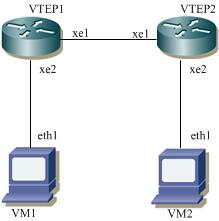
VxLAN unicast
VTEP1
#configure terminal | Enter the configure mode |
(config)#interface xe2 | Enter interface mode |
(config-if)#switchport | Configure the interface as switchport |
(config-if)#no shutdown | Bring the interface into operation with the no shutdown |
(config-if)#exit | Exit interface mode |
(config)#interface lo | Enter the configure mode |
(config-if)#ip address 1.1.1.1/32 secondary | Configure IP address on the interface xe1 |
(config-if)#no shutdown | Bring the interface into operation with the no shutdown |
(config-if)#exit | Exit interface mode |
(config)#interface xe1 | Enter the configure mode |
(config-if)#ip address 5.5.5.2/24 | Configure IP address on the interface xe1 |
(config-if)#no shutdown | Bring the interface into operation with the no shutdown |
(config-if)#exit | Exit interface mode |
(config)#ip route 2.2.2.2/32 5.5.5.4 | Configure static route |
(config)#hardware-profile filter vxlan enable | Enable hardware-profile filter for VxLAN |
(config)#nvo vxlan enable | Enable VxLAN globally on this vtep |
(config)#interface Tunnel 2 | Specify the interface (Tunnel2)to be configured and Enter interface mode |
(config-if)#tunnel mode vxlan | Assign this tunnel mode as VxLAN |
(config-if)#tunnel source 1.1.1.1 | Configure the source IP of this tunnel as an IP address which is configured on the interface xe1 of VTEP1 |
(config-if)#tunnel destination 2.2.2.2 | Configure the destination IP of this tunnel as an IP address which is configured on the interface xe1 of VTEP2. |
(config-if)#exit | Exit interface mode |
(config-if)#nvo vxlan vtep-ip-global 1.1.1.1 | Configure Source vtep-ip-global configuration - Use loopback ip address |
(config)#nvo vxlan id 100 ingress-replication inner-vid-disabled | Configure a VNID on this VTEP and enter the nvo mode. |
(config-nvo)#vxlan map-network tunnel Tunnel2 | Map the tunnel 2 with VNID 2 |
(config-nvo)#exit | Exit the nvo mode |
(config)# interface xe2.10 switchport | Enters sub-interface configuration mode for interface xe2, VLAN 10. |
(config-if)# encapsulation dot1q 10 | Configure encapsulation dot1q with vlan-id 10 |
(config-if)# access-if-evpn | Enter access-if-evpn mode |
(config-access-if)# map vpn-id 100 | Map vnid 100 to access interface xe2.1 |
(config-access-if)# exit | Exit access-if mode |
(config)#commit | Perform commit operation for the changes to take effect. |
VTEP2
#configure terminal | Enter the configure mode |
(config)#interface xe2 | Enter interface mode |
(config-if)#switchport | Configure the interface as switchport |
(config-if)#no shutdown | Bring the interface into operation with the no shutdown |
(config-if)#exit | Exit interface mode |
(config)#interface lo | Enter the configure mode |
(config-if)#ip address 2.2.2.2/32 secondary | Configure IP address on the interface xe1 |
(config-if)#no shutdown | Bring the interface into operation with the no shutdown |
(config-if)#exit | Exit interface mode |
(config)#interface xe1 | Enter the configure mode |
(config-if)#ip address 5.5.5.4/24 | Configure IP address on the interface xe1 |
(config-if)#no shutdown | Bring the interface into operation with the no shutdown |
(config-if)#exit | Exit interface mode |
(config)#ip route 1.1.1.1/32 5.5.5.2 | Configure static route |
(config)#hardware-profile filter vxlan enable | Enable hardware-profile filter for VxLAN |
(config)#nvo vxlan enable | Enable VxLAN globally on this vtep |
(config)#interface tunnel 2 | Specify the interface (Tunnel2)to be configured and Enter interface mode. |
(config-if)#tunnel mode vxlan | Assign this tunnel mode as VxLAN |
(config-if)#tunnel source 2.2.2.2 | Configure the source IP of this tunnel as an IP address which is configured on the interface xe1 of VTEP1. |
(config-if)#tunnel destination 1.1.1.1 | Configure the destination IP of this tunnel as an IP address which is configured on the interface xe1 of VTEP2. |
(config-if)#exit | Exit interface mode. |
(config-if)#nvo vxlan vtep-ip-global 2.2.2.2 | Configure Source vtep-ip-global configuration - Use loopback ip address |
(config)#nvo vxlan id 100 ingress-replication inner-vid-disabled | Configure a VNID on this VTEP and enter the nvo mode. |
(config-nvo)#vxlan map-network tunnel Tunnel2 | Map the tunnel 4 with VNID 2 |
(config-nvo)#exit | Exit the nvo mode. |
(config)# interface xe2.10 switchport | Enters sub-interface configuration mode for interface xe2, VLAN 10. |
(config-if)# encapsulation dot1q 10 | Configure encapsulation dot1q with vlan-id 10 |
(config-if)# access-if-evpn | Enter access-if-evpn mode |
(config-access-if)# map vpn-id 100 | Map vnid 100 to access interface xe2.10 |
(config-access-if)# exit | Exit access-if mode |
(config)#commit | Perform commit operation for the changes to take effect. |
Validation
VTEP1
VTEP1#sh nvo vxlan tunnel
VxLAN Network tunnel Entries
Source Destination Status Up/Down Update
============================================================================
1.1.1.1 2.2.2.2 Installed 00:04:59 00:04:59
Total number of entries are 1
VTEP1#sh nvo vxlan mac-table
================================================================================
=========================================================
VxLAN MAC Entries
================================================================================
=========================================================
VNID Interface VlanId In-VlanId Mac-Addr VTEP-Ip/ESI
Type Status MAC move AccessPortDesc
________________________________________________________________________________
_________________________________________________________
100 xe2 10 ---- 903c.b393.e001 1.1.1.1
Dynamic Local ------- 0 -------
Total number of entries are : 1
VTEP1#sh nvo vxlan arp-cache
VxLAN ARP-CACHE Information
===========================
VNID Ip-Addr Mac-Addr Type Age-Out Retries-Left
____________________________________________________________________________
Total number of entries are 0
VTEP1#sh nvo vxlan
VxLAN Information
=================
Codes: NW - Network Port
AC - Access Port
(u) - Untagged
VNID VNI-Name VNI-Type Type Interface ESI VLAN Vlan
-Range DF-Status Src-Addr Dst-Addr
________________________________________________________________________________
_______________________________________________
100 ---- L2 NW ---- ---- ----
---- 1.1.1.1 2.2.2.2
100 ---- -- AC xe2 --- Single Homed Port --- 10
---- ---- ---- ----
Total number of entries are 2
VTEP1#
VTEP1#sh nvo vxlan access-if brief
Inner Vlan Admin Link
Interface Vlan vlan Range Ifindex Vnid status status
-----------------------------------------------------------
xe2 10 --- --- 500000 100 up up
Total number of entries are 1
VTEP1#
VTEP1#
==============================================================================================
VTEP2#
VTEP2#sh nvo vxlan tunnel
VxLAN Network tunnel Entries
Source Destination Status Up/Down Update
============================================================================
2.2.2.2 1.1.1.1 Installed 00:05:30 00:05:30
Total number of entries are 1
VTEP2#sh nvo vxlan mac-table
================================================================================
=========================================================
VxLAN MAC Entries
================================================================================
=========================================================
VNID Interface VlanId In-VlanId Mac-Addr VTEP-Ip/ESI
Type Status MAC move AccessPortDesc
________________________________________________________________________________
_________________________________________________________
100 xe2 10 ---- 0018.2359.69b7 2.2.2.2
Dynamic Local ------- 0 -------
Total number of entries are : 1
VTEP2#sh nvo vxlan
VxLAN Information
=================
Codes: NW - Network Port
AC - Access Port
(u) - Untagged
VNID VNI-Name VNI-Type Type Interface ESI VLAN Vlan
-Range DF-Status Src-Addr Dst-Addr
________________________________________________________________________________
_______________________________________________
100 ---- L2 NW ---- ---- ----
---- 2.2.2.2 1.1.1.1
100 ---- -- AC xe2 --- Single Homed Port --- 10
---- ---- ---- ----
Total number of entries are 2
VTEP2#sh nvo vxlan access-if brief
Inner Vlan Admin Link
Interface Vlan vlan Range Ifindex Vnid status status
-----------------------------------------------------------
xe2 10 --- --- 500000 100 up up
Total number of entries are 1
VTEP2#
============================================================================================
host-1#ping 10.10.10.2
Press CTRL+C to exit
PING 10.10.10.2 (10.10.10.2) 56(84) bytes of data.
64 bytes from 10.10.10.2: icmp_seq=1 ttl=64 time=0.392 ms
--- 10.10.10.2 ping statistics ---
1 packets transmitted, 1 received, 0% packet loss, time 0ms
rtt min/avg/max/mdev = 0.392/0.392/0.392/0.000 ms
7015-Host#ping 10.10.10.1
Press CTRL+C to exit
PING 10.10.10.1 (10.10.10.1) 56(84) bytes of data.
64 bytes from 10.10.10.1: icmp_seq=1 ttl=64 time=0.704 ms
64 bytes from 10.10.10.1: icmp_seq=2 ttl=64 time=0.259 ms
Intermediate Non-VxLAN Router
This example is same as port mapping but with an intermediate non VxLAN router. It does forwarding based on IP header.
Topology
The procedures in this section use the following topology:
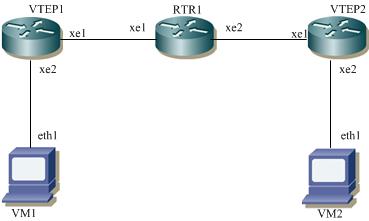
VxLAN unicast
VTEP1
#configure terminal | Enter the configure mode. |
(config)#interface xe2 | Enter interface mode. |
(config-if)#switchport | Configure the interface as switchport. |
(config-if)#no shutdown | Bring the interface into operation with the no shutdown |
(config-if)#exit | Exit interface mode. |
(config)#interface xe1 | Enter the configure mode. |
(config-if)#ip address 2.2.2.4/24 | Configure IP address on the interface xe1. |
(config-if)#no shutdown | Bring the interface into operation with the no shutdown |
(config-if)#exit | Exit interface mode. |
(config)#ip route 3.3.3.0/24 2.2.2.1 | Configuring static route |
(config)#hardware-profile filter vxlan enable | Enable hardware-profile filter for VxLAN |
(config)#nvo vxlan enable | Enable VxLAN globally on this vtep. |
(config)#interface tunnel 4 | Specify the interface (Tunnel4)to be configured and Enter interface mode. |
(config-if)#tunnel mode vxlan | Assign this tunnel mode as VxLAN. |
(config-if)#tunnel source 2.2.2.4 | Configure the source IP of this tunnel as an IP address which is configured on the interface xe1 of VTEP1. |
(config-if)#tunnel destination 3.3.3.4 | Configure the destination IP of this tunnel as an IP address which is configured on the interface xe1 of VTEP2. |
(config-if)#exit | Exit interface mode. |
(config)#nvo vxlan id 3 | Configure a VNID on this VTEP and enter the nvo mode. |
(config-nvo)#vxlan map-network tunnel Tunnel4 | Map the tunnel 4 with this VNID |
(config-nvo)#vxlan static-entry host-mac 0000.0000.aaaa remote-vtep-ip 3.3.3.4 | Configure a static entry for remote VM with MAC address and IP address. |
(config)# interface xe2 switchport | Enters sub-interface configuration mode for interface xe2 |
(config-if)# encapsulation dot1q | Configure encapsulation dot1q with vlan-id 3 |
(config-if)# access-if-evpn | Enter access-if-evpn mode |
(config-access-if)# map vpn-id 3 | Map vnid 3 to access interface xe2 |
(config-access-if)# exit | Exit access-if mode |
(config)#commit | Perform commit operation for the changes to take effect. |
RTR1
(config)#interface xe1 | Enter the configure mode. |
(config-if)#ip address 2.2.2.1/24 | Configure IP address on the interface xe1. |
(config-if)#no shutdown | Bring the interface into operation with the no shutdown |
(config-if)#exit | Exit interface mode. |
(config)#interface xe2 | Enter the configure mode. |
(config-if)#ip address 3.3.3.1/24 | Configure IP address on the interface xe2. |
(config-if)#no shutdown | Bring the interface into operation with the no shutdown |
(config-if)#exit | Exit interface mode. |
(config)#commit | Perform commit operation for the changes to take effect. |
VTEP2
#configure terminal | Enter the configure mode. |
(config)#interface xe2 | Enter interface mode. |
(config-if)#switchport | Configure the interface as switchport. |
(config-if)#no shutdown | Bring the interface into operation with the no shutdown |
(config-if)#exit | Exit interface mode. |
(config)#interface xe1 | Enter the configure mode. |
(config-if)#ip address 3.3.3.4/24 | Configure IP address on the interface xe1. |
(config-if)#no shutdown | Bring the interface into operation with the no shutdown |
(config-if)#exit | Exit interface mode. |
(config)#ip route 2.2.2.0/24 3.3.3.1 | Configuring static route |
(config)#hardware-profile filter vxlan enable | Enable hardware-profile filter for VxLAN |
(config)#nvo vxlan enable | Enable VxLAN globally on this vtep. |
(config)#interface tunnel 4 | Specify the interface (Tunnel4)to be configured and Enter interface mode. |
(config-if)#tunnel mode vxlan | Assign this tunnel mode as VxLAN. |
(config-if)#tunnel source 3.3.3.4 | Configure the source IP of this tunnel as an IP address which is configured on the interface xe1 of VTEP1. |
(config-if)#tunnel destination 2.2.2.4 | Configure the destination IP of this tunnel as an IP address which is configured on the interface xe1 of VTEP2. |
(config-if)#exit | Exit interface mode. |
(config)#nvo vxlan id 3 | Configure a VNID on this VTEP and enter the nvo mode. |
(config-nvo)#vxlan map-network tunnel Tunnel4 | Map the tunnel 4 with this VNID |
(config-nvo)#vxlan static-entry host-mac 0000.0000.bbbb remote-vtep-ip 2.2.2.4 | Configure a static entry for remote VM with MAC address and IP address. |
(config)# interface xe2 switchport | Enters sub-interface configuration mode for interface xe2 |
(config-if)# encapsulation dot1q | Configure encapsulation dot1q with vlan-id 3 |
(config-if)# access-if-evpn | Enter access-if-evpn mode |
(config-access-if)# map vpn-id 3 | Map vnid 3 to access interface xe2 |
(config-nvo-acc-if)#exit | Exit the NVO access interface mode |
(config)#commit | Perform commit operation for the changes to take effect. |
Validation
VTEP1
VTEP1#show nvo vxlan tunnel
VxLAN Network tunnel Entries
Source Destination Status Up/Down Update
====================================================================================
2.2.2.4 3.3.3.4 Installed 00:37:56 00:37:56
Total number of entries are 1
VTEP1#show nvo vxlan
VxLAN Information
=================
Codes: NW - Network Port
AC - Access Port
(u) - Untagged
VNID VNI-Name VNI-Type Type Interface ESI VLAN DF-Status Src-Addr Dst-Addr
_______________________________________________________________________________________________________________________________
3 ---- L2 NW ---- ------ ---- ---- 2.2.2.4 3.3.3.4
3 ---- -- AC xe2 --- Single Homed Port --- ---- ---- ---- ----
Total number of entries are 2
VTEP1#
VTEP1#show nvo vxlan mac-table
===============================================================================================================================================
======
VxLAN MAC Entries
===============================================================================================================================================
======
VNID Interface VlanId Inner-VlanId Mac-Addr VTEP-Ip/ESI Type Status AccessPortDesc
_______________________________________________________________________________________________________________________________________________
______
3 ---- ---- ---- 0000.0000.aaaa 3.3.3.4 Static Remote ------- -------
3 xe2 ---- ---- 0000.0000.bbbb Dynamic Local ------- -------
Total number of entries are : 2
VTEP1#sh nvo vxlan mac-table vnid 3
===============================================================================================================================================
======
VxLAN MAC Entries
===============================================================================================================================================
======
VNID Interface VlanId Inner-VlanId Mac-Addr VTEP-Ip/ESI Type Status AccessPortDesc
_______________________________________________________________________________________________________________________________________________
______
3 ---- ---- ---- 0000.0000.aaaa 3.3.3.4 Static Remote ------- -------
3 xe2 ---- ---- 0000.0000.bbbb Dynamic Local ------- -------
Total number of entries are : 2
VTEP2
VTEP2#show nvo vxlan tunnel
VxLAN Network tunnel Entries
Source Destination Status Up/Down Update
====================================================================================
3.3.3.4 2.2.2.4 Installed 00:34:02 00:34:02
Total number of entries are 1
VTEP2#show nvo vxlan
VxLAN Information
=================
Codes: NW - Network Port
AC - Access Port
(u) - Untagged
VNID VNI-Name VNI-Type Type Interface ESI VLAN DF-Status Src-Addr Dst-Addr
_______________________________________________________________________________________________________________________________
3 ---- L2 NW ---- ------ ---- ---- 3.3.3.4 2.2.2.4
3 ---- -- AC xe1 --- Single Homed Port --- ---- ---- ---- ----
Total number of entries are 2
VTEP2#sh nvo vxlan mac-table
===============================================================================================================================================
======
VxLAN MAC Entries
===============================================================================================================================================
======
VNID Interface VlanId Inner-VlanId Mac-Addr VTEP-Ip/ESI Type Status AccessPortDesc
_______________________________________________________________________________________________________________________________________________
______
3 xe1 ---- ---- 0000.0000.aaaa Dynamic Local ------- -------
3 ---- ---- ---- 0000.0000.bbbb 2.2.2.4 Static Remote ------- -------
Total number of entries are : 2
VTEP2#sh nvo vxlan mac-table vnid 3
===============================================================================================================================================
======
VxLAN MAC Entries
===============================================================================================================================================
======
VNID Interface VlanId Inner-VlanId Mac-Addr VTEP-Ip/ESI Type Status AccessPortDesc
_______________________________________________________________________________________________________________________________________________
______
3 xe1 ---- ---- 0000.0000.aaaa Dynamic Local ------- -------
3 ---- ---- ---- 0000.0000.bbbb 2.2.2.4 Static Remote ------- -------
Total number of entries are : 2