Multiple IPv6 Addressing on VxLAN Anycast IPv6 IRB Interfaces
Overview
This section describes the feature and its functional behavior within the network.
OcNOS will support configuring multiple IPv6 addresses within the same subnet on an IRB interface participating in a VXLAN-IRB Gateway deployment. This additionally configured IPv6 address with a same subnet extends reachability for IGP peering, ICMPv6 connectivity, and Neighbor Discovery.
Feature Characteristics
The following characteristics define the behavior and capabilities of this feature:
• Supports multiple IPv6 addresses within the same subnet.
• Establishes IPv6 BGP, OSPFv3, and BFD sessions using any configured IPv6 address. To establish iBGP sessions with a host, the IPv6 address must be unique across Multi-Homing (MH) nodes.
• Resolves IPv6 ND requests using any configured gateway address within the subnet.
• Allows optional Anycast configuration on IPv6 addresses for EVPN Multi-Homing (MH) deployments.
• Rejects the configuration of identical IPv6 address and prefix combinations on more than one interface within the same VRF.
• Reject configuration of the same IPv6 address and prefix on more than one interface within a VRF.
• Advertises EVPN Route Type 2 (MAC/IP) routes carrying each configured IPv6 address along with its associated Router MAC or Anycast MAC to remote VTEP peers.
Prerequisites
Before configuring this feature, ensure the following prerequisites are met:
• Configure the IRB interface and bind it to the target VRF.
• Enable VXLAN Anycast Gateway forwarding and the anycast gateway MAC on the IRB interface.
• Establish the EVPN-VXLAN underlay IGP between the anycast gateway pair, the route reflectors, and the remote leaf.
• Configure the BGP EVPN address family and activate neighbors before applying IRB addressing.
• Confirm the port-channel used for Ethernet Segment multihoming between the access switch and the anycast gateway pair is operational.
Refer to the Topology section for alignment with the deployment.
Limitation
For IRB interfaces configured with an anycast MAC, IPv6 link-local addresses use the system router MAC rather than the anycast MAC.
Configuration
This section configures the multiple IPv6 addressing on a VXLAN Anycast Gateway IRB interface. VTEP1 and VTEP2 already share a single IPv6 address on IRB interface irb1601; this configuration adds an additional IPv6 addresses in the same subnet so IGP peering, ICMPv6 connectivity, and IPv6 Neighbor Discovery continue to operate through this address.
Topology
This topology illustrates an EVPN-VXLAN fabric architecture utilizing anycast gateway redundancy, multihomed access, and multi-tier IPv6 addressing across tenant VRF L3_VRF1.
Underlay Fabric and Overlay Control Plane
• Underlay Transport: SPINE1 and SPINE2 establish an OSPF underlay to provide reachability for all VTEP loopbacks.
• Control Plane Peering: VTEP1 (Loopback 1.1.1.1), VTEP2 (Loopback 2.2.2.2), VTEP3, and VTEP4 maintain a full-mesh iBGP session (AS 100) to exchange EVPN Type-2 (MAC/IP) and Type-5 (IP Prefix) routes.
Anycast Gateway & Multihomed Access
• Gateway Redundancy: VTEP1 and VTEP2 function as an active-active Anycast Gateway pair for tenant VRF L3_VRF1.
• IRB & VNI Binding: Interface irb1601 binds to VNI 1601 on both nodes.
• Shared Identity: Both VTEPs share Anycast MAC 0000.0000.1111.
• Access Attachment: SWITCH1 dual-homes to VTEP1 and VTEP2 via an EVPN multihomed port-channel.
IPv6 Addressing & Gateway Redundancy
SWITCH1 assigns address 1100::2/48 to peer into VRF L3_VRF1 over gateway subnet 1100::/48 on irb1601. Interface irb1601 on VTEP1 and VTEP2 carries the following addressing model:
• First Address: 1100::1/48
• Additional Addresses (Added): 1100::3/48 and 1100::13/48
• Design Purpose: Guarantees that SWITCH1, downstream hosts, and Neighbor Discovery (ND) processes retain gateway reachability through alternate IP addresses if 1100::1/48 is withdrawn.
• Independent Fabric Address: 1600::1/64 (Anycast) resides on irb1601 for a separate, fabric-wide subnet and operates independently of the 1100::/48 configuration.
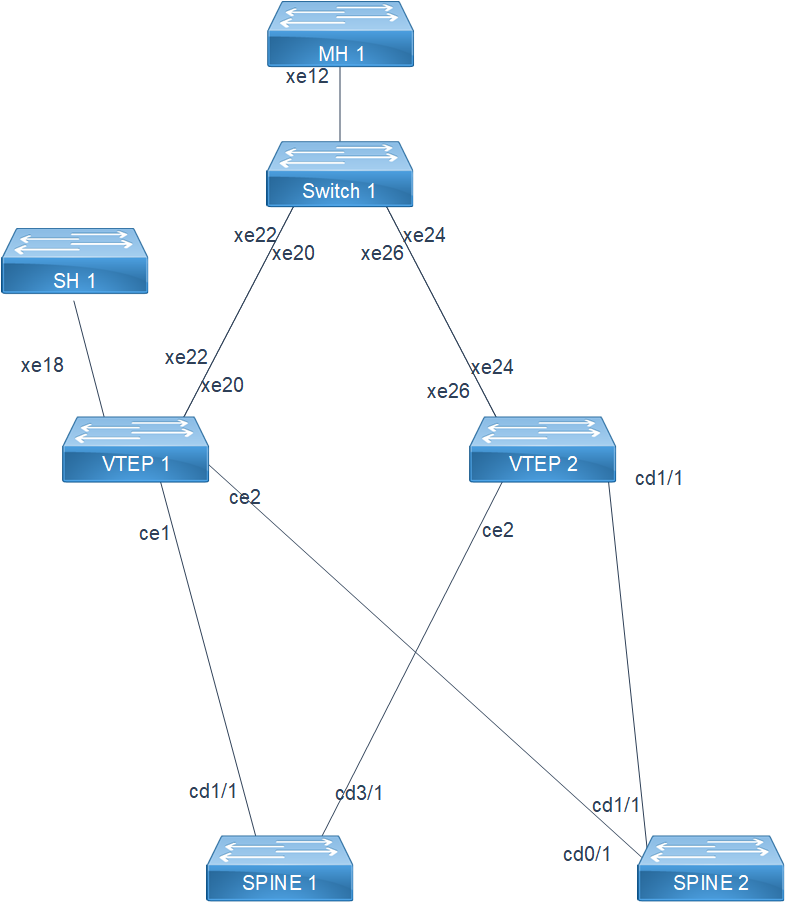
Multiple IPv6 Addressing on VxLAN Anycast IPv6 IRB Interfaces Topology
Before configuring, meet all Prerequisites for the following nodes:
• Spine: SPINE1, SPINE2
• VTEP / anycast gateway pair: VTEP1, VTEP2
• Access switch: SWITCH1
Configure VRF and Bind the IRB Interface to VNI
The following configuration on VTEP1 establishes the tenant VRF and binds IRB interface irb1601 to VNI 1601 so the anycast gateway pair has a Layer 3 context to host the multiple IPv6 addresses. Apply the identical configuration on VTEP2.
1. Define the Layer 3 VRF (L3_VRF1) with route distinguisher (1.1.1.1:10), route-target (10:10), and Layer 3 VNI (1000) to isolate the tenant routing table, and define the MAC VRF (L2_VRF1) with route distinguisher (1.1.1.1:100) and route-target (100:100) to scope Layer 2 EVPN reachability for the bridge domain.
VTEP1(config)# ip vrf L3_VRF1
VTEP1(config-vrf)# rd 1.1.1.1:10
VTEP1(config-vrf)# route-target both 10:10
VTEP1(config-vrf)# l3vni 1000
VTEP1(config-vrf)# exit
VTEP1(config)# mac vrf L2_VRF1
VTEP1(config-mac-vrf)# rd 1.1.1.1:100
VTEP1(config-mac-vrf)# route-target both 100:100
VTEP1(config-mac-vrf)# exit
2. Map VNI (1601) to ingress replication, bind it to the MAC VRF (L2_VRF1) using the evpn-bgp host-reachability protocol, and associate it with IRB interface (irb1601) so the anycast gateway addresses are reachable across the VXLAN fabric.
VTEP1(config)#nvo vxlan id 1601 ingress-replication inner-vid-disabled
VTEP1(config-nvo)# vxlan host-reachability-protocol evpn-bgp L2_VRF1
VTEP1(config-nvo)# evpn irb1601
VTEP1(config-nvo)# exit
3. Configure the IRB interface (irb1601), bind it to VRF (L3_VRF1), and enable EVPN IRB forwarding with the anycast gateway MAC (0000.0000.1111) so VTEP1 and VTEP2 forward tenant traffic using the same gateway MAC.
VTEP1(config)# interface irb1601
VTEP1(config-if)# ip vrf forwarding L3_VRF1
VTEP1(config-if)# evpn irb-if-forwarding anycast-gateway-mac
Configure Multiple IPv6 Addresses within the Same Subnet
The following configuration assigns multiple IPv6 addresses within the same subnet on the IRB interface to extend reachability for BGP peering, ICMPv6, and IPv6 Neighbor Discovery.
1. Configure the first IPv6 gateway address (1100::1/48) on irb1601 to provide the tenant subnet gateway shared by VTEP1 and VTEP2. The first IPv6 address does not use the anycast keyword, and OcNOS still treats it as first because it is the first IPv6 address configured on the interface, independent of the anycast keyword.
VTEP1(config-if)# ipv6 address 1100::1/48
2. Configure additional IPv6 addresses (1100::3/48 and 1100::13/48) in the same subnet to provide SWITCH1, downstream hosts, and IPv6 Neighbor Discovery multiple active addresses to reach the gateway.
VTEP1(config-if)# ipv6 address 1100::3/48
VTEP1(config-if)# ipv6 address 1100::13/48
3. Enable IPv6 OSPF on irb1601 (area 0.0.0.0, tag L3_VRF1, instance-id 1) to advertise the gateway subnet into the VRF underlay.
VTEP1(config-if)# ipv6 router ospf area 0.0.0.0 tag L3_VRF1 instance-id 1
VTEP1(config-if)# exit
Configure BGP Peering to Validate IPv6 Address Reachability
The following configuration establishes the overlay iBGP full mesh and the IPv6 peering into VRF L3_VRF1.
1. Enable router BGP (AS 100), set the router ID (1.1.1.1), and disable inbound route filtering so overlay and VRF routes are accepted from the mesh.
VTEP1(config)# router bgp 100
VTEP1(config-router)# bgp router-id 1.1.1.1
VTEP1(config-router)# no bgp inbound-route-filter
2. Establish iBGP sessions to VTEP2 (2.2.2.2) sourcing each session from the loopback interface with an advertisement interval (0) for fast overlay convergence.
VTEP1(config-router)# neighbor 2.2.2.2 remote-as 100
VTEP1(config-router)# neighbor 2.2.2.2 update-source lo
VTEP1(config-router)# neighbor 2.2.2.2 advertisement-interval 0
VTEP1(config-router)# neighbor 3.3.3.3 remote-as 100
VTEP1(config-router)# neighbor 3.3.3.3 update-source lo
VTEP1(config-router)# neighbor 3.3.3.3 advertisement-interval 0
VTEP1(config-router)# neighbor 4.4.4.4 remote-as 100
VTEP1(config-router)# neighbor 4.4.4.4 update-source lo
VTEP1(config-router)# neighbor 4.4.4.4 advertisement-interval 0
3. Activate the l2vpn evpn address family for VTEP2 to exchange EVPN Type-2 and Type-5 routes across the full mesh.
VTEP1(config-router)# address-family l2vpn evpn
VTEP1(config-router-af)# neighbor 2.2.2.2 activate
VTEP1(config-router-af)# neighbor 3.3.3.3 activate
VTEP1(config-router-af)# neighbor 4.4.4.4 activate
VTEP1(config-router-af)# exit-address-family
4. Configure the ipv6 vrf L3_VRF1 address family, advertise the gateway prefix (1100::/48), redistribute connected and OSPF routes, and activate the remote neighbor (1100::2, AS 100 on SWITCH1).
VTEP1(config-router)# address-family ipv6 vrf L3_VRF1
VTEP1(config-router-af)# network 1100::/48
VTEP1(config-router-af)# redistribute connected
VTEP1(config-router-af)# redistribute ospf
VTEP1(config-router-af)# neighbor 1100::2 remote-as 100
VTEP1(config-router-af)# neighbor 1100::2 activate
VTEP1(config-router-af)# exit-address-family
VTEP1(config-router)# exit
Note: Configuration shown for LEAF1. Apply similar configuration on LEAF2 as required based on the topology and its role in the anycast gateway pair.
Running Configuration
!
evpn irb-forwarding anycast-gateway-mac 0000.0000.1111
!
ip vrf L3_VRF1
rd 1.1.1.1:10
route-target both 10:10
l3vni 1000
!
mac vrf L2_VRF1
rd 1.1.1.1:100
route-target both 100:100
!
nvo vxlan vtep-ip-global 1.1.1.1
!
nvo vxlan id 1601 ingress-replication inner-vid-disabled
vxlan host-reachability-protocol evpn-bgp L2_VRF1
evpn irb1601
!
interface irb1601
ip vrf forwarding L3_VRF1
evpn irb-if-forwarding anycast-gateway-mac
ip address 12.0.0.12/24 anycast
ip address 71.10.0.2/24 secondary
ipv6 address 1100::1/48
ipv6 address 1100::3/48
ipv6 address 1100::13/48
ipv6 address 1600::1/64 anycast
ipv6 router ospf area 0.0.0.0 tag L3_VRF1 instance-id 1
!
router bgp 100
bgp router-id 1.1.1.1
no bgp inbound-route-filter
neighbor 2.2.2.2 remote-as 100
neighbor 2.2.2.2 update-source lo
neighbor 2.2.2.2 advertisement-interval 0
neighbor 3.3.3.3 remote-as 100
neighbor 3.3.3.3 update-source lo
neighbor 3.3.3.3 advertisement-interval 0
neighbor 4.4.4.4 remote-as 100
neighbor 4.4.4.4 update-source lo
neighbor 4.4.4.4 advertisement-interval 0
!
address-family l2vpn evpn
neighbor 2.2.2.2 activate
neighbor 3.3.3.3 activate
neighbor 4.4.4.4 activate
exit-address-family
!
address-family ipv4 vrf L3_VRF1
network 71.10.0.0/24
redistribute connected
redistribute ospf
exit-address-family
!
address-family ipv6 vrf L3_VRF1
network 1100::/48
redistribute connected
redistribute ospf
neighbor 1100::2 remote-as 100
neighbor 1100::2 activate
exit-address-family
exit
!
end
Note: Configuration shown for one node. Apply similar configuration on other nodes as required
Validation
This section describes how to verify that the feature is configured and operating correctly.
Verify that all configured IPv6 addresses are active on the IRB interface.
VTEP1# show interface irb1601
inet 12.0.0.12/24 anycast
inet 71.10.0.2/24 secondary
inet6 1100::1/48
inet6 1100::3/48
inet6 1100::13/48
inet6 1600::1/64 anycast
inet6 fe80::200:11ff:fe11:1111/64
Verify that the IPv6 BGP session with SWITCH1 remains established over the L3_VRF1 address family regardless of which address in the subnet is reachable:
VTEP1# show ipv6 bgp summary
BGP router identifier 71.10.0.2, local AS number 100
BGP VRF L3_VRF1 Route Distinguisher: 1.1.1.1:10
Neighbor V AS MsgRcv MsgSen TblVer InQ OutQ Up/Down State/PfxRcd
1100::2 4 100 22 24 1 0 0 00:18:07 3
Total number of neighbors 1
Total number of Established sessions 1
Verify that all configured IPv6 addresses are advertised as EVPN Route Type-2 with the shared anycast gateway MAC.
VTEP1# show bgp l2vpn evpn mac-ip
RD[1.1.1.1:100] VRF[L2_VRF1]:
ESI Eth-Tag Mac-Address IP-Address VNID/LABEL L3VNID Nexthop Encap
*> 0 1601 0000.0000.1111 1100::1 1601 1000 1.1.1.1 VXLAN
*> 0 1601 0000.0000.1111 1100::3 1601 1000 1.1.1.1 VXLAN
*> 0 1601 0000.0000.1111 1100::13 1601 1000 1.1.1.1 VXLAN
Verify that IPv6 Neighbor Discovery resolves all configured addresses in the VXLAN ND cache.
VTEP1# show nvo vxlan nd-cache
VNID Ip-Addr Mac-Addr Type Age-Out Retries-Left
1601 1100::1 0000.0000.1111 Static Local ----
1601 1100::3 0000.0000.1111 Static Local ----
1601 1100::13 0000.0000.1111 Static Local ----
Total number of entries are 3
Verify ICMPv6 reachability to the additional addresses from SWITCH1 to confirm connectivity is retained if the first IPv6 address is withdrawn.
SWITCH1# ping ipv6 1100::3
!!!!!
Success rate is 100 percent (5/5)
SWITCH1# ping ipv6 1100::13
!!!!!
Success rate is 100 percent (5/5)
Implementation Examples
Scenario 1: Redundancy and Gateway Reachability
Scenario: An anycast IPv6 gateway address on LEAF1 becomes unreachable or is withdrawn during a maintenance window.
Solution: Hosts and BGP peers continue to reach the subnet through other IPv6 addresses configured on the same IRB interface, since Neighbor Discovery and BGP peering are not tied to a single address on the interface.
Scenario 2: Seamless Address Addition / Migration
Scenario: An operator adds an additional IPv6 address to an IRB interface that already carries an active anycast gateway address, without disrupting existing sessions.
Action: The additional address within the same subnet is accepted without requiring removal or reconfiguration of existing addresses, leaving active BGP and ND states unaffected.
Scenario 3: Address-Specific Binding
Scenario: An operator attempts to source traffic from an IPv6 address that was never configured on the IRB interface.
Action: The system rejects the socket bind for the unconfigured address, confirming that only addresses explicitly applied to the interface are usable as a source or gateway address.
Troubleshooting
Issue 1: Multiple IPv6 Address Commit Fails
Issue: Configuring a multiple IPv6 address in the same subnet as the first anycast address is rejected during commit.
Cause: The addressing validation logic treats additional IPv6 addresses in the same prefix as an address overlap.
Resolution: Apply the release that includes multiple IPv6 addressing support, then reconfigure the address using the standard ipv6 address command.
Issue 2: Ping Fails Using an Unconfigured Source Address
Issue: A ping sourced from an IPv6 address in the subnet fails with a socket bind error.
Cause: The source address used for the ping was never configured on the IRB interface.
Resolution: Configure the address on the IRB interface using the ipv6 address command before using it as a ping source.
Glossary
This section defines the key terms and acronyms used within the context of this feature:
Key Terms/Acronym | Description |
|---|---|
IRB | Integrated Routing and Bridging interface that provides Layer 3 gateway functionality for a bridged VNI. |
Anycast Gateway | A shared IP and MAC address configured on multiple leaf nodes so that any node can act as the default gateway for a subnet. |
VNI - VXLAN | Network Identifier that uniquely identifies a Layer 2 or Layer 3 segment carried over the VXLAN overlay. |
EVPN | Ethernet VPN, a BGP-based control plane used to distribute MAC and IP reachability information for VXLAN overlays. |
Route Type 2 (RT2) | EVPN MAC/IP Advertisement route type used to advertise host MAC and IP bindings, including anycast gateway addresses. |
Route Type 5 (RT5) | EVPN IP Prefix Advertisement route type used to advertise IP subnet reachability across VTEPs. |
ND | IPv6 Neighbor Discovery, the protocol used to resolve link-layer addresses and discover gateways on an IPv6 subnet. |
VRF | Virtual Routing and Forwarding instance that isolates a tenant's routing table from other tenants. |
VTEP | VXLAN Tunnel Endpoint that originates and terminates VXLAN encapsulated traffic. |