Topology
.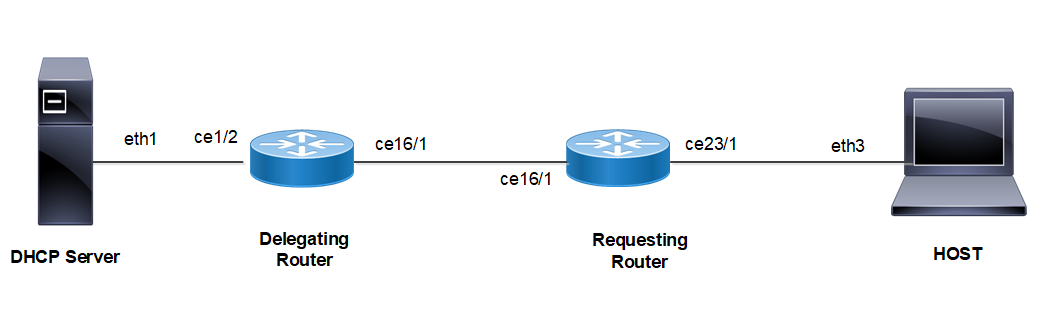
Figure 8-15: DHCPv6 Prefix Delegation Configuration
DHCP Relay - Delegating Router (DR)
#configure terminal | Enter configure mode. |
(config)#feature dhcp | Enable the feature DHCP. This is enabled by default. |
(config)#ipv6 dhcp relay | By default, this will be enabled. It starts the IPv6 DHCP relay service. |
(config)#ipv6 dhcp relay address 2001:101:0:1::131 | The relay address configured should be server interface address connected to Delegating Router. |
(config)#interface ce1/2 | Enter interface mode. |
(config-if)#ipv6 address 2001:101:0:1::130/64 | Configure IPv6 address on the interface ce1/2 |
(config-if)#ipv6 dhcp relay uplink | Configure relay uplink on the device connecting the server. |
(config-if)#exit | Exit interface mode. |
(config)#commit | Commit the candidate configuration to the running configuration |
(config)#interface ce16/1 | Enter interface mode. |
(config-if)#ipv6 address 3001:101:0:1::135/64 | Configure IPv6 address on the interface ce16/1 |
(config-if)#ipv6 dhcp relay | Relay should be configured on the interface connecting to the client. |
(config-if)#exit | Exit interface mode. |
(config)#commit | Commit the candidate configuration to the running configuration |
(config)#ipv6 route 1212:501:102:1::/64 3001:101:0:1::254 | Configure static route towards Host |
Requesting Router (RR)
#configure terminal | Enter configure mode. |
(config)#interface ce16/1 | Enter interface mode. |
(config-if)#ipv6 dhcp address-prefix-len 64 | Addition of address prefix length option |
(config-if)#ipv6 address dhcp | Configure IPv6 address DHCP. |
(config-if)#ipv6 dhcp prefix-delegation PREFIX_FROM_SERVER | Configure IPv6 DHCP prefix-delegation |
(config-if)#exit | Exit interface mode. |
(config)#commit | Commit the candidate configuration to the running configuration |
(config)#interface ce23/1 | Enter interface mode. |
(config-if)#ipv6 address PREFIX_FROM_SERVER ::1:0:0:0:1/64 | Configure IPv6 address from the prefix learnt |
(config-if)#exit | Exit interface mode. |
(config)#commit | Commit the candidate configuration to the running configuration |
(config)#ipv6 route 2001:101:0:1::/64 3001:101:0:1::135 | Configure static route towards server |
HOST
#configure terminal | Enter configure mode. |
(config)#interface ce23/1 | Enter interface mode. |
(config-if)#ipv6 address autoconfig | Configure IPv6 autoconfig |
(config if)#exit | Exit interface mode. |
(config)#commit | Commit the candidate configuration to the running configuration |
(config)#ipv6 route 2001:101:0:1::/64 fe80::ce37:abff:fec9:7426 ce23/1 | Configure static route towards server |
Linux Host
IPV6_AUTOCONF=yes | IPv6 autoconfig should be set to yes in interface config file. |
DHCP Server
ifconfig eth1 inet6 add 2001:101:0:1::131/64 | Configure IPv6 address on client facing interface |
dhcpd -d -6 -cf /etc/dhcp/dhcpd6.conf eth1 | Start server |
ipv6 route 1212:501:102:1::/64 2001:101:0:1::130 | Configure static route towards Requesting Router |
Sample dhcpd6.conf file
Note: Preferred and Max lifetimes must not be configured with same values.
#
#DHCPv6 Server Configuration file.
#see /usr/share/doc/dhcp*/dhcpd6.conf.sample
#see dhcpd.conf(5) man page
#
preferred-lifetime 200;
default-lease-time 600;
subnet6 2001:101:0:1::/64 {
range6 2001:101:0:1::129 2001:101:0:1::254;
}
subnet6 3001:101:0:1::/64 {
range6 3001:101:0:1::129 3001:101:0:1::254;
prefix6 1212:501:101:: 1212:501:102:: /48;
option dhcp6.name-servers fec0:0:0:1::1;
option dhcp6.domain-search "domain.example";
}
Validation
Delegation Router (DR)
DR#sh ipv6 dhcp relay
IPv6 DHCP relay service is Enabled.
VRF Name: default
DHCPv6 Servers configured: 2001:101:0:1::131
DHCPv6 IA_PD Route injection: Enabled
Interface Uplink/Downlink
--------- -------------
ce1/2 Uplink
ce16/1 Downlink
Requesting Router (RR)
RR#show ipv6 dhcp interface
ce16/1 is in client mode
prefix name: PREFIX_FROM_SERVER1
learned prefix: 1212:501:102::/48
preferred lifetime 600, valid lifetime 600
interfaces using the learned prefix
ce23/1 1212:501:102:1::1
RR#show int ce23/1
Interface ce23/1
Scope: both
Flexport: Breakout Control Port (Active): Break Out Enabled
Hardware is ETH Current HW addr: cc37.abc9.7426
Physical:cc37.abc9.743f Logical:(not set)
Port Mode is Router
Interface index: 10025
Metric 1 mtu 1500 duplex-full link-speed 1g
Debounce timer: disable
<UP,BROADCAST,RUNNING,MULTICAST>
VRF Binding: Not bound
DHCP client is disabled.
Last Flapped: 2021 Mar 02 09:44:05 (00:03:55 ago)
Statistics last cleared: 2021 Mar 02 09:44:05 (00:03:55 ago)
inet6 1212:501:102:1::1/64
inet6 fe80::ce37:abff:fec9:7426/64
ND router advertisements are sent approximately every 571 seconds
ND next router advertisement due in 434 seconds.
ND router advertisements live for 1800 seconds
Hosts use stateless autoconfig for addresses.
5 minute input rate 2 bits/sec, 0 packets/sec
5 minute output rate 23 bits/sec, 0 packets/sec
HOST
[root@localhost ~]#ifconfig -a
eth3 Link encap:Ethernet HWaddr 00:07:E9:A5:23:4C
inet6 addr: 1212:501:102:1:207:e9ff:fea5:234c/64 Scope:Global
inet6 addr: fe80::207:e9ff:fea5:234c/64 Scope:Link
UP BROADCAST RUNNING MULTICAST MTU:1500 Metric:1
RX packets:196985 errors:0 dropped:0 overruns:0 frame:0
TX packets:5733 errors:0 dropped:0 overruns:0 carrier:0
collisions:0 txqueuelen:1000
RX bytes:23542362 (22.4 MiB) TX bytes:710558 (693.9 KiB)
Assumptions/Dependencies/Limitations
• Neighbour discovery(NDD module / NSM) sends Router Advertisements (RA) to LAN devices with the learnt prefix, so they can auto-configure the IPV6 addresses for the interface.
• The route has to configure manually on the DR to forward the Traffic from Server to RR
• With Route injection Feature route will be injected in Delegating router, so that the traffic from the DHCP server-side shall be forwarded towards the Requesting router.
• For the Route-injection Feature refer to the DHCPv6 Relay Prefix Delegation Route Injection Configuration section
Last modified date: 08/28/2023