Inter-AS VPN Option-B Configuration
• Inter-AS Option B is a more scalable solution compared to Option A. It does not require any VRFs on the ASBRs, it uses VPNv4 eBGP to exchange VPNv4 updates.
• Single interface to connect the ASBRs.
• Packets are sent labelled between the ASBRs.
• No need for VRFs on the ASBR.
• ASBRs must be directly connected.
• Scales better than Option A.
Topology
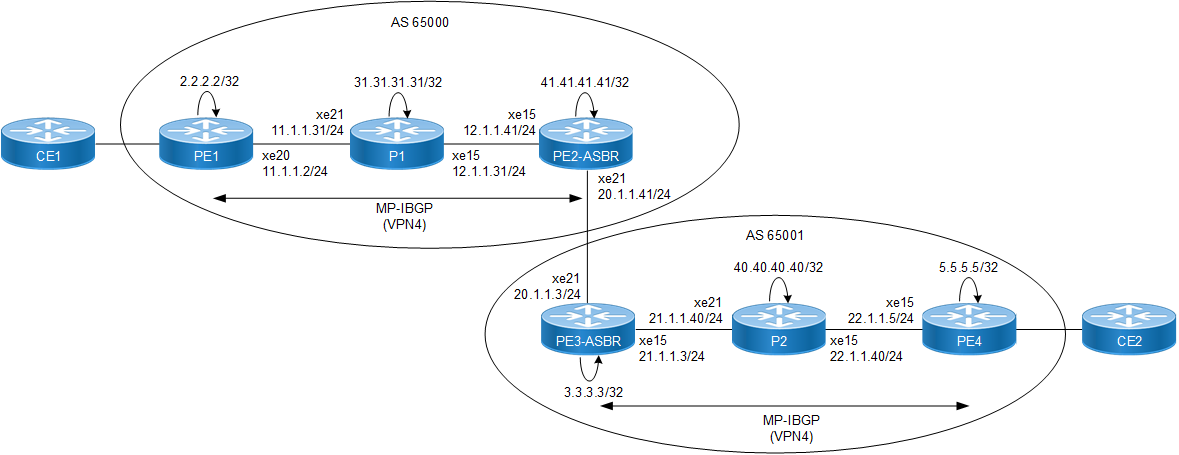
PE1
#configure terminal | Enter configure mode. |
(config)#interface lo | Enter interface mode. |
(config-if)#ip address 2.2.2.2/32 secondary | Assign the IPv4 address. |
(config-if)#exit | Exit interface mode. |
(config)#ip vrf vrf1 | Create a new VRF named vrf1. |
(config-vrf)#rd 1:1 | Assign the route distinguisher (RD) value as 1:1. |
(config-vrf)#route-target both 1:1 | Import routes between route target (RT) ext-communities. |
(config-vrf)#exit | Exit VRF mode. |
(config)#interface xe22 | Enter interface mode. |
(config-if)#ip vrf forwarding vrf1 | Bind the interface connected to the CE router with VRF vrf1. |
(config-if)#ip address 10.1.1.2/24 | Assign the IPv4 address. |
(config-if)#exit | Exit interface mode. |
(config)#interface xe20 | Enter interface mode. |
(config-if)#ip address 11.1.1.2/24 | Assign the IPv4 address. |
(config-if)#exit | Exit interface mode. |
(config)#router ospf 1 | Enter router OSPF mode. |
(config-router)#ospf router-id 2.2.2.2 | Configure OSPF router id same as loopback ip address. |
(config-router)#network 2.2.2.2/32 area 0 | Define the network on which OSPF runs and associate area id. |
(config-router)#network 11.1.1.0/24 area 0 | Define the network on which OSPF runs and associate area id. |
(config-router)#exit | Exit OSPF router mode. |
(config)#router ldp | Enter router LDP mode. |
(config-router)#router-id 2.2.2.2 | Set the router ID to IP address 2.2.2.2 |
(config-router)#transport-address ipv4 2.2.2.2 | Configure the transport address for IPV4 (for IPV6 use ipv6) to be used for a TCP session over which LDP will run. Note: It is preferable to use the loopback address as the transport address |
(config-router)#targeted-peer ipv4 41.41.41.41 | Configure targeted peer. |
(config-router)#targeted-peer ipv4 3.3.3.3 | Configure targeted peer. |
(config-router-targeted-peer)#targeted-peer ipv4 5.5.5.5 | Configure targeted peer. |
(config-router-targeted-peer)#targeted-peer ipv4 41.41.41.41 | Configure targeted peer. |
(config-router-targeted-peer)#exit | Exit-targeted-peer-mode. |
(config-router)#exit | Exit router mode |
(config)#interface xe20 | Enter interface mode. |
(config-if)#label-switching | Enable label switching in interface. |
(config-if)#enable-ldp ipv4 | Enable LDP in interface. |
(config-if)#exit | Exit interface mode. |
(config)#router bgp 65000 | Enter BGP router mode. |
(config-router)#bgp router-id 2.2.2.2 | Configure BGP router-id. |
(config-router)#neighbor 41.41.41.41 remote-as 65000 | Configure PE2-ASBR1 as an iBGP peer. |
(config-router)#neighbor 41.41.41.41 update-source lo | Update the source as loopback for iBGP peering with the remote PE2 router. |
(config-router)#address-family vpnv4 | Enter VPNv4 address family mode. |
(config-router-af)#neighbor 41.41.41.41 activate | Activate the PE neighbor so that it can accept VPN IPv4 routes. |
(config-router-af)#exit | Exit VPNv4 address family mode. |
(config-router)#address-family ipv4 vrf vrf1 | Enter the IPv4 address family for VRF vrf1. |
(config-router-af)#redistribute connected | Redistribute connected route. |
(config-router-af)#commit | Commit the transaction. |
(config-router-af)#exit-address-family | Exit address family mode. |
(config-router)#exit | Exit the router mode. |
(config)#commit | Commit candidate configuration to be running configuration. |
(config)#exit | Exit the config mode. |
P1
#configure terminal | Enter configure mode. |
(config)#interface lo | Enter interface mode. |
(config-if)#ip address 31.31.31.31/32 secondary | Assign the IPv4 address. |
(config-if)#exit | Exit interface mode. |
(config)#interface xe21 | Enter interface mode. |
(config-if)#ip address 11.1.1.31/24 | Assign the IPv4 address. |
(config-if)#exit | Exit interface mode. |
(config)#interface xe15 | Enter interface mode. |
(config-if)#ip address 12.1.1.31/24 | Assign the IPv4 address. |
(config-if)#exit | Exit interface mode. |
(config)#router ospf 1 | Enter router OSPF mode. |
(config-router)#ospf router-id 31.31.31.31 | Configure OSPF router id same as loopback ip address. |
(config-router)#network 31.31.31.31/32 area 0 | Define the network on which OSPF runs and associate area id. |
(config-router)#network 11.1.1.0/24 area 0 | Define the network on which OSPF runs and associate area id. |
(config-router)#network 12.1.1.0/24 area 0 | Define the network on which OSPF runs and associate area id. |
(config-router)#exit | Exit OSPF router mode. |
(config)#router ldp | Enter router LDP mode. |
(config-router)#router-id 31.31.31.31 | Set the router ID to IP address 31.31.31.31 |
(config-router)#transport-address ipv4 31.31.31.31 | Configure LDP transport address same as loopback address. |
(config-router)#exit | Exit LDP mode. |
(config)#interface xe21 | Enter interface mode. |
(config-if)#label-switching | Enable label switching in interface. |
(config-if)#enable-ldp ipv4 | Enable LDP in interface. |
(config-if)#exit | Exit interface mode. |
(config)#interface xe15 | Enter interface mode. |
(config-if)#label-switching | Enable label switching in interface. |
(config-if)#enable-ldp ipv4 | Enable LDP in interface. |
(config-if)#commit | Commit the transaction. |
(config-if)#exit | Exit interface mode. |
(config)#commit | Commit candidate configuration to be running configuration. |
(config)#exit | Exit the config mode. |
PE2-ASBR
#configure terminal | Enter configure mode. |
(config)#interface lo | Enter interface mode. |
(config-if)#ip address 41.41.41.41/32 secondary | Assign the IPv4 address. |
(config-if)#exit | Exit interface mode. |
(config)#router ldp | Enter router mode for LDP. |
(config-router)#router-id 41.41.41.41 | Set the router ID to IP address 41.41.41.41 |
(config-router)#transport-address ipv4 41.41.41.41 | Configure the transport address for IPV4 (for IPV6 use ipv6) to be used for a TCP session over which LDP will run. Note: It is preferable to use the loopback address as the transport address. |
(config-router)#targeted-peer ipv4 2.2.2.2 | Configure targeted peer. |
(config-router-targeted-peer)#targeted-peer ipv4 3.3.3.3 | Configure targeted peer. |
(config-router-targeted-peer)#targeted-peer ipv4 5.5.5.5 | Configure targeted peer. |
(config-router-targeted-peer)#exit | Exit-targeted-peer-mode |
(config-router)#exit | Exit router mode. |
(config)#interface xe15 | Enter interface mode. |
(config-if)#ip address 12.1.1.41/24 | Assign ipv4 address. |
(config-if)#exit | Exit interface mode. |
(config)#router ospf 1 | Enter router OSPF mode. |
(config-router)#ospf router-id 41.41.41.41 | Configure OSPF router id same as loopback ip address. |
(config-router)#network 41.41.41.41/32 area 0 | Define the network on which OSPF runs and associate area id. |
(config-router)#network 12.1.1.0/24 area 0 | Define the network on which OSPF runs and associate area id. |
(config-router)#exit | Exit OSPF router mode. |
(config)#interface xe15 | Enter interface mode. |
(config-if)#label-switching | Enable label switching in interface. |
(config-if)#enable-ldp ipv4 | Enable LDP in interface. |
(config-if)#exit | Exit interface mode. |
(config)#interface xe21 | Enter interface mode. |
(config-if)#ip address 20.1.1.41/24 | Assign the IPv4 address. |
(config-if)#label-switching | Enable label switching in interface. |
(config-if)#exit | Exit interface mode. |
(config)#router bgp 65000 | Enter BGP router mode. |
(config-router)#bgp router-id 41.41.41.41 | Configure BGP router-id. |
(config-router)#no bgp inbound-route-filter | Disable inbound route filter. |
(config-router)#neighbor 2.2.2.2 remote-as 65000 | Configure PE1 as an iBGP peer. |
(config-router)#neighbor 2.2.2.2 update-source lo | Update the source as loopback for iBGP peering with the remote PE1 router. |
(config-router)#neighbor 20.1.1.3 remote-as 65001 | Configure eBGP neighbor with ASBR2. |
(config-router)#address-family vpnv4 | Enter VPNv4 address family mode. |
(config-router-af)#neighbor 2.2.2.2 activate | Activate the PE neighbor so that it can accept VPN IPv4 routes. |
(config-router-af)#neighbor 2.2.2.2 next-hop-self | Configure this to make the router the next hop for a BGP neighbor. |
(config-router-af)#neighbor 20.1.1.3 activate | Activate the ASBR eBGP neighbor. |
(config-router-af)#neighbor 20.1.1.3 allow-ebgp-vpn | Configure this to allow exchange of VPN updates between eBGP peers. |
(config-router-af)#neighbor 20.1.1.3 activate | Activate the ASBR eBGP neighbor. |
(config-router-af)#commit | Commit candidate configuration to the running configuration. |
PE3-ASBR
#configure terminal | Enter configure mode. |
(config)#interface lo | Enter interface mode. |
(config-if)#ip address 3.3.3.3/32 secondary | Assign the IPv4 address. |
(config-if)#exit | Exit interface mode. |
(config)#router ldp | Enter router mode for LDP. |
(config-router)#router-id 3.3.3.3 | Set the router ID to IP address 3.3.3.3 |
(config-router)#transport-address ipv4 3.3.3.3 | Configure the transport address for IPV4 (for IPV6 use ipv6) to be used for a TCP session over which LDP will run. Note: It is preferable to use the loopback address as the transport address. |
(config-router)#targeted-peer ipv4 2.2.2.2 | Configure targeted peer. |
(config-router-targeted-peer)#targeted-peer ipv4 41.41.41.41 | Configure targeted peer. |
(config-router-targeted-peer)#targeted-peer ipv4 5.5.5.5 | Configure targeted peer. |
(config-router-targeted-peer)#exit | Exit-targeted-peer-mode |
(config-router)#exit | Exit router mode |
(config)#interface xe21 | Enter interface mode. |
(config-if)#ip address 20.1.1.3/24 | Assign the IPv4 address. |
(config-if)#exit | Exit interface mode. |
(config)#interface xe15 | Enter interface mode. |
(config-if)#ip address 21.1.1.3/24 | Assign the IPv4 address. |
(config-if)#exit | Exit interface mode. |
(config)#router ospf 1 | Enter router OSPF mode. |
(config-router)#ospf router-id 3.3.3.3 | Configure OSPF router id same as loopback ip address. |
(config-router)#network 3.3.3.3/32 area 0 | Define the network on which OSPF runs and associate area id. |
(config-router)#network 21.1.1.0/24 area 0 | Define the network on which OSPF runs and associate area id. |
(config-router)#exit | Exit OSPF router mode. |
(config)#router ldp | Enter router ldp mode. |
(config-router)#transport-address ipv4 3.3.3.3 | Configure LDP transport address same as loopback address |
(config-router)#exit | Exit LDP mode. |
(config)#interface xe15 | Enter interface mode. |
(config-if)#label-switching | Enable label switching in interface. |
(config-if)#enable-ldp ipv4 | Enable LDP in interface. |
(config-router)#exit | Exit LDP mode. |
(config)#interface xe21 | Enter interface mode. |
(config-if)#label-switching | Enable label switching in interface. |
(config-if)#exit | Exit interface mode. |
(config)#router bgp 65001 | Enter BGP router mode. |
(config-router)#bgp router-id 3.3.3.3 | Configure BGP router-id. |
(config-router)#no bgp inbound-route-filter | Disable inbound route filter. |
(config-router)#neighbor 5.5.5.5 remote-as 65001 | Configure PE4 as an iBGP peer. |
(config-router)#neighbor 5.5.5.5 update-source lo | Update the source as loopback for iBGP peering with the remote PE1 router. |
(config-router)#neighbor 20.1.1.41 remote-as 65000 | Configure eBGP neighbor with PE4. |
(config-router)#address-family vpnv4 | Enter VPNv4 address family mode. |
(config-router-af)#neighbor 5.5.5.5 activate | Activate the PE neighbor so that it can accept VPN IPv4 routes. |
(config-router-af)#neighbor 5.5.5.5 next-hop-self | Configure this to make the router the next hop for a BGP neighbor. |
(config-router-af)#neighbor 20.1.1.41 activate | Activate the ASBR eBGP neighbor. |
(config-router-af)#neighbor 20.1.1.41 allow-ebgp-vpn | Configure this to allow exchange of vpn updates between eBGP peers. |
(config-router-af)#neighbor 20.1.1.41 activate | Activate the ASBR eBGP neighbor. |
(config-router-af)#commit | Commit candidate configuration to be running configuration. |
P2
#configure terminal | Enter configure mode. |
(config)#interface lo | Enter interface mode. |
(config-if)#ip address 40.40.40.40/32 secondary | Assign the IPv4 address. |
(config-if)#exit | Exit interface mode. |
(config)#router ldp | Enter router mode for LDP. |
(config-router)#router-id 40.40.40.40 | Set the router ID to IP address 40.40.40.40 |
(config-router)#transport-address ipv4 40.40.40.40 | Configure the transport address for IPV4 (for IPV6 use ipv6) to be used for a TCP session over which LDP will run. Note: It is preferable to use the loopback address as the transport address. |
(config-router)#targeted-peer ipv4 40.40.40.40 | Configure targeted peer. |
(config-router-targeted-peer)#exit | Exit-targeted-peer-mode |
(config-router)#exit | Exit router mode |
(config)#interface xe21 | Enter interface mode. |
(config-if)#ip address 21.1.1.40/24 | Assign the IPv4 address. |
(config-if)#exit (config-router)#targeted-peer ipv4 40.40.40.40 | Exit interface mode. |
(config)#interface xe15 | Enter interface mode. |
(config-if)#ip address 22.1.1.40/24 | Assign the IPv4 address. |
(config-if)#exit | Exit interface mode. |
(config)#router ospf 1 | Enter router OSPF mode. |
(config-router)#ospf router-id 40.40.40.40 | Configure OSPF router id same as loopback ip address. |
(config-router)#network 40.40.40.40/32 area 0 | Define the network on which OSPF runs and associate area id. |
(config-router)#network 21.1.1.0/24 area 0 | Define the network on which OSPF runs and associate area id. |
(config-router)#network 22.1.1.0/24 area 0 | Define the network on which OSPF runs and associate area id. |
(config-router)#exit | Exit OSPF router mode. |
(config)#router ldp | Enter router LDP mode. |
(config-router)#transport-address ipv4 40.40.40.40 | Configure LDP transport address same as loopback address. |
(config-router)#exit | Exit LDP mode. |
(config)#interface xe21 | Enter interface mode. |
(config-if)#label-switching | Enable label switching in interface. |
(config-if)#enable-ldp ipv4 | Enable ldp in interface. |
(config-if)#exit | Exit interface mode. |
(config)#interface xe15 | Enter interface mode. |
(config-if)#label-switching | Enable label switching in interface. |
(config-if)#enable-ldp ipv4 | Enable LDP in interface. |
(config-if)#commit | Commit the transaction. |
(config-if)#exit | Exit interface mode. |
(config)#commit | Commit candidate configuration to be running configuration. |
(config)#exit | Exit the config mode. |
PE4
#configure terminal | Enter configure mode. |
(config)#interface lo | Enter interface mode. |
(config-if)#ip address 5.5.5.5/32 secondary | Assign the IPv4 address. |
(config-if)#exit | Exit interface mode. |
(config)#router ldp | Enter router mode for LDP. |
(config-router)#router-id 5.5.5.5 | Set the router ID to IP address 5.5.5.5 |
(config-router)#transport-address ipv4 5.5.5.5 | Configure the transport address for IPV4 (for IPV6 use ipv6) to be used for a TCP session over which LDP will run. Note: It is preferable to use the loopback address as the transport address. |
(config-router)#targeted-peer ipv4 5.5.5.5 | Configure targeted peer. |
(config-router-targeted-peer)# targeted-peer ipv4 2.2.2.2 | Configure targeted peer. |
(config-router-targeted-peer)# targeted-peer ipv4 41.41.41.41 | Configure targeted peer. |
(config-router-targeted-peer)# targeted-peer ipv4 3.3.3.3 | Configure targeted peer. |
(config-router)#exit | Exit router mode |
(config)#ip vrf vrf1 | Create a new VRF named vrf1. |
(config-vrf)#rd 1:1 | Assign the route distinguisher (RD) value as 1:1. |
(config-vrf)#route-target both 1:1 | Import routes between route target (RT) ext-communities. |
(config-vrf)#exit | Exit VRF mode. |
(config)#interface xe22 | Enter interface mode. |
(config-if)#ip vrf forwarding vrf1 | Bind the interface connected to the CE router with VRF vrf1. |
(config-if)#ip address 30.1.1.5/24 | Assign the IPv4 address. |
(config-if)#exit | Exit interface mode. |
(config)#interface xe15 | Enter interface mode. |
(config-if)#ip address 22.1.1.5/24 | Assign the IPv4 address. |
(config-if)#exit | Exit interface mode. |
(config)#router ospf 1 | Enter router OSPF mode. |
(config-router)#ospf router-id 5.5.5.5 | Configure OSPF router id same as loopback ip address. |
(config-router)#network 5.5.5.5/32 area 0 | Define the network on which OSPF runs and associate area id. |
(config-router)#network 22.1.1.0/24 area 0 | Define the network on which OSPF runs and associate area id. |
(config-router)#exit | Exit OSPF router mode. |
(config)#interface xe15 | Enter interface mode. |
(config-if)#label-switching | Enable label switching in interface. |
(config-if)#enable-ldp ipv4 | Enable LDP in interface. |
(config-if)#exit | Exit interface mode. |
(config)#router bgp 65001 | Enter BGP router mode. |
(config-router)#bgp router-id 5.5.5.5 | Configure BGP router-id. |
(config-router)#neighbor 3.3.3.3 remote-as 65001 | Configure PE2-ASBR1 as an iBGP peer. |
(config-router)#neighbor 3.3.3.3 update-source lo | Update the source as loopback for iBGP peering with the remote PE2 router. |
(config-router)#address-family vpnv4 | Enter VPNv4 address family mode. |
(config-router-af)#neighbor 3.3.3.3 activate | Activate the PE neighbor so that it can accept VPN IPv4 routes. |
(config-router-af)#exit | Exit VPNv4 address family mode. |
(config-router)#address-family ipv4 vrf vrf1 | Enter the IPv4 address family for VRF vrf1. |
(config-router-af)#redistribute connected | Redistribute connected route. |
(config-router-af)#commit | Commit the transaction. |
(config-router-af)#exit-address-family | Exit address family mode. |
(config-router)#exit | Exit the router mode. |
(config)#commit | Commit candidate configuration to be running configuration. |
(config)#exit | Exit the config mode. |
Validation
PE1
PE1#sh ldp session
Peer IP Address IF Name My Role State KeepAlive UpTime
31.31.31.31 xe20 Passive OPERATIONAL 30 00:49:02
#show ip route vrf vrf1 database
Codes: K - kernel, C - connected, S - static, R - RIP, B - BGP
O - OSPF, IA - OSPF inter area
N1 - OSPF NSSA external type 1, N2 - OSPF NSSA external type 2
E1 - OSPF external type 1, E2 - OSPF external type 2
i - IS-IS, L1 - IS-IS level-1, L2 - IS-IS level-2,
ia - IS-IS inter area, E - EVPN,
v - vrf leaked
> - selected route, * - FIB route, p - stale info
IP Route Table for VRF "vrf1"
C *> 10.1.1.0/24 is directly connected, xe22, 03:49:26
B *> 30.1.1.0/24 [200/0] via 41.41.41.41, 00:00:41
C *> 127.0.0.0/8 is directly connected, lo.vrf1, 03:50:18
PE1#show ip bgp vpnv4 all
Status codes: s suppressed, d damped, h history, * valid, > best, i - internal, l - labeled
S Stale
Origin codes: i - IGP, e - EGP, ? - incomplete
Network Next Hop Metric LocPrf Weight Path
Route Distinguisher: 1:1 (Default for VRF vrf1)
*> l 10.1.1.0/24 0.0.0.0 0 100 32768 ?
*>i 30.1.1.0/24 41.41.41.41 0 100 0 65001 ?
Announced routes count = 1
Accepted routes count = 1
Route Distinguisher: 1:1
*>i 30.1.1.0/24 41.41.41.41 0 100 0 65001 ?
Announced routes count = 0
Accepted routes count = 1
PE2-ASBR1
PE2-ASBR2#show ldp session
Peer IP Address IF Name My Role State KeepAlive UpTime 31.31.31.31 xe47 Active OPERATIONAL 30 00:16:22
3.3.3.3 xe45 Active OPERATIONAL 30 00:14:54
#show ip bgp vpnv4 all
Status codes: s suppressed, d damped, h history, * valid, > best, i - internal, l - labeled
S Stale
Origin codes: i - IGP, e - EGP, ? - incomplete
Network Next Hop Metric LocPrf Weight Path
Route Distinguisher: 1:1
*>il 10.1.1.0/24 2.2.2.2 0 100 0 ?
*> l 30.1.1.0/24 20.1.1.3 0 100 0 65001 ?
Announced routes count = 0
Accepted routes count = 2
#show ip bgp vpnv4 all summary
BGP router identifier 41.41.41.41, local AS number 65000
BGP table version is 4
2 BGP AS-PATH entries
0 BGP community entries
Neighbor V AS MsgRcv MsgSen TblVer InQ OutQ Up/Down State/PfxRcd
2.2.2.2 4 65000 168 171 4 0 0 00:29:03 1
20.1.1.3 4 65001 111 119 4 0 0 00:42:51 1
Total number of neighbors 2
Total number of Established sessions 2
PE3-ASBR2
PE3-ASBR2#sh ldp session
Peer IP Address IF Name My Role State KeepAlive UpTime
41.41.41.41 xe45 Passive OPERATIONAL 30 00:15:47
40.40.40.40 xe6 Passive OPERATIONAL 30 00:24:32
#show ip bgp vpnv4 all
Status codes: s suppressed, d damped, h history, * valid, > best, i - internal, l - labeled
S Stale
Origin codes: i - IGP, e - EGP, ? - incomplete
Network Next Hop Metric LocPrf Weight Path
Route Distinguisher: 1:1
*> l 10.1.1.0/24 20.1.1.41 0 100 0 65000 ?
*>il 30.1.1.0/24 5.5.5.5 0 100 0 ?
Announced routes count = 0
Accepted routes count = 2
#show ip bgp vpnv4 all summary
BGP router identifier 3.3.3.3, local AS number 65001
BGP table version is 4
2 BGP AS-PATH entries
0 BGP community entries
Neighbor V AS MsgRcv MsgSen TblVer InQ OutQ Up/Down State/PfxRcd
5.5.5.5 4 65001 41 45 4 0 0 00:15:59 1
20.1.1.41 4 65000 115 118 4 0 0 00:43:58 1
Total number of neighbors 2
Total number of Established sessions 2
PE4
#show ip bgp vpnv4 all
Status codes: s suppressed, d damped, h history, * valid, > best, i - internal, l - labeled
S Stale
Origin codes: i - IGP, e - EGP, ? - incomplete
Network Next Hop Metric LocPrf Weight Path
Route Distinguisher: 1:1 (Default for VRF vrf1)
*>i 10.1.1.0/24 3.3.3.3 0 100 0 65000 ?
*> l 30.1.1.0/24 0.0.0.0 0 100 32768 ?
Announced routes count = 1
Accepted routes count = 1
Route Distinguisher: 1:1
*>i 10.1.1.0/24 3.3.3.3 0 100 0 65000 ?
Announced routes count = 0
Accepted routes count = 1
#show ip route vrf vrf1 database
Codes: K - kernel, C - connected, S - static, R - RIP, B - BGP
O - OSPF, IA - OSPF inter area
N1 - OSPF NSSA external type 1, N2 - OSPF NSSA external type 2
E1 - OSPF external type 1, E2 - OSPF external type 2
i - IS-IS, L1 - IS-IS level-1, L2 - IS-IS level-2,
ia - IS-IS inter area, E - EVPN,
v - vrf leaked
> - selected route, * - FIB route, p - stale info
IP Route Table for VRF "vrf1"
B *> 10.1.1.0/24 [200/0] via 3.3.3.3, 00:00:48
C *> 30.1.1.0/24 is directly connected, xe22, 03:46:38
C *> 127.0.0.0/8 is directly connected, lo.vrf1, 03:49:54
Gateway of last resort is not set
PE4#sh ldp session
Peer IP Address IF Name My Role State KeepAlive UpTime
40.40.40.40 xe5 Passive OPERATIONAL 30 00:26:30
P#sh ldp session
Peer IP Address IF Name My Role State KeepAlive UpTime
2.2.2.2 xe7 Active OPERATIONAL 30 00:31:27
41.41.41.41 xe1 Passive OPERATIONAL 30 00:15:12
P#
P2#sh ldp session
Peer IP Address IF Name My Role State KeepAlive UpTime
3.3.3.3 xe6 Active OPERATIONAL 30 00:24:58
5.5.5.5 xe5 Active OPERATIONAL 30 00:24:15