PFC Deadlock Detection and Recovery
Overview
Priority-based Flow Control (PFC) helps manage traffic in networks by pausing specific flows during congestion. However, under certain conditions, a deadlock can occur when cyclical dependencies between flows create a loop of PFC pause events that prevents traffic from making forward progress indefinitely.
Priority Flow Control Pause Frames
PFC uses the standard pause frame mechanism with an additional 14 bytes of padding in the frame. This padding contains a 2-byte value for each of the eight priority classes, specifying the pause time in quanta for that class.
Example for priority pause frame:
Pause Frame:
Control Opcode: 0x0101 (Priority Pause)
Pause Time (8 priority classes):
Class 0: 0x0000 (no pause)
Class 1: 0x1234 (pause time in quanta)
Class 2: 0x5678 (pause time in quanta)
...
Class 7: 0x9ABC (pause time in quanta)
In the example above, the pause time in quanta field defines if the pause frame has XON or XOFF set for that class:
• XON (X-On): A control signal sent from the receiver to the transmitter to indicate readiness to accept data. For example, Class 0 represents a no-pause condition.
• XOFF (X-Off): A control signal sent from the receiver to the transmitter indicating that it cannot accept additional data due to congestion. For example, Classes 1, 2, and 7 above specify a non-zero pause time (in quanta), signaling the transmitter to temporarily halt transmission.
Workflow of PFC Frames
• Transmission: The transmitter sends data to the receiver.
• XOFF: The receiver sends an XOFF signal to the transmitter, indicating that it is congested and cannot process more data.
• Pause: The transmitter pauses sending data to the receiver.
• XON: The receiver sends an XON signal to the transmitter, indicating that it is ready to receive data again.
• Resume: The transmitter resumes sending data to the receiver.
PFC deadlock:
A deadlock may occur when the receiver continuously sends XOFF signals for one or more classes, preventing the transmitter from sending any traffic. This feature is designed to detect such deadlocks and initiate recovery mechanisms.
To handle such critical situation, the OcNOS system provides PFC Deadlock Detection and Recovery capability. This chapter describes how to:
• Enable PFC deadlock detection and recovery on a specific interface
• Configure the global PFC deadlock detection and recovery action to drop
Feature Characteristics
Deadlock Detection
• The system monitors PFC queues for extended periods in the XOFF state.
• If a queue remains paused beyond a configurable threshold, a deadlock event is declared.
• An interrupt is raised to inform software of the detected deadlock.
Deadlock Recovery
Once a deadlock is detected, software moves the affected queue into an ignore PFC XOFF state, allowing traffic scheduling to resume.
Recovery can be configured on a per-interface basis and supports three modes:
• Timer Mode: Recovery ends automatically after a user-defined time interval. The system then clears the interrupt and restarts the detection timer. It is an automatic recovery method and recovery starts after a configurable detection-multiplier times time-granularity period. During that period, traffic will be allowed by default, but can also be dropped if the configuration priority-flow-control deadlock recovery-action drop is set. Recovery also ends automatically after a optionally configurable recovery-time period.
Note: Traffic will gradually decrease to zero if the recovery-mode timer is not configured; otherwise, it will continue indefinitely.
• PFC-State-XON Mode: Recovery ends when the interface receives a PFC XON frame, signaling that the pause condition is lifted.
• Manual Mode: Recovery requires explicit user action with CLI commands. This option is only valid if no automatic recovery mode is configured.
Limitation:
• Manual recovery mode is not supported in Trident3 (TR3) platforms or Tomahawk3 (TH3) platforms.
• Trident3 (TR3) platforms support deadlock recovery only in timer mode.
• Trident3 (TR3) platforms do not support 1ms time granularity.
• Tomahawk 2 (TH2) series platforms are not supported.
Benefits
• Prevents indefinite traffic stalls due to PFC loops.
• Provides flexible recovery options (automatic or manual).
• Improves network reliability in environments that rely on PFC.
Prerequisites
• The device should be enabled with PFC.
Configuring PFC Deadlock Detection and Recovery
Topology
This topology illustrates Deadlock condition using single Switch1:
1. the xe0 interfaces receives the regular traffic flow from a traffic source which is PFC enabled.
2. the same priority 1 regular unicast traffic is transmitted to the xe1 interface which is also PFC enabled.
3. the traffic source sends pause frames that have XOFF on priority 1 to the xe0 interface.
4. the regular traffic received on xe0 interface is slowed down until no more packets arrive from the regular traffic flow.
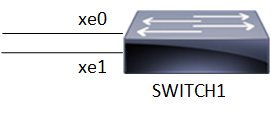
PFC Deadlock Detection and Recovery
Configure Using Timer mode
The following configurations, enables PFC deadlock recovery on every priority interfaces. Optionally, the detection multiplier, time granularity and recovery time parameters may be set, otherwise the defaults (respectively 10, 10, 100) will be used.
Execute the following steps to configure PFC on both interfaces.
1. Create a bridge 1 as an IEEE VLAN-enabled bridge. Enable DCB and PFC on the bridge.
(config)#bridge 1 protocol ieee vlan-bridge
(config)#data-center-bridging enable bridge 1
(config)#priority-flow-control enable bridge 1
2. Enable PFC priorities 0 and 1 on both the interfaces xe0 and xe1.
(config)#interface xe0
(config-if)#switchport
(config-if)#bridge-group 1
(config-if)#switchport mode trunk
(config-if)#switchport trunk allowed vlan all
(config-if)#priority-flow-control mode on
(config-if)#priority-flow-control enable priority 0 1
(config-if)#load-interval 30
(config)interface xe1
(config-if)#switchport
(config-if)#bridge-group 1
(config-if)#switchport mode trunk
(config-if)#switchport trunk allowed vlan all
(config-if)#priority-flow-control mode on
(config-if)#priority-flow-control enable priority 0 1
(config-if)#load-interval 30
3. Configure the priority flow control deadlock recovery mode timer on xe0 interface.
(config)#interface xe0
(config-if)#priority-flow-control deadlock recovery-mode timer
(config-if)#commit
(config-if)#
4. Configure the PFC deadlock detection happens with non-default detection-multiplier and time-granularity parameters
(config)#interface xe0
(config-if)#priority-flow-control deadlock recovery-mode timer detection-multiplier 10 time-granularity 10 recovery-time 1000
Validation
Check the PFC priority 1 traffic received and send on xe0 and xe1 interfaces.
OcNOS#show int count rate mbps
+-------------------+--------------+-------------+--------------+-------------+
| Interface | Rx mbps | Rx pps | Tx mbps | Tx pps |
+-------------------+--------------+-------------+--------------+-------------+
xe0 0.00 0 1176.62 147078
xe1 1176.62 147077 0.00 0
OcNOS#
Check the queue-level statistics on each interface to monitor transmitted traffic, drops, and queue.
OcNOS#clear interface counters
OcNOS#show interface counters queue-stats
E - Egress, I - Ingress, Q-Size is in bytes
* indicates monitor is active
+------------------+---------------------+-------------------+-----------------+-------------------+-----------------+-------------------+
| Interface | Queue/Class-map | Q-Size | Tx pkts | Tx bytes | Dropped pkts | Dropped bytes |
+------------------+---------------------+-------------------+-----------------+-------------------+-----------------+-------------------+
xe0 q1 (E) 0 427127 427127000 0 0
After 30 seconds, check link throughput, should be like this:
OcNOS#show int count rate mbps
+-------------------+--------------+-------------+--------------+-------------+
| Interface | Rx mbps | Rx pps | Tx mbps | Tx pps |
+-------------------+--------------+-------------+--------------+-------------+
xe0 0.00 0 1176.62 147077
xe1 1176.62 147077 0.00 0
OcNOS#
Check the traffic gradually stops after starting the XOFF P1 traffic to simulate the deadlock.
OcNOS#show int count rate mbps
+-------------------+--------------+-------------+--------------+-------------+
| Interface | Rx mbps | Rx pps | Tx mbps | Tx pps |
+-------------------+--------------+-------------+--------------+-------------+
xe0 0.66 162 540.53 67566
xe1 1176.62 147077 0.11 211
Check the TX traffic on xe0 is completely stopped after 30 seconds.
OcNOS#show int count rate mbps
+-------------------+--------------+-------------+--------------+-------------+
| Interface | Rx mbps | Rx pps | Tx mbps | Tx pps |
+-------------------+--------------+-------------+--------------+-------------+
xe0 1.23 300 0.00 0
xe1 1176.62 147077 0.20 397
Check the traffic flow is restored after 30 seconds even though the XOFF packets exists.
OcNOS#show int count rate mbps
+-------------------+--------------+-------------+--------------+-------------+
| Interface | Rx mbps | Rx pps | Tx mbps | Tx pps |
+-------------------+--------------+-------------+--------------+-------------+
xe0 1.23 300 1176.68 147086
xe1 1176.59 147074 0.00 0
Check the PFC deadlock is detected:
OcNOS#show priority-flow-control deadlock-status interface xe0
Deadlock Detection and Recovery Configuration
----------------------------------------------------------------------
interface recovery detection detection recovery
mode multiplier granularity time
======================================================================
xe0 Timer 10 10 1500
---------------------------------------------------------------------------------------------------------
Deadlock Detection and Recovery Status
---------------------------------------------------------------------------------------------------------
interface pri state detection last detection last recovery
count timestamp timestamp
=========================================================================================================
xe0 0 no deadlock 0 - -
xe0 1 deadlock 35 2025-05-29 19:03:34.611 -
xe0 2 no deadlock 0 - -
xe0 3 no deadlock 0 - -
xe0 4 no deadlock 0 - -
xe0 5 no deadlock 0 - -
xe0 6 no deadlock 0 - -
xe0 7 no deadlock 0 - -
OcNOS#show priority-flow-control deadlock-status
Deadlock Detection and Recovery Configuration
----------------------------------------------------------------------
interface recovery detection detection recovery
mode multiplier granularity time
======================================================================
xe0 Timer 10 10 1500
---------------------------------------------------------------------------------------------------------
Deadlock Detection and Recovery Status
---------------------------------------------------------------------------------------------------------
interface pri state detection last detection last recovery
count timestamp timestamp
=========================================================================================================
xe0 1 deadlock 39 2025-05-29 19:03:49.481
Check the deadlock detection count:
OcNOS#show priority-flow-control deadlock-status interface xe0
Deadlock Detection and Recovery Configuration
----------------------------------------------------------------------
interface recovery detection detection recovery
mode multiplier granularity time
======================================================================
xe0 Timer 1 1 1500
---------------------------------------------------------------------------------------------------------
Deadlock Detection and Recovery Status
---------------------------------------------------------------------------------------------------------
interface pri state detection last detection last recovery
count timestamp timestamp
=========================================================================================================
xe0 0 no deadlock 0 - -
xe0 1 no deadlock 163 2025-05-29 19:55:16.842 2025-05-29 19:55:18.344
xe0 2 no deadlock 0 - -
xe0 3 no deadlock 0 - -
xe0 4 no deadlock 0 - -
xe0 5 no deadlock 0 - -
xe0 6 no deadlock 0 - -
xe0 7 no deadlock 0 - -
Change recovery-time to 1000 and check the PFC deadlock
OcNOS#show priority-flow-control deadlock-status interface xe0
Deadlock Detection and Recovery Configuration
----------------------------------------------------------------------
interface recovery detection detection recovery
mode multiplier granularity time
======================================================================
xe0 Timer 10 10 1000
---------------------------------------------------------------------------------------------------------
Deadlock Detection and Recovery Status
---------------------------------------------------------------------------------------------------------
interface pri state detection last detection last recovery
count timestamp timestamp
=========================================================================================================
xe0 0 no deadlock 0 - -
xe0 1 deadlock 9 2025-05-29 20:04:23.251 -
xe0 2 no deadlock 0 - -
xe0 3 no deadlock 0 - -
xe0 4 no deadlock 0 - -
xe0 5 no deadlock 0 - -
xe0 6 no deadlock 0 - -
xe0 7 no deadlock 0 - -
PFC State XON mode
Execute the following steps to configure PFC on both interfaces.
1. Create a bridge 1 as an IEEE VLAN-enabled bridge. Enable DCB on the bridge.
(config)#bridge 1 protocol ieee vlan-bridge
(config)#data-center-bridging enable bridge 1
2. Enables PFC on the bridge. Configure the advertise flag and start sending DCBX TLVs in LLDP messages.
(config)#priority-flow-control enable bridge 1
(config-if)#priority-flow-control mode on
3. Enable PFC on priorities 0 and 1.
(config-if)#priority-flow-control enable priority 0 1
4. Enable automatic priority flow control deadlock recovery mode pfc-state-xon with custom detection time.
(config-if)#priority-flow-control deadlock recovery-mode pfc-state-xon detection-multiplier 10 time-granularity 10
Validation
Change the recovery-mode to pfc-state-xon and check PFC deadlocks
OcNOS#show int counters rate mbps
+-------------------+--------------+-------------+--------------+-------------+
| Interface | Rx mbps | Rx pps | Tx mbps | Tx pps |
+-------------------+--------------+-------------+--------------+-------------+
xe0 1.23 300 1176.62 147078
xe1 1176.62 147077 0.00 0
OcNOS##show priority-flow-control deadlock-status
Deadlock Detection and Recovery Configuration
----------------------------------------------------------------------
interface recovery detection detection recovery
mode multiplier granularity time
======================================================================
xe0 XON 10 10 -
---------------------------------------------------------------------------------------------------------
Deadlock Detection and Recovery Status
---------------------------------------------------------------------------------------------------------
interface pri state detection last detection last recovery
count timestamp timestamp
=========================================================================================================
xe0 1 deadlock 1 2025-05-29 20:12:58.089 -
Global Mode
When any interface enters deadlock recovery mode, instead of allowing the deadlocked traffic to pass, traffic will be dropped if this command is set globally.
(config)#priority-flow-control deadlock recovery-action drop
Validation
Change the global action command to drop and check the effect on traffic during the recovery process:
OcNOS#show int counters rate mbps
+-------------------+--------------+-------------+--------------+-------------+
| Interface | Rx mbps | Rx pps | Tx mbps | Tx pps |
+-------------------+--------------+-------------+--------------+-------------+
xe0 1.23 300 0.00 0
xe1 1176.62 147077 0.00 0
OcNOS#
Manual Recovery
Once a deadlock is detected and no manual recovery mode is configured in the interface, it is possible to recover from the deadlock by manually entering and exiting recovery mode on supported boards with the below commands:
1. Start manual deadlock recovery on interface eth1.
#priority-flow-control xe0 deadlock manual-recovery start
2. Stop manual deadlock recovery on interface eth1
#priority-flow-control xe1 deadlock manual-recovery stop
Validation
Start sending XOFF on P1 manual recovery mode and check if traffic starts to flow:
OcNOS#priority-flow-control xe0 deadlock-manual-recovery start
OcNOS#show int count rate mbps
+-------------------+--------------+-------------+--------------+-------------+
| Interface | Rx mbps | Rx pps | Tx mbps | Tx pps |
+-------------------+--------------+-------------+--------------+-------------+
xe0 1.21 295 311.12 38890
xe1 1176.60 147075 0.15 287
OcNOS#show int count rate mbps
+-------------------+--------------+-------------+--------------+-------------+
| Interface | Rx mbps | Rx pps | Tx mbps | Tx pps |
+-------------------+--------------+-------------+--------------+-------------+
xe0 1.21 295 311.12 38890
xe1 1176.60 147075 0.15 287
OcNOS#show int count rate mbps
+-------------------+--------------+-------------+--------------+-------------+
| Interface | Rx mbps | Rx pps | Tx mbps | Tx pps |
+-------------------+--------------+-------------+--------------+-------------+
xe0 1.21 296 595.44 74430
xe1 1176.60 147074 0.10 191
Stop manual recovery mode and check if traffic stops
OcNOS#priority-flow-control xe0 deadlock-manual-recovery stop
OcNOS#show int count rate mbps
+-------------------+--------------+-------------+--------------+-------------+
| Interface | Rx mbps | Rx pps | Tx mbps | Tx pps |
+-------------------+--------------+-------------+--------------+-------------+
xe0 1.22 297 823.27 102909
xe1 1176.61 147076 0.06 115
OcNOS#show int count rate mbps
+-------------------+--------------+-------------+--------------+-------------+
| Interface | Rx mbps | Rx pps | Tx mbps | Tx pps |
+-------------------+--------------+-------------+--------------+-------------+
xe0 1.22 297 823.27 102909
xe1 1176.61 147076 0.06 115
OcNOS#show int count rate mbps
+-------------------+--------------+-------------+--------------+-------------+
| Interface | Rx mbps | Rx pps | Tx mbps | Tx pps |
+-------------------+--------------+-------------+--------------+-------------+
xe0 1.21 296 710.29 88786
xe1 1176.61 147075 0.08 147
OcNOS#show int count rate mbps
+-------------------+--------------+-------------+--------------+-------------+
| Interface | Rx mbps | Rx pps | Tx mbps | Tx pps |
+-------------------+--------------+-------------+--------------+-------------+
xe0 1.21 296 710.29 88786
xe1 1176.61 147075 0.08 147
OcNOS#show int count rate mbps
+-------------------+--------------+-------------+--------------+-------------+
| Interface | Rx mbps | Rx pps | Tx mbps | Tx pps |
+-------------------+--------------+-------------+--------------+-------------+
xe0 1.22 297 537.98 67248
xe1 1176.61 147076 0.11 208
OcNOS#
Clear PFC Deadlock
Following are the two commands to clear the deadlock.
1. Clearing deadlock status for a specific interface
#clear priority-flow-control deadlock-status xe1
2. Clearing deadlock status for all interfaces
#clear priority-flow-control deadlock-status
Show Running Configuration
OcNOS#show running-config
!
! Software version: UFI_S9110-32X-OcNOS-DC-NA-7.0.0.999- 08/21/2025 14:08:11
!
! Last configuration change at 05:02:36 UTC Sat Aug 16 2025 by root
!
!
service password-encryption
!
logging console 0
logging monitor 7
logging level nsm 7
logging level hsl 7
snmp-server enable traps link linkDown
snmp-server enable traps link linkUp
!
qos enable
!
bridge 1 protocol rstp vlan-bridge
tfo Disable
errdisable cause stp-bpdu-guard
data-center-bridging enable bridge 1
snmp-server enable snmp vrf management
snmp-server view all .1 included vrf management
snmp-server community test group network-operator vrf management
snmp-server host 192.168.5.18 traps version 2c test vrf management host-vrf management
feature dns relay
ip dns relay
ipv6 dns relay
!
ip access-list 1
10 permit ahp any any
!
policy-map type queuing default default-out-policy
class type queuing default q0
priority
lossless
exit
class type queuing default q1
priority
lossless
exit
class type queuing default q2
priority
lossless
exit
class type queuing default q3
priority
lossless
exit
class type queuing default q4
priority
lossless
exit
class type queuing default q5
priority
lossless
exit
class type queuing default q7
priority
lossless
exit
!
vlan database
vlan-reservation 4029-4094
vlan 10 bridge 1
!
ip vrf management
!
interface ce0
!
interface ce6
!
interface ce7
switchport
bridge-group 1
switchport mode trunk
switchport trunk allowed vlan all
priority-flow-control mode on
priority-flow-control enable priority 0 1
load-interval 30
!
interface ce8
switchport
bridge-group 1
switchport mode trunk
switchport trunk allowed vlan all
priority-flow-control mode on
priority-flow-control enable priority 0 1
load-interval 30
!
interface ce9
!
interface ce31
!
interface eth0
ip vrf forwarding management
ip address dhcp
!
interface lo
ip address 127.0.0.1/8
ipv6 address ::1/128
!
interface lo.management
ip vrf forwarding management
ip address 127.0.0.1/8
ipv6 address ::1/128
!
interface xe32
switchport
bridge-group 1
switchport mode trunk
switchport trunk allowed vlan all
priority-flow-control mode on
priority-flow-control enable priority 0 1
load-interval 30
!
exit
!
line console 0
exec-timeout 35791
line vty 0 3
exec-timeout 35791
!
!
end
Topology
The topology uses an EVPN-VXLAN Underlay using OSPF for the internal gateway protocol (IGP) and eBGP with unnumbered interfaces for advertising host and loopback routes. It also utilizes Dynamic Load Balancing (DLB) and Priority Flow Control (PFC) for PFC Dead Lock Detection requirements.
Leaf switches connect to both the spines layer (uplinks) and the end-hosts (downlinks, often GPUs/Servers).
PFC Dead Lock Detection and Recovery
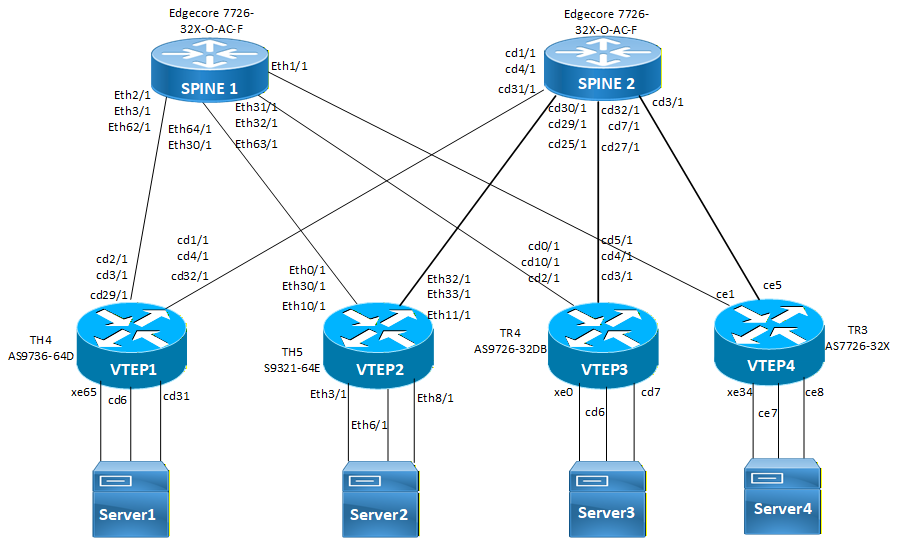
PFC Deadlock Detection and Recovery
Configure Leaf 1, Leaf 2, Leaf 3, Leaf 4, Spine 1 and Spine 2
The following configurations, enables PFC deadlock recovery on every priority interfaces on spines and leafs.
Cand load balance rtag7 hashingdata-center-bridging enable bridge 1priority-flow-control enable bridge 1
dynamic-load-balance enable
maximum-paths 64
load-balance rtag7 ipv4 dest-ipv4 src-ipv4 destl4-port srcl4-port protocol-id rocev2-dest-qpairs
load-balance rtag7 ipv6 dest-ipv6 src-ipv6 destl4-port srcl4-port rocev2-dest-qpairs next-hdr
policy-map type queuing default default-out-policy
class type queuing default q6
priority
lossless
exit
class type queuing default q7
priority
lossless
exit
1. Configure PFC default lossless ECN policy.
(config)#policy-map type queuing default lossless_ecn_egress
(config-pmap-que-def)#class type queuing default q0
(config-pmap-c-que-def)#shape 10 gbps
(config-pmap-c-que-def)#priority
(config-pmap-c-que-def)#lossless
(config-pmap-c-que-def)#random-detect green min-threshold 500 max-threshold 600 yellow min-threshold 300 max-threshold 400 red min-threshold 100 max-threshold 200 packets ecn
(config-pmap-c-que-def)#exit
(config-pmap-que-def)#class type queuing default q1
(config-pmap-c-que-def)#shape 10 gbps
(config-pmap-c-que-def)#priority
(config-pmap-c-que-def)#lossless
(config-pmap-c-que-def)#random-detect green min-threshold 500 max-threshold 600 yellow min-threshold 300 max-threshold 400 red min-threshold 100 max-threshold 200 packets ecn
(config-pmap-c-que-def)#exit
(config-pmap-que-def)#class type queuing default q2
(config-pmap-c-que-def)#shape 10 gbps
(config-pmap-c-que-def)#priority
(config-pmap-c-que-def)#lossless
random-detect green min-threshold 500 max-threshold 600 yellow min-threshold 300 max-threshold 400 red min-threshold 100 max-threshold 200 packets ecn
(config-pmap-c-que-def)#exit
(config-pmap-que-def)#class type queuing default q3
(config-pmap-c-que-def)#shape 10 gbps
(config-pmap-c-que-def)#priority
(config-pmap-c-que-def)#lossless
(config-pmap-c-que-def)#random-detect green min-threshold 500 max-threshold 600 yellow min-threshold 300 max-threshold 400 red min-threshold 100 max-threshold 200 packets ecn
(config-pmap-c-que-def)#exit
(config-pmap-que-def)#class type queuing default q4
(config-pmap-c-que-def)#shape 10 gbps
(config-pmap-c-que-def)#priority
(config-pmap-c-que-def)#lossless
(config-pmap-c-que-def)#random-detect green min-threshold 500 max-threshold 600 yellow min-threshold 300 max-threshold 400 red min-threshold 100 max-threshold 200 packets ecn
(config-pmap-c-que-def)#exit
(config-pmap-que-def)#class type queuing default q5
(config-pmap-c-que-def)#shape 10 gbps
(config-pmap-c-que-def)#priority
(config-pmap-c-que-def)#lossless
(config-pmap-c-que-def)#random-detect green min-threshold 500 max-threshold 600 yellow min-threshold 300 max-threshold 400 red min-threshold 100 max-threshold 200 packets ecn
(config-pmap-c-que-def)#exit
(config-pmap-que-def)#class type queuing default q6
(config-pmap-c-que-def)#shape 10 gbps
(config-pmap-c-que-def)#priority
(config-pmap-c-que-def)#lossless
(config-pmap-c-que-def)#random-detect green min-threshold 500 max-threshold 600 yellow min-threshold 300 max-threshold 400 red min-threshold 100 max-threshold 200 packets ecn
(config-pmap-c-que-def)#exit
(config-pmap-que-def)#class type queuing default q7
(config-pmap-c-que-def)#shape 10 gbps
(config-pmap-c-que-def)#priority
(config-pmap-c-que-def)#lossless
(config-pmap-c-que-def)#random-detect green min-threshold 500 max-threshold 600 yellow min-threshold 300 max-threshold 400 red min-threshold 100 max-threshold 200 packets ecn
(config-pmap-c-que-def)#exit
2. Configure routing map information to allow redistribution of routes. It is applied to incoming BGP routes, which sets the metric to 55555.
(config)#route-map HIG_MED permit 10
(config-route-map)#set metric 55555
3. Set the PFC mode to auto on the uplink interfaces.
On Leaf 1
(config)#interface cd1/1
(config-if)#priority-flow-control mode auto
(config-if)#ip address 10.1.12.1/24
(config-if)#ipv6 address 1012::1/64
(config-if)#shape rate 5 gbps burst 10000
(config-if)#ip ospf cost 100
(config-if)#ipv6 ospf cost 100 instance-id 0
(config-if)#ipv6 router ospf area 0.0.0.0 instance-id 0
(config-if)#lldp-agent
(config-if)#exit
(config)#interface cd3/1
(config-if)#priority-flow-control mode auto
(config-if)#ip address 10.1.11.1/24
(config-if)#ipv6 address 1011::1/64
(config-if)#shape rate 5 gbps burst 10000
(config-if)#ip ospf cost 100
(config-if)#ipv6 ospf cost 100 instance-id 0
(config-if)#ipv6 router ospf area 0.0.0.0 instance-id 0
(config-if)#lldp-agent
(config-if)#exit
(config)#interface cd2/1
(config-if)# priority-flow-control mode auto
(config-if)#ip address 20.1.11.1/24
(config-if)#ipv6 address 2011::1/64
(config-if)#shape rate 5 gbps burst 10000
(config-if)#ip ospf cost 100
(config-if)#ipv6 ospf cost 100 instance-id 0
(config-if)#ipv6 router ospf area 0.0.0.0 instance-id 0
(config-if)#lldp-agent
(config-if)#exit
(config)#interface cd4/1
(config-if)#priority-flow-control mode auto
(config-if)#ip address 20.1.12.1/24
(config-if)#ipv6 address 2012::1/64
(config-if)#shape rate 5 gbps burst 10000
(config-if)#ip ospf cost 100
(config-if)#ipv6 ospf cost 100 instance-id 0
(config-if)#ipv6 router ospf area 0.0.0.0 instance-id 0
(config-if)# lldp-agent
(config-if)# exit
(config)#interface cd29/1
(config-if)#priority-flow-control mode auto
(config-if)#ip address 30.1.11.1/24
(config-if)#ipv6 address 3011::1/64
(config-if)#shape rate 5 gbps burst 10000
(config-if)#ip ospf cost 100
(config-if)#ipv6 ospf cost 100 instance-id 0
(config-if)#ipv6 router ospf area 0.0.0.0 instance-id 0
(config-if)#lldp-agent
(config-if)#exit
(config)#interface cd32/1
(config-if)#priority-flow-control mode auto
(config-if)#ip address 30.1.12.1/24
(config-if)#ipv6 address 3012::1/64
(config-if)#shape rate 5 gbps burst 10000
(config-if)#ip ospf cost 100
(config-if)#ipv6 ospf cost 100 instance-id 0
(config-if)#ipv6 router ospf area 0.0.0.0 instance-id 0
(config-if)#lldp-agent
(config-if)#exit
On Leaf 2
(config)#interface ethernet0/1
(config-if)#priority-flow-control mode auto
(config-if)#ip address 10.1.13.1/24
(config-if)#ipv6 address 1013::1/64
(config-if)#shape rate 5 gbps burst 10000
(config-if)#ip ospf cost 100
(config-if)#ipv6 ospf cost 100 instance-id 0
(config-if)#ipv6 router ospf area 0.0.0.0 instance-id 0
(config-if)#lldp-agent
(config-if)#exit
(config)#interface ethernet32/1
(config-if)#priority-flow-control mode auto
(config-if)#ip address 10.1.14.1/24
(config-if)#ipv6 address 1014::1/64
(config-if)#shape rate 5 gbps burst 10000
(config-if)#ip ospf cost 100
(config-if)#ipv6 ospf cost 100 instance-id 0
(config-if)#ipv6 router ospf area 0.0.0.0 instance-id 0
(config-if)#lldp-agent
(config-if)#exit
(config)#interface ethernet30/1
(config-if)#priority-flow-control mode auto
(config-if)#ip address 20.1.13.1/24
(config-if)#ipv6 address 2013::1/64
(config-if)#shape rate 5 gbps burst 10000
(config-if)#ip ospf cost 100
(config-if)#ipv6 ospf cost 100 instance-id 0
(config-if)#ipv6 router ospf area 0.0.0.0 instance-id 0
(config-if)#lldp-agent
(config-if)#exit
(config)#interface ethernet33/1
(config-if)# priority-flow-control mode auto
(config-if)#ip address 20.1.14.1/24
(config-if)#ipv6 address 2014::1/64
(config-if)# shape rate 5 gbps burst 10000
(config-if)#ip ospf cost 100
(config-if)#ipv6 ospf cost 100 instance-id 0
(config-if)# ipv6 router ospf area 0.0.0.0 instance-id 0
(config-if)#lldp-agent
(config-if)#exit
(config)#interface ethernet10/1
(config-if)#priority-flow-control mode auto
(config-if)#ip address 30.1.13.1/24
(config-if)#ipv6 address 3013::1/64
(config-if)#shape rate 5 gbps burst 10000
(config-if)#ip ospf cost 100
(config-if)#ipv6 ospf cost 100 instance-id 0
(config-if)#ipv6 router ospf area 0.0.0.0 instance-id 0
(config-if)#lldp-agent
(config-if)#exit
(config)#interface ethernet11/1
(config-if)#priority-flow-control mode auto
(config-if)#ip address 30.1.14.1/24
(config-if)#ipv6 address 3014::1/64
(config-if)#shape rate 5 gbps burst 10000
(config-if)#ip ospf cost 100
(config-if)#ipv6 ospf cost 100 instance-id 0
(config-if)#ipv6 router ospf area 0.0.0.0 instance-id 0
(config-if)#lldp-agent
(config-if)#exit
On Leaf 3
(config)#interface cd2/1
(config-if)# priority-flow-control mode auto
(config-if)#ip address 10.1.16.1/24
(config-if)#ipv6 address 1016::1/64
(config-if)# shape rate 5 gbps burst 10000
(config-if)# ip ospf cost 100
(config-if)#ipv6 ospf cost 100 instance-id 0
(config-if)# ipv6 router ospf area 0.0.0.0 instance-id 0
(config-if)# lldp-agent
(config-if)# exit
(config)#interface cd0/1
(config-if)# priority-flow-control mode auto
(config-if)#ip address 10.1.15.1/24
(config-if)#ipv6 address 1015::1/64
(config-if)#shape rate 5 gbps burst 10000
(config-if)#ip ospf cost 100
(config-if)#ipv6 ospf cost 100 instance-id 0
(config-if)#ipv6 router ospf area 0.0.0.0 instance-id 0
(config-if)#lldp-agent
(config-if)#exit
(config)#interface cd10/1
(config-if)#priority-flow-control mode auto
(config-if)# ip address 20.1.15.1/24
(config-if)#ipv6 address 2015::1/64
(config-if)#shape rate 5 gbps burst 10000
(config-if)#ip ospf cost 100
(config-if)#ipv6 ospf cost 100 instance-id 0
(config-if)# ipv6 router ospf area 0.0.0.0 instance-id 0
(config-if)# lldp-agent
(config-if)# exit
(config)#interface cd5/1
(config-if)#priority-flow-control mode auto
(config-if)#ip address 20.1.16.1/24
(config-if)#ipv6 address 2016::1/64
(config-if)#shape rate 5 gbps burst 10000
(config-if)#ip ospf cost 100
(config-if)#ipv6 ospf cost 100 instance-id 0
(config-if)#ipv6 router ospf area 0.0.0.0 instance-id 0
(config-if)#lldp-agent
(config-if)#exit
(config)#interface cd3/1
(config-if)# priority-flow-control mode auto
(config-if)#ip address 30.1.15.1/24
(config-if)#ipv6 address 3015::1/64
(config-if)#shape rate 5 gbps burst 10000
(config-if)#ip ospf cost 100
(config-if)#ipv6 ospf cost 100 instance-id 0
(config-if)#ipv6 router ospf area 0.0.0.0 instance-id 0
(config-if)#lldp-agent
(config-if)#exit
(config)#interface cd4/1
(config-if)#priority-flow-control mode auto
(config-if)#ip address 30.1.16.1/24
(config-if)#ipv6 address 3016::1/64
(config-if)#shape rate 5 gbps burst 10000
(config-if)#ip ospf cost 100
(config-if)#ipv6 ospf cost 100 instance-id 0
(config-if)#ipv6 router ospf area 0.0.0.0 instance-id 0
(config-if)#lldp-agent
(config-if)#exit
On Leaf 4
(config)#interface ce1
(config-if)# priority-flow-control mode auto
(config-if)#ip address 10.1.17.1/24
(config-if)#ipv6 address 1017::1/64
(config-if)#ip ospf cost 100
(config-if)#ipv6 ospf cost 100 instance-id 0
(config-if)#ipv6 router ospf area 0.0.0.0 instance-id 0
(config-if)#lldp-agent
(config-if)#exit
(config)#interface ce5
(config-if)# priority-flow-control mode auto
(config-if)#ip address 10.1.18.1/24
(config-if)# ipv6 address 1018::1/64
(config-if)# ip ospf cost 100
(config-if)# ipv6 ospf cost 100 instance-id 0
(config-if)# ipv6 router ospf area 0.0.0.0 instance-id 0
(config-if)# lldp-agent
(config-if)# exit
4. Set PFC mode and DeadLock Detection Recovery timer on downlink interfaces.
On Leaf1
(config)#interface cd6
(config-if)#description ***GPU ***
(config-if)#priority-flow-control mode on
(config-if)#priority-flow-control advertise-local-config
(config-if)#priority-flow-control enable priority 0 1 2 3 4 5 6 7
(config-if)#ip address 111.1.1.1/24
(config-if)#ipv6 address 111::1/64
(config-if)#ipv6 router ospf area 0.0.0.0 instance-id 0
(config-if)#lldp-agent
(config-if)#exit
(config)#interface cd31
(config-if)#description ***GPU ***
(config-if)#switchport
(config-if)#bridge-group 1
(config-if)#switchport mode trunk
(config-if)#switchport trunk allowed vlan add 111-115
(config-if)#priority-flow-control mode on
(config-if)#priority-flow-control advertise-local-config
(config-if)#priority-flow-control enable priority 0 1 2 3 4 5 6 7
(config-if)#lldp-agent
(config-if)#exit
(config)#interface xe65
(config-if)#description ***GPU ***
(config-if)#priority-flow-control mode on
(config-if)#priority-flow-control deadlock recovery-mode timer
(config-if)#priority-flow-control advertise-local-config
(config-if)#priority-flow-control enable priority 0 1 2 3 4 5 6 7
(config-if)#ip address 101.1.1.1/24
(config-if)#ipv6 address 101::1/64
(config-if)#ipv6 router ospf area 0.0.0.0 instance-id 0
(config-if)#lldp-agent
(config-if)#exit
Note: The 'deadlock recovery-mode timer' command configured only on xe65 and not explicitly on cd6 or cd31.
On Leaf 2
(config)#interface ethernet3/1
(config-if)#description ***GPU ***
(config-if)#priority-flow-control mode on
(config-if)#priority-flow-control deadlock recovery-mode timer
(config-if)#priority-flow-control advertise-local-config
(config-if)#priority-flow-control enable priority 0 1 2 3 4 5 6 7
(config-if)#ip address 102.1.1.1/24
(config-if)#ipv6 address 102::1/64
(config-if)#ipv6 router ospf area 0.0.0.0 instance-id 0
(config-if)#lldp-agent
(config-if)#exit
(config)#interface ethernet6/1
(config-if)#description ***GPU ***
(config-if)#priority-flow-control mode on
(config-if)#priority-flow-control deadlock recovery-mode timer
(config-if)#priority-flow-control advertise-local-config
(config-if)#priority-flow-control enable priority 0 1 2 3 4 5 6 7
(config-if)#ip address 112.1.1.1/24
(config-if)#ipv6 address 112::1/64
(config-if)#ipv6 router ospf area 0.0.0.0 instance-id 0
(config-if)#lldp-agent
(config-if)#exit
(config)#interface ethernet8/1
(config-if)# description ***GPU ***
(config-if)# switchport
(config-if)# bridge-group 1
(config-if)#switchport mode trunk
(config-if)#switchport trunk allowed vlan add 211-215
(config-if)#priority-flow-control mode on
(config-if)#priority-flow-control deadlock recovery-mode timer
(config-if)#priority-flow-control advertise-local-config
(config-if)#priority-flow-control enable priority 0 1 2 3 4 5 6 7
(config-if)# lldp-agent
(config-if)#exit
On Leaf 3
(config)#interface cd7
(config-if)# description ***GPU ***
(config-if)#switchport
(config-if)#bridge-group 1
(config-if)#switchport mode trunk
(config-if)#switchport trunk allowed vlan add 311-315
(config-if)# priority-flow-control mode on
(config-if)# priority-flow-control deadlock recovery-mode timer
(config-if)#priority-flow-control advertise-local-config
(config-if)#priority-flow-control enable priority 0 1 2 3 4 5 6 7
(config-if)#lldp-agent
(config-if) exit
(config)#interface cd6
(config-if)#description ***GPU ***
(config-if)#priority-flow-control mode on
(config-if)#priority-flow-control deadlock recovery-mode timer
(config-if)#priority-flow-control advertise-local-config
(config-if)#priority-flow-control enable priority 0 1 2 3 4 5 6 7
(config-if)#ip address 113.1.1.1/24
(config-if)#ipv6 address 113::1/64
(config-if)#ipv6 router ospf area 0.0.0.0 instance-id 0
(config-if)#lldp-agent
(config-if)#exit
(config-if)#interface xe0
(config-if)# description ***GPU ***
(config-if)#priority-flow-control mode on
(config-if)# priority-flow-control deadlock recovery-mode timer
(config-if)# priority-flow-control advertise-local-config
(config-if)# priority-flow-control enable priority 0 1 2 3 4 5 6 7
(config-if)#ip address 103.1.1.1/24
(config-if)#ipv6 address 103::1/64
(config-if)#ipv6 router ospf area 0.0.0.0 instance-id 0
(config-if)# lldp-agent
(config-if)# exit
On Leaf 4
(config)#interface ce7
(config-if)#description ***GPU ***
(config-if)#priority-flow-control mode on
(config-if)#priority-flow-control deadlock recovery-mode timer
(config-if)# priority-flow-control advertise-local-config
(config-if)# priority-flow-control enable priority 0 1 2 3 4 5 6 7
(config-if)#ip address 114.1.1.1/24
(config-if)# ipv6 address 114::1/64
(config-if)#ipv6 router ospf area 0.0.0.0 instance-id 0
(config-if)#lldp-agent
(config-if)# exit
(config)#interface ce8
(config-if)#description ***GPU ***
(config-if)#priority-flow-control mode on
(config-if)#priority-flow-control deadlock recovery-mode timer
(config-if)#priority-flow-control advertise-local-config
(config-if)#priority-flow-control enable priority 0 1 2 3 4 5 6 7
(config-if)#ip address 124.1.1.1/24
(config-if)#ipv6 address 124::1/64
(config-if)#ipv6 router ospf area 0.0.0.0 instance-id 0
(config-if)#lldp-agent
(config-if)#exit
(config)#interface xe34
(config-if)#description ***GPU ***
(config-if)#priority-flow-control mode on
(config-if)#priority-flow-control deadlock recovery-mode timer
(config-if)#priority-flow-control advertise-local-config
(config-if)#priority-flow-control enable priority 0 1 2 3 4 5 6 7
(config-if)#ip address 104.1.1.1/24
(config-if)#ipv6 address 104::1/64
(config-if)#ipv6 router ospf area 0.0.0.0 instance-id 0
(config-if)#lldp-agent
(config-if)#exit
5. Configure interfaces on spines that connects to leafs.
On Spine 1
(config-if)#interface ethernet1/1
(config-if)#priority-flow-control mode on
(config-if)#priority-flow-control deadlock recovery-mode timer
(config-if)#priority-flow-control advertise-local-config
(config-if)#priority-flow-control enable priority 0 1 2 3 4 5 6 7
(config-if)#load-interval 30
(config-if)#ip address 10.1.17.2/24
(config-if)#ipv6 address 1017::2/64
(config-if)#ip ospf cost 100
(config-if)#ipv6 ospf cost 100 instance-id 0
(config-if)#ipv6 router ospf area 0.0.0.0 instance-id 0
(config-if)#lldp-agent
(config-if)#exit
(config-if)#interface ethernet2/1
(config-if)#priority-flow-control mode on
(config-if)#priority-flow-control deadlock recovery-mode timer
(config-if)#priority-flow-control advertise-local-config
(config-if)#priority-flow-control enable priority 0 1 2 3 4 5 6 7
(config-if)#load-interval 30
(config-if)#ip address 20.1.11.2/24
(config-if)#ipv6 address 2011::2/64
(config-if)#ip ospf cost 100
(config-if)#ipv6 ospf cost 100 instance-id 0
(config-if)#ipv6 router ospf area 0.0.0.0 instance-id 0
(config-if)#lldp-agent
(config-if)#exit
(config)#interface ethernet3/1
(config-if)#priority-flow-control mode on
(config-if)#priority-flow-control deadlock recovery-mode timer
(config-if)#priority-flow-control advertise-local-config
(config-if)#priority-flow-control enable priority 0 1 2 3 4 5 6 7
(config-if)#load-interval 30
(config-if)#ip address 10.1.11.2/24
(config-if)#ipv6 address 1011::2/64
(config-if)#ip ospf cost 100
(config-if)#ipv6 ospf cost 100 instance-id 0
(config-if)#ipv6 router ospf area 0.0.0.0 instance-id 0
(config-if)#lldp-agent
(config-if)#exit
(config-if)#interface ethernet30/1
(config-if)#priority-flow-control mode on
(config-if)#priority-flow-control deadlock recovery-mode timer
(config-if)#priority-flow-control advertise-local-config
(config-if)#priority-flow-control enable priority 0 1 2 3 4 5 6 7
(config-if)#load-interval 30
(config-if)#ip address 20.1.13.2/24
(config-if)#ipv6 address 2013::2/64
(config-if)#ip ospf cost 100
(config-if)#ipv6 ospf cost 100 instance-id 0
(config-if)#ipv6 router ospf area 0.0.0.0 instance-id 0
(config-if)#lldp-agent
(config-if)#exit
(config-if)#interface ethernet31/1
(config-if)#priority-flow-control mode on
(config-if)#priority-flow-control deadlock recovery-mode timer
(config-if)#priority-flow-control advertise-local-config
(config-if)#priority-flow-control enable priority 0 1 2 3 4 5 6 7
(config-if)#load-interval 30
(config-if)#ip address 10.1.15.2/24
(config-if)#ipv6 address 1015::2/64
(config-if)#ip ospf cost 100
(config-if)#ipv6 ospf cost 100 instance-id 0
(config-if)#ipv6 router ospf area 0.0.0.0 instance-id 0
(config-if)#lldp-agent
(config-if)#exit
(config)#interface ethernet32/1
(config-if)#priority-flow-control mode on
(config-if)#priority-flow-control deadlock recovery-mode timer
(config-if)#priority-flow-control advertise-local-config
(config-if)#priority-flow-control enable priority 0 1 2 3 4 5 6 7
(config-if)#load-interval 30
(config-if)#ip address 20.1.15.2/24
(config-if)#ipv6 address 2015::2/64
(config-if)#ip ospf cost 100
(config-if)#ipv6 ospf cost 100 instance-id 0
(config-if)#ipv6 router ospf area 0.0.0.0 instance-id 0
(config-if)#lldp-agent
(config-if)#exit
(config)#interface ethernet62/1
(config-if)#priority-flow-control mode on
(config-if)#priority-flow-control deadlock recovery-mode timer
(config-if)#priority-flow-control advertise-local-config
(config-if)#priority-flow-control enable priority 0 1 2 3 4 5 6 7
(config-if)#load-interval 30
(config-if)#ip address 30.1.11.2/24
(config-if)#ipv6 address 3011::2/64
(config-if)#ip ospf cost 100
(config-if)#ipv6 ospf cost 100 instance-id 0
(config-if)#ipv6 router ospf area 0.0.0.0 instance-id 0
(config-if)#lldp-agent
(config-if)#exit
(config)#interface ethernet63/1
(config-if)#priority-flow-control mode on
(config-if)#priority-flow-control deadlock recovery-mode timer
(config-if)#priority-flow-control advertise-local-config
(config-if)#priority-flow-control enable priority 0 1 2 3 4 5 6 7
(config-if)#load-interval 30
(config-if)#ip address 30.1.15.2/24
(config-if)#ipv6 address 3015::2/64
(config-if)#ip ospf cost 100
(config-if)#ipv6 ospf cost 100 instance-id 0
(config-if)#ipv6 router ospf area 0.0.0.0 instance-id 0
(config-if)#lldp-agent
(config-if)#exit
(config)#interface ethernet64/1
(config-if)# priority-flow-control mode on
(config-if)#priority-flow-control deadlock recovery-mode timer
(config-if)# priority-flow-control advertise-local-config
(config-if)#priority-flow-control enable priority 0 1 2 3 4 5 6 7
(config-if)#load-interval 30
(config-if)#ip address 10.1.13.2/24
(config-if)#ipv6 address 1013::2/64
(config-if)#ip ospf cost 100
(config-if)#ipv6 ospf cost 100 instance-id 0
(config-if)#ipv6 router ospf area 0.0.0.0 instance-id 0
(config-if)#lldp-agent
(config-if)# exit
On Spine 2
(config)#interface cd1/1
(config-if)# priority-flow-control mode on
(config-if)# priority-flow-control deadlock recovery-mode timer
(config-if)#priority-flow-control advertise-local-config
(config-if)#priority-flow-control enable priority 0 1 2 3 4 5 6 7
(config-if)#ip address 10.1.12.2/24
(config-if)#ipv6 address 1012::2/64
(config-if)#ip ospf cost 100
(config-if)#ipv6 ospf cost 100 instance-id 0
(config-if)#ipv6 router ospf area 0.0.0.0 instance-id 0
(config-if)#lldp-agent
(config-if)#exit
(config)#interface cd3/1
(config-if)#priority-flow-control mode on
(config-if)#priority-flow-control deadlock recovery-mode timer
(config-if)#priority-flow-control advertise-local-config
(config-if)#priority-flow-control enable priority 0 1 2 3 4 5 6 7
(config-if)#ip address 10.1.18.2/24
(config-if)#ipv6 address 1018::2/64
(config-if)#ip ospf cost 100
(config-if)#ipv6 ospf cost 100 instance-id 0
(config-if)#ipv6 router ospf area 0.0.0.0 instance-id 0
(config-if)#lldp-agent
(config-if)#exit
(config)#interface cd4/1
(config-if)# priority-flow-control mode on
(config-if)# priority-flow-control deadlock recovery-mode timer
(config-if)# priority-flow-control advertise-local-config
(config-if)# priority-flow-control enable priority 0 1 2 3 4 5 6 7
(config-if)#ip address 20.1.12.2/24
(config-if)# ipv6 address 2012::2/64
(config-if)#ip ospf cost 100
(config-if)#ipv6 ospf cost 100 instance-id 0
(config-if)# ipv6 router ospf area 0.0.0.0 instance-id 0
(config-if)# lldp-agent
(config-if)# exit
(config)#interface cd7/1
(config-if)#priority-flow-control mode on
(config-if)#priority-flow-control deadlock recovery-mode timer
(config-if)#priority-flow-control advertise-local-config
(config-if)#priority-flow-control enable priority 0 1 2 3 4 5 6 7
(config-if)#ip address 20.1.16.2/24
(config-if)#ipv6 address 2016::2/64
(config-if)#ip ospf cost 100
(config-if)#ipv6 ospf cost 100 instance-id 0
(config-if)#ipv6 router ospf area 0.0.0.0 instance-id 0
(config-if)#lldp-agent
(config-if)#exit
(config)#interface cd25/1
(config-if)#priority-flow-control mode on
(config-if)#priority-flow-control deadlock recovery-mode timer
(config-if)#priority-flow-control advertise-local-config
(config-if)#priority-flow-control enable priority 0 1 2 3 4 5 6 7
(config-if)#ip address 30.1.14.2/24
(config-if)#ipv6 address 3014::2/64
(config-if)#ip ospf cost 100
(config-if)#ipv6 ospf cost 100 instance-id 0
(config-if)#ipv6 router ospf area 0.0.0.0 instance-id 0
(config-if)#lldp-agent
(config-if)#exit
(config)#interface cd27/1
(config-if)#priority-flow-control mode on
(config-if)#priority-flow-control deadlock recovery-mode timer
(config-if)#priority-flow-control advertise-local-config
(config-if)#priority-flow-control enable priority 0 1 2 3 4 5 6 7
(config-if)#ip address 30.1.16.2/24
(config-if)#ipv6 address 3016::2/64
(config-if)#ip ospf cost 100
(config-if)#ipv6 ospf cost 100 instance-id 0
(config-if)#ipv6 router ospf area 0.0.0.0 instance-id 0
(config-if)#lldp-agent
(config-if)#exit
(config)#interface cd29/1
(config-if)#priority-flow-control mode on
(config-if)#priority-flow-control deadlock recovery-mode timer
(config-if)#priority-flow-control advertise-local-config
(config-if)#priority-flow-control enable priority 0 1 2 3 4 5 6 7
(config-if)#ip address 20.1.14.2/24
(config-if)#ipv6 address 2014::2/64
(config-if)#ip ospf cost 100
(config-if)#ipv6 ospf cost 100 instance-id 0
(config-if)#ipv6 router ospf area 0.0.0.0 instance-id 0
(config-if)#lldp-agent
(config-if)#exit
(config)#interface cd30/1
(config-if)#priority-flow-control mode on
(config-if)#priority-flow-control deadlock recovery-mode timer
(config-if)#priority-flow-control advertise-local-config
(config-if)#priority-flow-control enable priority 0 1 2 3 4 5 6 7
(config-if)#ip address 10.1.14.2/24
(config-if)#ipv6 address 1014::2/64
(config-if)#ip ospf cost 100
(config-if)#ipv6 ospf cost 100 instance-id 0
(config-if)#ipv6 router ospf area 0.0.0.0 instance-id 0
(config-if)#lldp-agent
(config-if)#exit
(config)#interface cd31/1
(config-if)#priority-flow-control mode on
(config-if)# priority-flow-control deadlock recovery-mode timer
(config-if)# priority-flow-control advertise-local-config
(config-if)#priority-flow-control enable priority 0 1 2 3 4 5 6 7
(config-if)#ip address 30.1.12.2/24
(config-if)#ipv6 address 3012::2/64
(config-if)#ip ospf cost 100
(config-if)#ipv6 ospf cost 100 instance-id 0
(config-if)#ipv6 router ospf area 0.0.0.0 instance-id 0
(config-if)# lldp-agent
(config-if)#exit
(config)#interface cd32/1
(config-if)#priority-flow-control mode on
(config-if)#priority-flow-control deadlock recovery-mode timer
(config-if)#priority-flow-control advertise-local-config
(config-if)#priority-flow-control enable priority 0 1 2 3 4 5 6 7
(config-if)#ip address 10.1.16.2/24
(config-if)#ipv6 address 1016::2/64
(config-if)#ip ospf cost 100
(config-if)#ipv6 ospf cost 100 instance-id 0
(config-if)#ipv6 router ospf area 0.0.0.0 instance-id 0
(config-if)#lldp-agent
(config-if)#exit
6. Configure the Underlay routing OSPF for Spine and Leaf interconnections.
On Leaf 1
(config)#router ospf 100
(config-router)#ospf router-id 1.1.1.1
(config-router)#network 1.1.1.1/32 area 0.0.0.0
(config-router)#network 10.1.11.0/24 area 0.0.0.0
(config-router)#network 10.1.12.0/24 area 0.0.0.0
(config-router)#network 20.1.11.0/24 area 0.0.0.0
(config-router)#network 20.1.12.0/24 area 0.0.0.0
(config-router)#network 30.1.11.0/24 area 0.0.0.0
(config-router)#network 30.1.12.0/24 area 0.0.0.0
(config-router)#network 101.1.1.0/24 area 0.0.0.0
(config-router)#network 111.1.1.0/24 area 0.0.0.0
(config-router)#network 171.1.1.0/24 area 0.0.0.0
(config-router)#network 171.1.2.0/24 area 0.0.0.0
(config-router)#network 171.1.3.0/24 area 0.0.0.0
(config-router)#network 171.1.4.0/24 area 0.0.0.0
(config-router)#network 171.1.5.0/24 area 0.0.0.0
(config)#router ipv6 ospf
(config-router)#router-id 1.1.1.1
On Leaf 2
(config)#router ospf 100
(config-router)#ospf router-id 2.2.2.2
(config-router)#network 2.2.2.2/32 area 0.0.0.0
(config-router)#network 10.1.13.0/24 area 0.0.0.0
(config-router)#network 10.1.14.0/24 area 0.0.0.0
(config-router)#network 20.1.13.0/24 area 0.0.0.0
(config-router)#network 20.1.14.0/24 area 0.0.0.0
(config-router)#network 30.1.13.0/24 area 0.0.0.0
(config-router)#network 30.1.14.0/24 area 0.0.0.0
(config-router)#network 40.1.13.0/24 area 0.0.0.0
(config-router)#network 50.1.13.0/24 area 0.0.0.0
(config-router)#network 60.1.13.0/24 area 0.0.0.0
(config-router)#network 102.1.1.0/24 area 0.0.0.0
(config-router)#network 112.1.1.0/24 area 0.0.0.0
(config-router)#network 172.1.1.0/24 area 0.0.0.0
(config-router)#network 172.1.2.0/24 area 0.0.0.0
(config-router)#network 172.1.3.0/24 area 0.0.0.0
(config-router)#network 172.1.4.0/24 area 0.0.0.0
(config-router)#network 172.1.5.0/24 area 0.0.0.0
On Leaf 3
(config)#router ospf 100
(config-router)#ospf router-id 3.3.3.3
(config-router)#network 3.3.3.3/32 area 0.0.0.0
(config-router)#network 10.1.15.0/24 area 0.0.0.0
(config-router)#network 10.1.16.0/24 area 0.0.0.0
(config-router)#network 20.1.15.0/24 area 0.0.0.0
(config-router)#network 20.1.16.0/24 area 0.0.0.0
(config-router)#network 30.1.15.0/24 area 0.0.0.0
(config-router)#network 30.1.16.0/24 area 0.0.0.0
(config-router)#network 103.1.1.0/24 area 0.0.0.0
(config-router)#network 113.1.1.0/24 area 0.0.0.0
(config-router)#network 173.1.1.0/24 area 0.0.0.0
(config-router)#network 173.1.2.0/24 area 0.0.0.0
(config-router)#network 173.1.3.0/24 area 0.0.0.0
(config-router)#network 173.1.4.0/24 area 0.0.0.0
(config-router)#network 173.1.5.0/24 area 0.0.0.0
On Leaf 4
(config)#router ospf 100
(config-router)#ospf router-id 4.4.4.4
(config-router)#network 4.4.4.4/32 area 0.0.0.0
(config-router)#network 10.1.17.0/24 area 0.0.0.0
(config-router)#network 10.1.18.0/24 area 0.0.0.0
(config-router)#network 104.1.1.0/24 area 0.0.0.0
(config-router)#network 114.1.1.0/24 area 0.0.0.0
(config-router)#network 174.1.1.0/24 area 0.0.0.0
(config-router)#network 174.1.2.0/24 area 0.0.0.0
(config-router)#network 174.1.3.0/24 area 0.0.0.0
(config-router)#network 174.1.4.0/24 area 0.0.0.0
(config-router)#network 174.1.5.0/24 area 0.0.0.0
On Spine 1
(config-router)#router ospf 100
(config-router)#ospf router-id 7.7.7.7
(config-router)#network 7.7.7.7/32 area 0.0.0.0
(config-router)#network 10.1.11.0/24 area 0.0.0.0
(config-router)#network 10.1.13.0/24 area 0.0.0.0
(config-router)#network 10.1.15.0/24 area 0.0.0.0
(config-router)#network 10.1.17.0/24 area 0.0.0.0
(config-router)#network 10.1.19.0/24 area 0.0.0.0
(config-router)#network 20.1.11.0/24 area 0.0.0.0
(config-router)#network 20.1.13.0/24 area 0.0.0.0
(config-router)#network 20.1.15.0/24 area 0.0.0.0
(config-router)#network 20.1.17.0/24 area 0.0.0.0
(config-router)#network 30.1.11.0/24 area 0.0.0.0
(config-router)#network 30.1.13.0/24 area 0.0.0.0
(config-router)#network 30.1.15.0/24 area 0.0.0.0
(config-router)#network 30.1.17.0/24 area 0.0.0.0
(config-router)#network 40.1.13.0/24 area 0.0.0.0
(config-router)#network 50.1.13.0/24 area 0.0.0.0
(config-router)#network 60.1.13.0/24 area 0.0.0.0
On Spine2
(config-router)#router ospf 100
(config-router)#ospf router-id 8.8.8.8
(config-router)#network 8.8.8.8/32 area 0.0.0.0
(config-router)#network 10.1.12.0/24 area 0.0.0.0
(config-router)#network 10.1.14.0/24 area 0.0.0.0
(config-router)#network 10.1.16.0/24 area 0.0.0.0
(config-router)#network 10.1.18.0/24 area 0.0.0.0
(config-router)#network 10.1.20.0/24 area 0.0.0.0
(config-router)#network 20.1.12.0/24 area 0.0.0.0
(config-router)#network 20.1.14.0/24 area 0.0.0.0
(config-router)#network 20.1.16.0/24 area 0.0.0.0
(config-router)#network 20.1.18.0/24 area 0.0.0.0
(config-router)#network 30.1.12.0/24 area 0.0.0.0
(config-router)#network 30.1.14.0/24 area 0.0.0.0
(config-router)#network 30.1.16.0/24 area 0.0.0.0
(config-router)#network 30.1.18.0/24 area 0.0.0.0
7. Configure the eBGP router in unnumbered mode on interfaces connecting to Spine and Leaf for advertising host and loopback.
On Leaf 1
(config)#router bgp 4294967201
(config-router)#bgp router-id 1.1.1.1
(config-router)#bgp log-neighbor-changes
(config-router)#neighbor underlay peer-group
(config-router)#neighbor underlay remote-as 4294967209
(config-router)#neighbor underlay shutdown
(config-router)#neighbor underlay authentication-key 0xb59db09d828b2528
(config-router)#neighbor underlay as-origination-interval 1
(config-router)#neighbor underlay advertisement-interval 0
(config-router)#neighbor underlay fall-over bfd
(config-router)#exit
(config-router)#bgp unnumbered-mode
(config-router-unnum)#neighbor cd4/1 peergroup underlay
(config-router-unnum)#neighbor cd3/1 peergroup underlay
(config-router-unnum)#neighbor cd2/1 peergroup underlay
(config-router-unnum)#neighbor cd1/1 peergroup underlay
(config-router-unnum)#neighbor cd32/1 peergroup underlay
(config-router-unnum)#neighbor cd29/1 peergroup underlay
(config-router-unnum)#exit-unnumbered-mode
(config-router)#address-family ipv4 unicast
(config-router-af)#max-paths ebgp 10
(config-router-af)#redistribute connected
(config-router-af)#neighbor underlay activate
(config-router)#bgp v4-unnumbered-mode
(config-router-v4-unnum)#neighbor cd4/1 route-map HIG_MED in
(config-router-v4-unnum)#neighbor cd3/1 route-map HIG_MED in
(config-router-v4-unnum)#neighbor cd2/1 route-map HIG_MED in
(config-router-v4-unnum)#neighbor cd1/1 route-map HIG_MED in
(config-router-v4-unnum)#neighbor cd32/1 route-map HIG_MED in
(config-router-v4-unnum)#neighbor cd29/1 route-map HIG_MED in
(config-router-v4-unnum)#exit-v4-unnumbered-mode
(config-router-af)#exit-address-family
(config-router)#exit
On Leaf 2
(config)#router bgp 4294967202
(config-router)#bgp router-id 2.2.2.2
(config-router)#bgp log-neighbor-changes
(config-router)#neighbor underlay peer-group
(config-router)#neighbor underlay remote-as 4294967209
(config-router)#neighbor underlay shutdown
(config-router)#neighbor underlay authentication-key 0xb59db09d828b2528
(config-router)#neighbor underlay as-origination-interval 1
(config-router)#neighbor underlay advertisement-interval 0
(config-router)#neighbor underlay fall-over bfd
(config)#bgp unnumbered-mode
(config-router-unnum)#neighbor ethernet10/1 peergroup underlay
(config-router-unnum)#neighbor ethernet0/1 peergroup underlay
(config-router-unnum)#neighbor ethernet30/1 peergroup underlay
(config-router-unnum)#neighbor ethernet33/1 peergroup underlay
(config-router-unnum)#neighbor ethernet32/1 peergroup underlay
(config-router-unnum)#neighbor ethernet11/1 peergroup underlay
(config-router-unnum)#exit-unnumbered-mode
(config)#address-family ipv4 unicast
(config-router-af)#max-paths ebgp 10
(config-router-af)#redistribute connected
(config-router-af)#neighbor underlay activate
(config)#bgp v4-unnumbered-mode
(config-router-v4-unnum)#neighbor ethernet10/1 route-map HIG_MED in
(config-router-v4-unnum)#neighbor ethernet0/1 route-map HIG_MED in
(config-router-v4-unnum)#neighbor ethernet30/1 route-map HIG_MED in
(config-router-v4-unnum)#neighbor ethernet33/1 route-map HIG_MED in
(config-router-v4-unnum)#neighbor ethernet32/1 route-map HIG_MED in
(config-router-v4-unnum)#neighbor ethernet11/1 route-map HIG_MED in
(config-router-v4-unnum)#exit-v4-unnumbered-mode
(config-router-v4-unnum)#exit-address-family
(config-router-v4-af)#exit
On Leaf 3
(config)#router bgp 4294967203
(config-router)#bgp router-id 3.3.3.3
(config-router)#bgp log-neighbor-changes
(config-router)#neighbor underlay peer-group
(config-router)#neighbor underlay remote-as 4294967209
(config-router)#neighbor underlay shutdown
(config-router)#neighbor underlay authentication-key 0xb59db09d828b2528
(config-router)#neighbor underlay as-origination-interval 1
(config-router)#neighbor underlay advertisement-interval 0
(config-router)#neighbor underlay fall-over bfd
(config-router)#bgp unnumbered-mode
(config-router-unnum)#neighbor cd10/1 peergroup underlay
(config-router-unnum)#neighbor cd5/1 peergroup underlay
(config-router-unnum)#neighbor cd4/1 peergroup underlay
(config-router-unnum)#neighbor cd3/1 peergroup underlay
(config-router-unnum)#neighbor cd2/1 peergroup underlay
(config-router-unnum)#neighbor cd0/1 peergroup underlay
(config-router-unnum)#exit-unnumbered-mode
(config)#address-family ipv4 unicast
(config-router-af)#max-paths ebgp 10
(config-router-af)#redistribute connected
(config-router-af)#neighbor underlay activate
(config-router)#bgp v4-unnumbered-mode
(config-router-v4-unnum)#neighbor cd10/1 route-map HIG_MED in
(config-router-v4-unnum)#neighbor cd5/1 route-map HIG_MED in
(config-router-v4-unnum)#neighbor cd4/1 route-map HIG_MED in
(config-router-v4-unnum)#neighbor cd3/1 route-map HIG_MED in
(config-router-v4-unnum)#neighbor cd2/1 route-map HIG_MED in
(config-router-v4-unnum)#neighbor cd0/1 route-map HIG_MED in
(config-router-v4-unnum)#exit-v4-unnumbered-mode
(config-router-v4-unnum)#exit-address-family
(config-router-v4-af)#exit
On Leaf 4
(config)#router bgp 4294967204
(config-router)#bgp router-id 4.4.4.4
(config-router)#bgp log-neighbor-changes
(config-router)#neighbor underlay peer-group
(config-router)#neighbor underlay remote-as 4294967209
(config-router)#neighbor underlay shutdown
(config-router)#neighbor underlay authentication-key 0xb59db09d828b2528
(config-router)#neighbor underlay as-origination-interval 1
(config-router)#neighbor underlay advertisement-interval 0
(config-router)#neighbor underlay fall-over bfd
(config)#bgp unnumbered-mode
(config-router-unnum)#neighbor ce1 peergroup underlay
(config-router-unnum)# neighbor ce5 peergroup underlay
(config-router-unnum)# exit-unnumbered-mode
(config-router)#address-family ipv4 unicast
(config-router-af)#max-paths ebgp 10
(config-router-af)#redistribute connected
(config-router-af)#neighbor underlay activate
(config-router)#bgp v4-unnumbered-mode
(config-router-v4-unnum)#neighbor ce1 route-map HIG_MED in
(config-router-v4-unnum)#neighbor ce5 route-map HIG_MED in
(config-router-v4-unnum)#exit-v4-unnumbered-mode
(config-router-v4-af)#exit-address-family
On Spine1
(config)#router bgp 4294967209
(config-router)#bgp router-id 7.7.7.7
(config-router)#bgp log-neighbor-changes
(config-router)#neighbor underlay peer-group
(config-router)#neighbor underlay remote-as 1
(config-router)#neighbor underlay shutdown
(config-router)#neighbor underlay authentication-key 0xb59db09d828b2528
(config-router)#neighbor underlay as-origination-interval 1
(config-router)#neighbor underlay advertisement-interval 0
(config-router)#neighbor underlay fall-over bfd
(config-router)#bgp unnumbered-mode
(config-router-unnum)#neighbor ethernet1/1 remote-as external
(config-router-unnum)#neighbor ethernet1/1 peergroup underlay
(config-router-unnum)#neighbor ethernet31/1 remote-as external
(config-router-unnum)#neighbor ethernet31/1 peergroup underlay
(config-router-unnum)#neighbor ethernet63/1 remote-as external
(config-router-unnum)#neighbor ethernet63/1 peergroup underlay
(config-router-unnum)#neighbor ethernet32/1 remote-as external
(config-router-unnum)#neighbor ethernet32/1 peergroup underlay
(config-router-unnum)#neighbor ethernet64/1 remote-as external
(config-router-unnum)#neighbor ethernet64/1 peergroup underlay
(config-router-unnum)#neighbor ethernet61/1 remote-as external
(config-router-unnum)#neighbor ethernet61/1 peergroup underlay
(config-router-unnum)#neighbor ethernet30/1 remote-as external
(config-router-unnum)#neighbor ethernet30/1 peergroup underlay
(config-router-unnum)#neighbor ethernet2/1 remote-as external
(config-router-unnum)#neighbor ethernet2/1 peergroup underlay
(config-router-unnum)#neighbor ethernet3/1 remote-as external
(config-router-unnum)#neighbor ethernet3/1 peergroup underlay
(config-router-unnum)#neighbor ethernet62/1 remote-as external
(config-router-unnum)#neighbor ethernet62/1 peergroup underlay
(config-router-unnum)#neighbor ethernet11/1 remote-as external
(config-router-unnum)#neighbor ethernet11/1 peergroup underlay
(config-router-unnum)#exit-unnumbered-mode
(config-router)#address-family ipv4 unicast
(config-router-af)#max-paths ebgp 10
(config-router-af)#redistribute connected
(config-router-af)#neighbor underlay activate
(config-router)#bgp v4-unnumbered-mode
(config-router-v4-unnum)#neighbor ethernet1/1 route-map HIG_MED in
(config-router-v4-unnum)#neighbor ethernet31/1 route-map HIG_MED in
(config-router-v4-unnum)#neighbor ethernet63/1 route-map HIG_MED in
(config-router-v4-unnum)#neighbor ethernet32/1 route-map HIG_MED in
(config-router-v4-unnum)#neighbor ethernet64/1 route-map HIG_MED in
(config-router-v4-unnum)#neighbor ethernet61/1 route-map HIG_MED in
(config-router-v4-unnum)#neighbor ethernet30/1 route-map HIG_MED in
(config-router-v4-unnum)#neighbor ethernet2/1 route-map HIG_MED in
(config-router-v4-unnum)#neighbor ethernet3/1 route-map HIG_MED in
(config-router-v4-unnum)#neighbor ethernet62/1 route-map HIG_MED in
(config-router-v4-unnum)#neighbor ethernet11/1 route-map HIG_MED in
(config-router-v4-unnum)#exit-v4-unnumbered-mode
(config-router-v4-af)#exit-address-family
(config-router)#exit
On Spine2
(config)#router bgp 4294967209
(config-router)#bgp router-id 8.8.8.8
(config-router)#bgp log-neighbor-changes
(config-router)#neighbor underlay peer-group
(config-router)#neighbor underlay remote-as 1
(config-router)#neighbor underlay shutdown
(config-router)#neighbor underlay authentication-key 0xb59db09d828b2528
(config-router)#neighbor underlay as-origination-interval 1
(config-router)#neighbor underlay advertisement-interval 0
(config-router)#neighbor underlay fall-over bfd
(config-router)#bgp unnumbered-mode
(config-router-unnum)#neighbor cd29/1 remote-as external
(config-router-unnum)#neighbor cd29/1 peergroup underlay
(config-router-unnum)#neighbor cd3/1 remote-as external
(config-router-unnum)#neighbor cd3/1 peergroup underlay
(config-router-unnum)#neighbor cd30/1 remote-as external
(config-router-unnum)#neighbor cd30/1 peergroup underlay
(config-router-unnum)#neighbor cd25/1 remote-as external
(config-router-unnum)#neighbor cd25/1 peergroup underlay
(config-router-unnum)#neighbor cd4/1 remote-as external
(config-router-unnum)#neighbor cd4/1 peergroup underlay
(config-router-unnum)#neighbor cd1/1 remote-as external
(config-router-unnum)#neighbor cd1/1 peergroup underlay
(config-router-unnum)#neighbor cd31/1 remote-as external
(config-router-unnum)#neighbor cd31/1 peergroup underlay
(config-router-unnum)#neighbor cd32/1 remote-as external
(config-router-unnum)#neighbor cd32/1 peergroup underlay
(config-router-unnum)#neighbor cd27/1 remote-as external
(config-router-unnum)#neighbor cd27/1 peergroup underlay
(config-router-unnum)#neighbor cd7/1 remote-as external
(config-router-unnum)#neighbor cd7/1 peergroup underlay
(config-router-unnum)#neighbor cd9/1 remote-as external
(config-router-unnum)#neighbor cd9/1 peergroup underlay
(config-router-unnum)#exit-unnumbered-mode
(config-router)#address-family ipv4 unicast
(config-router-af)# max-paths ebgp 10
(config-router-af)#redistribute connected
(config-router-af)#neighbor underlay activate
(config-router)#bgp v4-unnumbered-mode
(config-router-v4-unnum)#neighbor cd29/1 route-map HIG_MED in
(config-router-v4-unnum)#neighbor cd3/1 route-map HIG_MED in
(config-router-v4-unnum)#neighbor cd30/1 route-map HIG_MED in
(config-router-v4-unnum)#neighbor cd25/1 route-map HIG_MED in
(config-router-v4-unnum)#neighbor cd4/1 route-map HIG_MED in
(config-router-v4-unnum)#neighbor cd1/1 route-map HIG_MED in
(config-router-v4-unnum)#neighbor cd31/1 route-map HIG_MED in
(config-router-v4-unnum)#neighbor cd32/1 route-map HIG_MED in
(config-router-v4-unnum)#neighbor cd27/1 route-map HIG_MED in
(config-router-v4-unnum)#neighbor cd7/1 route-map HIG_MED in
(config-router-v4-unnum)#neighbor cd9/1 route-map HIG_MED in
(config-router-v4-unnum)#exit-v4-unnumbered-mode
(config-router)#exit-address-family
(config-router)#exit
Validation
Check the PFC details on Spine1 interfaces.
Spine1-TH5-7001#show priority-flow-control details all
Admin Configuration
--------------------
interface mode advertise willing cap link delay priorities
allowance
================================================================================
ethernet1/1 on on off 8 0 0 1 2 3 4 5 6 7
ethernet2/1 on on off 8 0 0 1 2 3 4 5 6 7
ethernet30/1 on on off 8 0 0 1 2 3 4 5 6 7
ethernet32/1 on on off 8 0 0 1 2 3 4 5 6 7
ethernet64/1 on on off 8 0 0 1 2 3 4 5 6 7
--------------------------------------------------------------------------------
Operational Configuration
-------------------------
interface state cap link delay priorities
allowance
================================================================================
ethernet1/1 on 8 0 0 1 2 3 4 5 6 7
ethernet2/1 on 8 0 0 1 2 3 4 5 6 7
ethernet30/1 on 8 0 0 1 2 3 4 5 6 7
ethernet32/1 on 8 0 0 1 2 3 4 5 6 7
ethernet64/1 on 8 0 0 1 2 3 4 5 6 7
Change recovery-time to 100 and check the PFC deadlock status.
Spine1-TH5-7001#show priority-flow-control deadlock-status interface ethernet1/1
Deadlock Detection and Recovery Configuration
----------------------------------------------------------------------
interface recovery detection detection recovery
mode multiplier granularity time
======================================================================
ethernet1/1 XON 100 10 100
---------------------------------------------------------------------------------------------------------
Deadlock Detection and Recovery Status
---------------------------------------------------------------------------------------------------------
interface pri state detection last detection last recovery
count timestamp timestamp
=========================================================================================================
ethernet1/1 0 no deadlock 0 - -
ethernet1/1 1 no deadlock 0 - -
ethernet1/1 2 no deadlock 0 - -
ethernet1/1 3 no deadlock 0 - -
ethernet1/1 4 no deadlock 0 - -
ethernet1/1 5 no deadlock 0 - -
ethernet1/1 6 no deadlock 0 - -
ethernet1/1 7 no deadlock 0 - -
-------------------------------------------------------------------------------------
Remove recovery-time and check the PFC deadlock status.
#sh run int ethernet1/1
!
interface ethernet1/1
description Connected-ce1-7042
priority-flow-control mode on
priority-flow-control advertise-local-config
priority-flow-control deadlock recovery-mode pfc-state-xon detection-multiplier 100 time-granularity 10
priority-flow-control enable priority 0 1 2 3 4 5 6 7
load-interval 30
ip address 104.1.1.2/24
ipv6 address 1401::2/64
mtu 9216
ipv6 router ospf area 0.0.0.0 instance-id 0
!
No PFC deadlock detected.
-------------------------------------------------------------------------------------
Spine1-TH5-7001#show priority-flow-control deadlock-status
Deadlock Detection and Recovery Configuration
----------------------------------------------------------------------
interface recovery detection detection recovery
mode multiplier granularity time
======================================================================
ethernet1/1 XON 100 10 -
---------------------------------------------------------------------------------------------------------
Deadlock Detection and Recovery Status
---------------------------------------------------------------------------------------------------------
interface pri state detection last detection last recovery
count timestamp timestamp
=========================================================================================================
CLI Commands
The feature introduces the following configuration commands.
clear priority-flow-control deadlock-status
Use this command to clear the PFC deadlock details for a specified interface or for all interfaces
Command Syntax
clear priority-flow-control deadlock-status [ IFNAME ]
Parameters
IFNAME
Name of the input or output interface.
Default
None
Command Mode
Exec mode
Applicability
This command was introduced before OcNOS version 7.0.0.
Example
#clear priority-flow-control deadlock-status interface eth1
priority-flow-control deadlock manual-recovery
Use this command to start/stop manually the PFC deadlock recovery on the specified interface.
Command Syntax
priority-flow-control <NAME> deadlock manual-recovery ( start | stop
Parameters
IFNAME
Name of the input or output interface.
Default
Nones
Command Mode
Exec mode
Applicability
This command was introduced before OcNOS version 7.0.0.
Example
#priority-flow-control eth1 deadlock manual-recovery start
#priority-flow-control eth1 deadlock manual-recovery stop
priority-flow-control deadlock recovery-action drop
Use this command to globally drop deadlocked traffic on Priority-based Flow Control (PFC) deadlock recovery.
Use the no form of this command to allow deadlocked traffic when a PFC deadlock recovery occurs.
Command Syntax
priority-flow-control deadlock recovery-action drop
no priority-flow-control deadlock recovery-action drop
Parameters
None
Default
By default, PFC deadlocked traffic during a recovery is allowed.
Command Mode
Configuration mode
Applicability
This command was introduced before OcNOS version 7.0.0.
Example
#configure terminal (config)
#priority-flow-control deadlock recovery-action drop
#priority-flow-control deadlock recovery-action drop
priority-flow-control deadlock recovery-mode timer
Use this command to enable Priority-based Flow Control (PFC) deadlock and recovery on all priorities of an interface, using a timer to end the recovery phase.
Use the no form of this command to disable PFC deadlock detection and recovery on an interface.
Command Syntax
priority-flow-control deadlock recovery-mode timer [ detection-multiplier <1-1599> time-granularity <1|10|100> ] [ recovery-time <100-1599> ]
no priority-flow-control deadlock recovery-mode
Parameters
detection-multiplier
Specify the detection multiplier duration in micro seconds.
time-granularity
Specify the time granularity duration in micro seconds.
recovery-time
Specify the Recovery time duration in micro seconds.
Default
By default, detection multiplier is 10, time granularity is 10ms and recovery time is 100ms.
PFC deadlock detection is disabled by default.
Command Mode
Interface mode
Applicability
This command was introduced before OcNOS version 7.0.0.
Example
#configure terminal (config)
(config)#interface xe1
(config-if)#priority-flow-control deadlock recovery-mode timer detection-multiplier 100 time-granularity 100 recovery-time 1000
OcNOS(config)#interface xe0
OcNOS(config-if)#no priority-flow-control deadlock recovery-mode
priority-flow-control deadlock recovery-mode pfc-state-xon
Use this command to enable Priority-based Flow Control (PFC) deadlock and recovery on all priorities of an interface, using XON packet reception end the recovery phase.
Use this command to enable Priority-based Flow Control (PFC) deadlock and recovery on all priorities of an interface to cause any XON packet received in the interface to end the recovery phase.
Use the no form of this command to disable PFC deadlock detection and recovery on an interface.
Command Syntax
priority-flow-control deadlock recovery-mode pfc-state-xon [ detection-multiplier <1-1599> time-granularity <1|10|100> ]
no priority-flow-control deadlock recovery-mode
Parameters
detection-multiplier
Specify the detection multiplier duration in micro seconds.
time-granularit
y
Specify the time granularity duration in micro seconds.
Default
By default, detection multiplier is 10, and time granularity is 10ms.
PFC deadlock detection is disabled by default.
Command Mode
Interface mode
Applicability
This command was introduced before OcNOS version 7.0.0.
Example
#configure terminal (config)
(config)#interface xe1
(config-if)#priority-flow-control deadlock recovery-mode pfc-state-xon detection-multiplier 100 time-granularity 100
show priority-flow-control deadlock-status
Use this command to display the PFC deadlock details for a specified interface or for all interfaces.
Command Syntax
show priority-flow-control deadlock-status [ IFNAME ]
Parameters
IFNAME
Name of the input or output interface.
Default
None
Command Mode
Exec mode
Applicability
This command was introduced before OcNOS version 7.0.0.
Example
#show priority-flow-control deadlock-status
Deadlock Detection and Recovery Configuration
----------------------------------------------------------------------
interface recovery detection detection recovery
mode multiplier granularity time
======================================================================
xe0 Timer 10 10 1500
---------------------------------------------------------------------------------------------------
Deadlock Detection and Recovery Status
---------------------------------------------------------------------------------------------------------
interface pri state detection last detection last recovery
count timestamp timestamp
===================================================================================================
xe0 1 deadlock 39 2025-05-29 19:03:49.481 -
Implementation Examples
Use case for PFC monitoring:
In a cloud data center, RoCEv2 traffic (RDMA over Converged Ethernet) runs across the fabric. Lossless transmission is critical, and PFC is used to pause specific priorities when buffers approach congestion. Use PFC monitoring to detect:
• If too many pause frames are being sent (could indicate congestion hotspots).
• If pause frames are stuck (deadlock scenarios).
Use Case for ECN monitoring in Leaf-Spine Fabric:
A hyperscale data center enables ECN marking on switches to signal congestion without dropping packets. End-host TCP stacks respond by reducing transmission rates. For ECN monitoring:
• Enable ECN on switch interfaces.
• Monitor ECN-marked packets per flow.
Glossary
The following table provides definitions for key terms or abbreviations and their meanings used throughout this document:
Key Terms/Acronym | Description |
PFC | Priority-based Flow Control. A mechanism to pause specific flows during congestion using pause frames based on defined times for each priority class. |
XOFF | A control signal sent from the receiver to the transmitter, indicating that the receiver is congested and cannot accept additional data. It is signaled by a non-zero pause time in the PFC frame. |
XON | A control signal sent from the receiver to the transmitter, indicating readiness to accept data (a no-pause condition). |
Timer Mode | An automatic recovery mode where the system clears the deadlock after a user-defined time interval (recovery-time). This is the only mode supported by Trident3 (TR3) platforms. |
PFC-State-XON Mode | An automatic recovery mode where recovery ends when the interface receives a PFC XON frame, signaling the pause condition is lifted. |
Manual Mode | A recovery option that requires explicit user action via CLI commands to start and stop the recovery phase. |